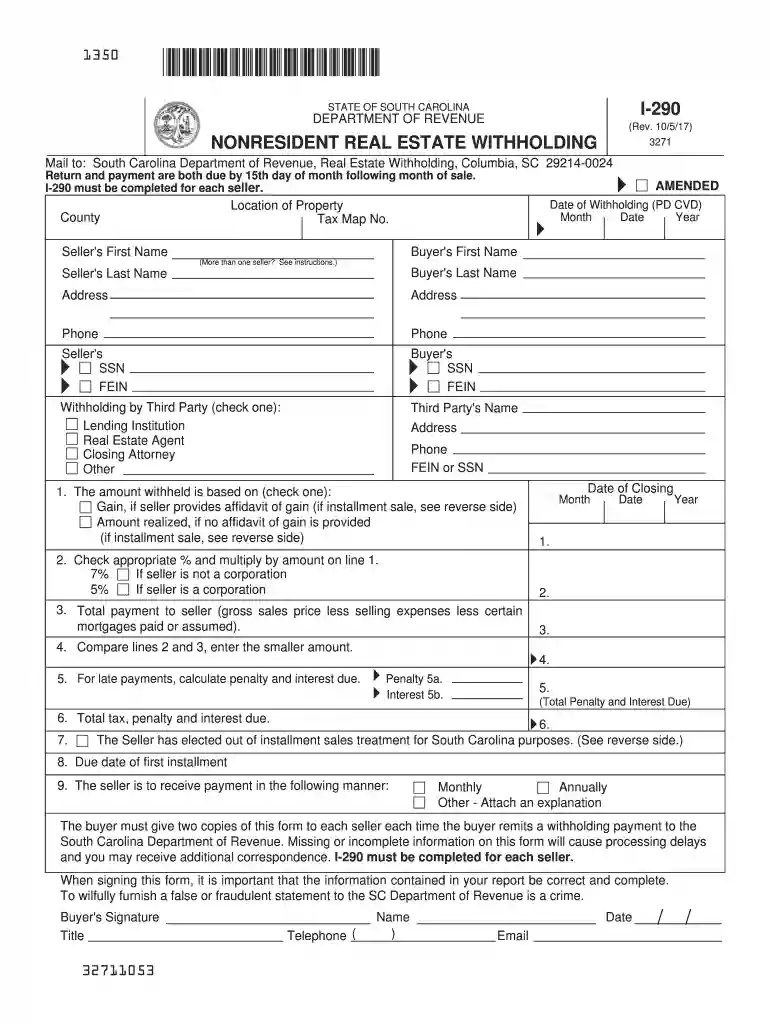
Sc form i 290 2017-2019-2026

Get Form
sc form i 290 2017-2019 Preview on Page 1

Here's how it works

01. Edit your form online
Type text, add images, blackout confidential details, add comments, highlights and more.

02. Sign it in a few clicks
Draw your signature, type it, upload its image, or use your mobile device as a signature pad.

03. Share your form with others
Send it via email, link, or fax. You can also download it, export it or print it out.

How to use or fill out sc form i 290 2017-2019 with our platform

Form edit decoration
9.5
Ease of Setup
DocHub User Ratings on G2
9.0
Ease of Use
DocHub User Ratings on G2
  1. Click ‘Get Form’ to open the SC Form I-290 in the editor.
  2. Begin by entering the date of withholding, including the month, day, and year. This is crucial for tracking payment timelines.
  3. Fill in the location of the property and its Tax Map Number. Ensure accuracy to avoid processing delays.
  4. Input both seller's and buyer's names, addresses, and SSNs or FEINs. If there are multiple sellers, follow the instructions provided.
  5. Select the third party responsible for withholding by checking one of the options provided (e.g., Lending Institution, Real Estate Agent).
  6. Complete line 1 by entering either the gain or amount realized from the sale based on provided affidavits.
  7. Check the appropriate percentage for withholding based on whether the seller is a corporation or not and multiply it by line 1.
  8. Calculate total payment to seller by subtracting selling expenses from gross sales price on line 3.
  9. Compare lines 2 and 3; enter the smaller amount on line 4. This ensures correct tax calculation.
  10. If applicable, calculate any penalties or interest due for late payments as indicated in lines 5a and 5b.

Start using our platform today to streamline your form completion process for free!

See more sc form i 290 2017-2019 versions

We've got more versions of the sc form i 290 2017-2019 form. Select the right sc form i 290 2017-2019 version from the list and start editing it straight away!
Versions Form popularity Fillable & printable
2023 4.9 Satisfied (60 Votes)
2022 4.8 Satisfied (113 Votes)
2020 4.8 Satisfied (164 Votes)
2019 4.3 Satisfied (108 Votes)
2019 4.4 Satisfied (258 Votes)
2017 4.3 Satisfied (82 Votes)
2014 4.3 Satisfied (55 Votes)
2013 4.1 Satisfied (41 Votes)
2010 4 Satisfied (29 Votes)
be ready to get more

Complete this form in 5 minutes or less

Get form

Security and compliance

At DocHub, your data security is our priority. We follow HIPAA, SOC2, GDPR, and other standards, so you can work on your documents with confidence.

Learn more
ccpa2
pci-dss
gdpr-compliance
hipaa
soc-compliance
be ready to get more

Complete this form in 5 minutes or less

Get form