




Here's how it works

01. Edit your 2017 utah income tax forms online
Type text, add images, blackout confidential details, add comments, highlights and more.

02. Sign it in a few clicks
Draw your signature, type it, upload its image, or use your mobile device as a signature pad.

03. Share your form with others
Send it via email, link, or fax. You can also download it, export it or print it out.
How to use or fill out utah tc 65 2017-2018 form with our platform

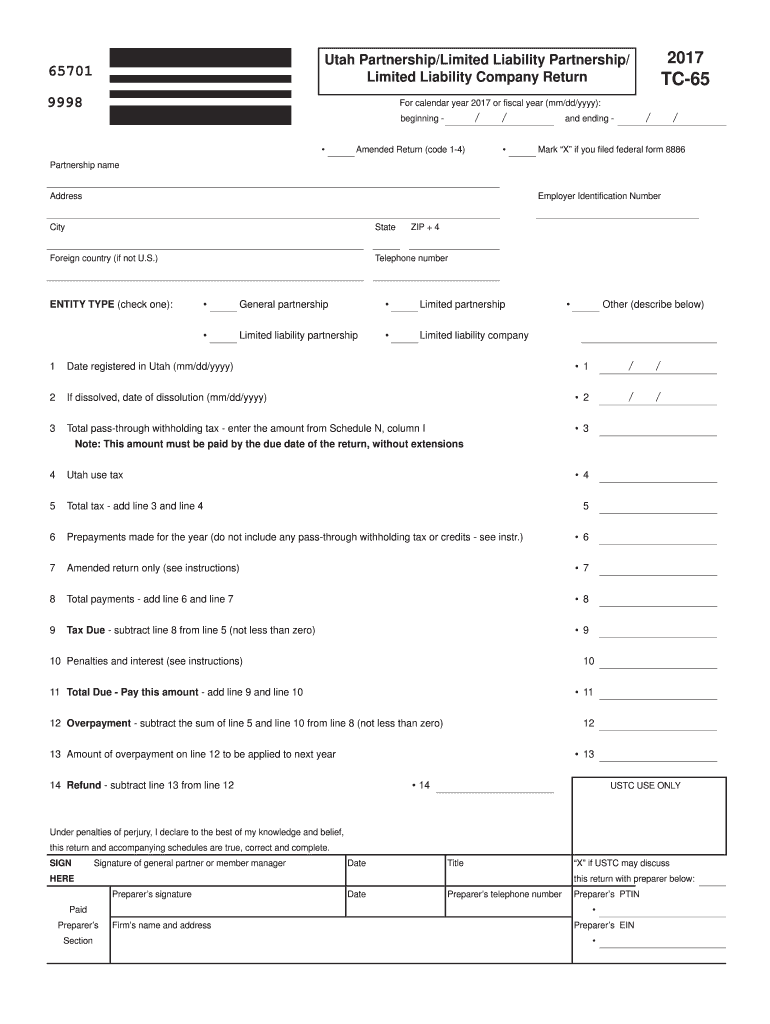
- Click ‘Get Form’ to open the Utah TC-65 form in the editor.
- Begin by entering the calendar year or fiscal year dates at the top of the form. Ensure accuracy as this sets the context for your return.
- Fill in your partnership name, address, and Employer Identification Number (EIN) in the designated fields. This information is crucial for identification purposes.
- Select your entity type by checking one of the boxes provided. Options include General Partnership, Limited Partnership, Limited Liability Partnership, and Limited Liability Company.
- Complete sections regarding total pass-through withholding tax and Utah use tax. Make sure to refer to Schedule N for accurate figures.
- Review all calculations for total payments and any potential overpayments before signing at the bottom of the form. Your signature confirms that all information is true and complete.
Start filling out your Utah TC-65 form online for free today!
Fill out utah tc 65 2017-2018 form online
It's free
It's free
See more utah tc 65 2017-2018 form versions
We've got more versions of the utah tc 65 2017-2018 form form. Select the right utah tc 65 2017-2018 form version from the list and start editing it straight away!
| Versions | Form popularity | Fillable & printable |
|---|---|---|
| 2025 | 4.1 Satisfied (30 Votes) | |
| 2024 | 4.2 Satisfied (55 Votes) | |
| 2023 | 4.6 Satisfied (37 Votes) | |
| 2022 | 4.6 Satisfied (57 Votes) | |
| 2021 | 4.8 Satisfied (123 Votes) | |
| 2020 | 4.3 Satisfied (108 Votes) | |
| 2019 | 4.3 Satisfied (269 Votes) | |
| 2018 | 4.4 Satisfied (190 Votes) | |
| 2017 | 4.1 Satisfied (25 Votes) | |
| 2016 | 4.3 Satisfied (166 Votes) | |
| 2012 | 4.4 Satisfied (292 Votes) | |
| 2006 | 4 Satisfied (58 Votes) |
Security and compliance
At DocHub, your data security is our priority. We follow HIPAA, SOC2, GDPR, and other standards, so you can work on your documents with confidence.
Learn more


Related forms

Capital campaign pledge form
The document is a pledge form for the Kaji Aso Studio's Building Fund capital campaign, inviting donors to contribute to ...

Servsafe Certification: The Complete Guide to Passing
The document outlines the ServSafe 2023 Food Safety Training and Certification program, which provides comprehensive foo ...

Model Written Silica Exposure Control Plan for General
The Silica Exposure Control Plan outlines the procedures and responsibilities for managing exposure to respirable crysta ...