GH Disclosure and Consent Form-02012016.docx 2026

Get Form
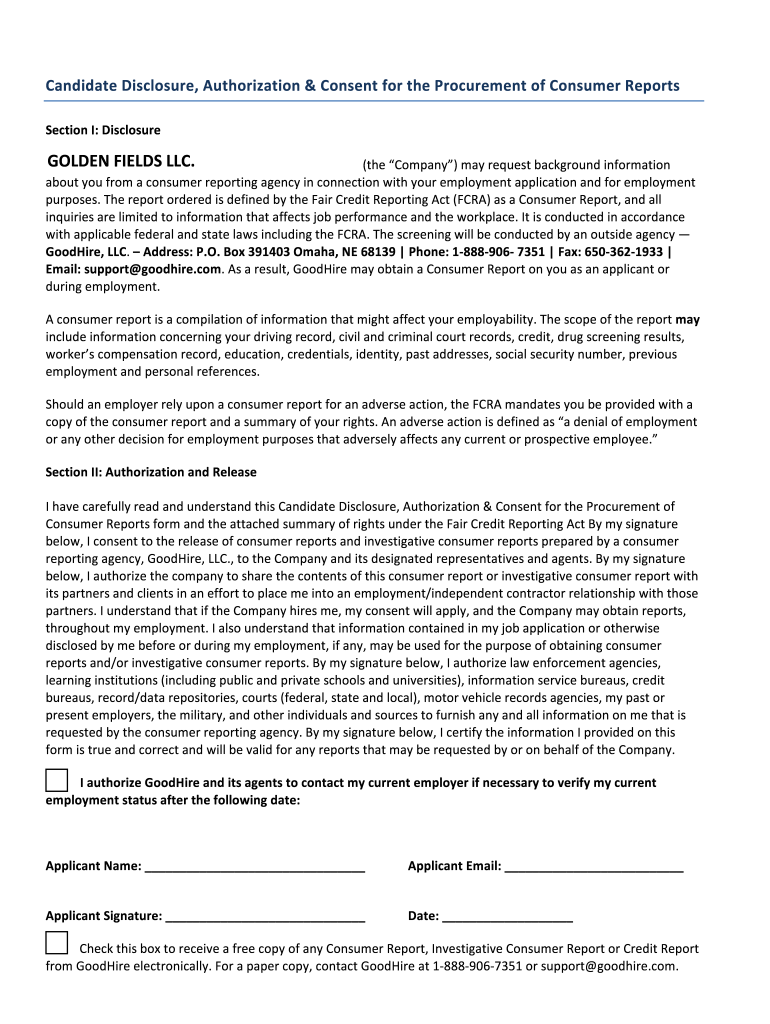
GH Disclosure and Consent Form-02012016.docx Preview on Page 1

Here's how it works

01. Edit your form online
Type text, add images, blackout confidential details, add comments, highlights and more.
02. Sign it in a few clicks
Draw your signature, type it, upload its image, or use your mobile device as a signature pad.
03. Share your form with others
Send it via email, link, or fax. You can also download it, export it or print it out.

How to use or fill out GH Disclosure and Consent Form-02012016.docx with our platform

Form edit decoration
9.5
Ease of Setup
DocHub User Ratings on G2
9.0
Ease of Use
DocHub User Ratings on G2
  1. Click ‘Get Form’ to open the GH Disclosure and Consent Form in the editor.
  2. Begin with Section I: Disclosure. Read through the information provided about background checks and consumer reports. Ensure you understand your rights under the Fair Credit Reporting Act (FCRA).
  3. In Section II: Authorization and Release, fill in your name, email, and date. Sign where indicated to consent to the release of consumer reports by GoodHire, LLC.
  4. If you wish to receive a free copy of any Consumer Report electronically, check the corresponding box before submitting your form.
  5. Review Section III: A Summary of Rights Under The FCRA for important information regarding your rights related to consumer reporting agencies.

Start using our platform today for free to complete your GH Disclosure and Consent Form efficiently!

See more GH Disclosure and Consent Form-02012016.docx versions

We've got more versions of the GH Disclosure and Consent Form-02012016.docx form. Select the right GH Disclosure and Consent Form-02012016.docx version from the list and start editing it straight away!
Versions Form popularity Fillable & printable
2016 4.8 Satisfied (56 Votes)
be ready to get more

Complete this form in 5 minutes or less

Get form

Got questions?

We have answers to the most popular questions from our customers. If you can't find an answer to your question, please contact us.
Contact us
Consent forms should be written directly to the reader, as though you are explaining the facts in person. Consent language should be written in the second person (you), not in the first person (I). Consent forms should avoid the passive voice whenever possible in favor of active voice.
Ensure your consent letter contains: All necessary personal details, including full names and contact information. Complete travel information (destinations, dates, purpose) Signatures, date, and witness/notary details.
How to write a consent form: A step-by-step guide Step 1: Title and introduction. Step 2: Description of the activity. Step 3: Risks and benefits. Step 4: Confidentiality and data handling. Step 5: Voluntary participation and withdrawal. Step 6: Consent statement. Step 7: Signature and date. Step 8: Contact information.
Hylands paperless registration and consent form completion eliminates redundancy and enables patients to fill out forms conveniently using mobile devices from the privacy of their home or bedside.
I have read and I understand the provided information and have had the opportunity to ask questions. I understand that my participation is voluntary and that I am free to withdraw at any time, without giving a reason and without cost. I understand that I will be given a copy of this consent form.

Security and compliance

At DocHub, your data security is our priority. We follow HIPAA, SOC2, GDPR, and other standards, so you can work on your documents with confidence.

Learn more
ccpa2
pci-dss
gdpr-compliance
hipaa
soc-compliance