Mississippi sample brief 2026

Get Form
mississippi sample brief Preview on Page 1

Here's how it works

01. Edit your form online
Type text, add images, blackout confidential details, add comments, highlights and more.
02. Sign it in a few clicks
Draw your signature, type it, upload its image, or use your mobile device as a signature pad.
03. Share your form with others
Send it via email, link, or fax. You can also download it, export it or print it out.

How to use or fill out Mississippi Sample Brief with Our Platform

Form edit decoration
9.5
Ease of Setup
DocHub User Ratings on G2
9.0
Ease of Use
DocHub User Ratings on G2
  1. Click ‘Get Form’ to open the Mississippi Sample Brief in the editor.
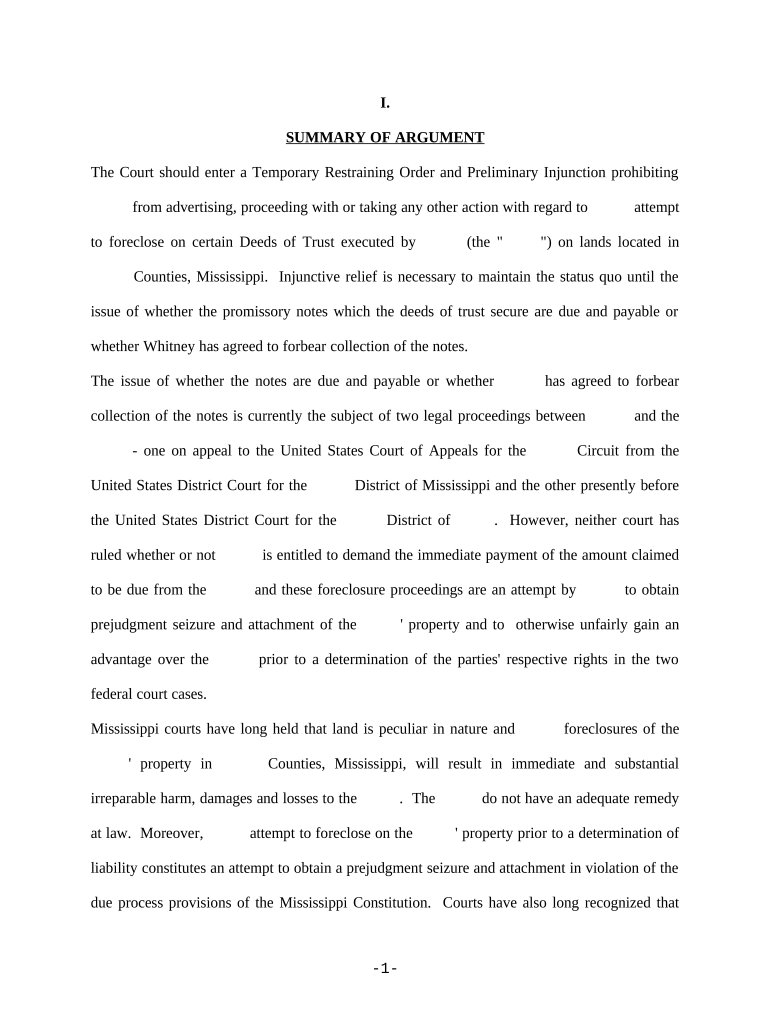
  2. Begin by filling out the 'Summary of Argument' section. Clearly state the request for a Temporary Restraining Order and Preliminary Injunction, specifying the parties involved and the nature of the dispute.
  3. Proceed to the 'Factual Background' section. Provide detailed information about the history of dealings between the parties, including any agreements made and relevant financial transactions.
  4. In the 'Argument' section, articulate why injunctive relief is necessary. Reference applicable legal precedents and explain how failing to grant this relief would result in irreparable harm.
  5. Complete the 'Conclusion' section by summarizing your requests and reiterating the need for a minimal security bond if an injunction is granted.

Start editing your Mississippi Sample Brief online for free today!

be ready to get more

Complete this form in 5 minutes or less

Get form

Got questions?

We have answers to the most popular questions from our customers. If you can't find an answer to your question, please contact us.
Contact us

With DocHub, it’s quite simple. The editor offers users an add-on called DocHub for Gmail, which you can locate in the Google Workspace Marketplace without being charged. Set it up and grant it access to your Google account. Open your email with your mississippi sample brief attached and click on the add-on button in the right-side panel. Sign in to your DocHub account, and upload the file to our editor, where you can fill it out and sign.

It is a no-brainer on a computer or via a mobile device to complete a mississippi sample brief with DocHub. All you need to do is open any installed browser on your smartphone and proceed to the DocHub site. Once authenticated, add your document and open it in editing mode. Use our toolbar to make your edits and save changes. Optionally, keep your file in your files or send it to a recipient on the spot.

Security and compliance

At DocHub, your data security is our priority. We follow HIPAA, SOC2, GDPR, and other standards, so you can work on your documents with confidence.

Learn more
ccpa2
pci-dss
gdpr-compliance
hipaa
soc-compliance