




01. Edit your form 4952 online
Type text, add images, blackout confidential details, add comments, highlights and more.

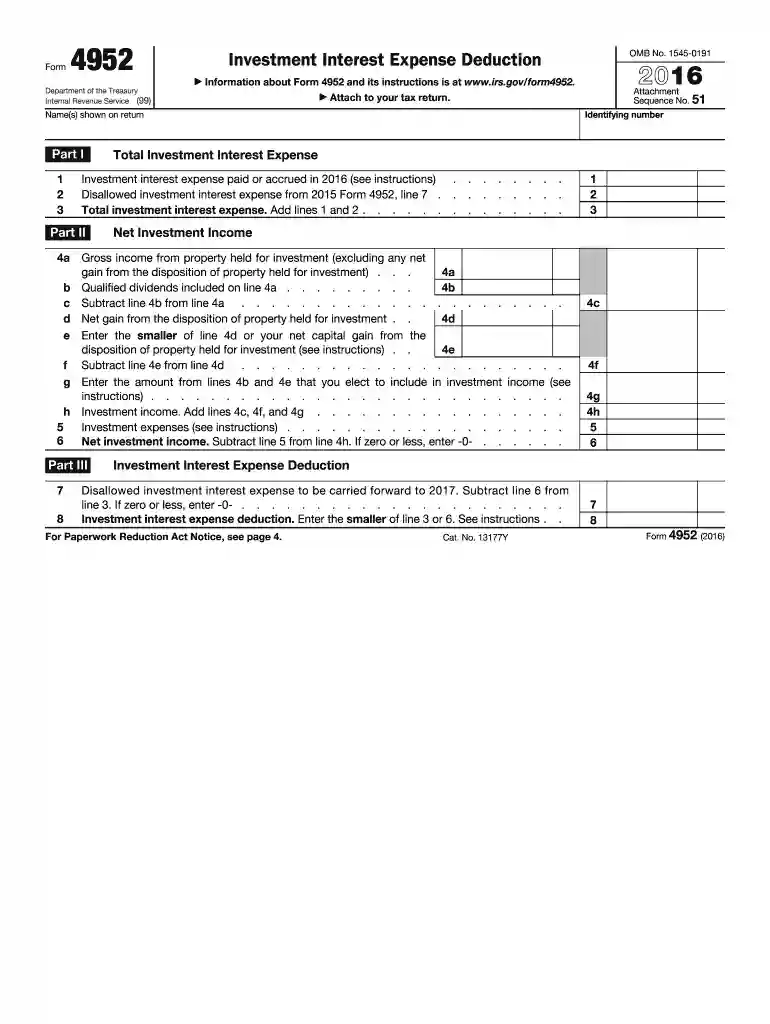
Type text, add images, blackout confidential details, add comments, highlights and more.

Draw your signature, type it, upload its image, or use your mobile device as a signature pad.

Send form 4952 pdf via email, link, or fax. You can also download it, export it or print it out.
IRS Form 4952 is specifically designed for individuals, estates, or trusts who need to calculate the deductible amount of investment interest expenses for the tax year 2016. This form is essential for accurately reporting total investment interest expenses, net investment income, and determining any disallowed expenses eligible for carryforward to future tax years. By using Form 4952, taxpayers ensure that all investment-related deductions are properly applied and reported as per IRS regulations, potentially reducing their taxable income.
Using the IRS Form 4952 involves filling out several sections to accurately report your investment interest expenses. Here's a step-by-step approach:
Complete Part I: Enter total investment interest expenses you paid or accrued during the tax year.
Navigate Part II: Report your net investment income, which includes interest and dividends income reduced by related expenses.
Calculate Allowable Deduction: Utilize the information from Parts I and II to determine how much of your investment interest can be deducted.
Include Carryforward Amounts: If applicable, indicate any investment interest expense disallowed in the previous year that you are carrying forward.
To access the IRS Form 4952 for the 2016 tax year, you have several options:
Visit the Official IRS Website: Locate and download the form directly from the IRS's official website where historical tax forms are available.
DocHub Platform: Use DocHub to download the form in PDF format. The platform allows for direct editing and form filling online, which can streamline the filing process.
Tax Preparation Software: Many tax software programs, like TurboTax and TaxAct, provide access to prior years' tax forms for easy import and electronic filing.
Filling out IRS Form 4952 involves a detailed understanding of investment-related financials. Here are the necessary steps:
Gather Financial Records: Collect all documents related to investment interest expenses, including interest and dividend statements.
Enter Accurate Information: Complete each required section of the form with precise figures. Double-check all calculations.
Review for Completeness: Ensure all applicable parts of the form are filled out, and verify that the provided information matches your financial records.
Submit the Form: Attach the completed form with your federal tax return (Form 1040 or others) or submit it directly to the IRS if filing separately.
Several critical components constitute IRS Form 4952:
Investment Interest Expense: Key expenses incurred in relation to investing activities.
Net Investment Income: The income generated from investments after deducting related expenses.
Carryforward Provisions: Detailed steps for reporting previously disallowed deductions that are eligible to be carried forward.
Form 4952 is predominantly utilized by:
Individual Investors: Those managing personal investment portfolios.
Trusts and Estates: Entities handling investment-related activities on behalf of beneficiaries.
Tax Professionals: Preparing returns that involve significant investment interest expense deductions.


The IRS provides specific guidelines to ensure accurate completion of Form 4952:
Adhere to Detailed Instructions: Follow the IRS's comprehensive instructions provided with the form to avoid errors.
Use Correct Forms: Always ensure that you are using the appropriate form version for the specific year, in this case, 2016.
Consult IRS Publications: For deeper understanding, refer to IRS publications that discuss investment income and expenses in greater detail.
For the tax year 2016, Form 4952 should accompany the annual tax return:
Standard Deadline: Generally due by April 15 following the tax year, aligning with the standard deadline for individual tax filings.
Extensions: If you filed for an extension, the deadline would typically extend to October 15, allowing additional time for submission.
To determine eligibility for using Form 4952:
Types of Income: Primarily for taxpayers with investment interest expenses exceeding net investment income.
Applicable Deductions: Determine eligibility for deductions based on investment-related financial activities documented throughout the year.
Maximizing the content and understanding of IRS Form 4952 ensures accurate tax reporting and compliance, aiding taxpayers in leveraging potential deductions related to their investment activities efficiently.

We've got more versions of the form 4952 form. Select the right form 4952 version from the list and start editing it straight away!
| Versions | Form popularity | Fillable & printable |
|---|---|---|
| 2025 | 4.7 Satisfied (57 Votes) | |
| 2024 | 4.3 Satisfied (34 Votes) | |
| 2023 | 4.6 Satisfied (51 Votes) | |
| 2022 | 4.8 Satisfied (28 Votes) | |
| 2021 | 4.8 Satisfied (149 Votes) | |
| 2020 | 4.3 Satisfied (110 Votes) | |
| 2019 | 4.2 Satisfied (32 Votes) | |
| 2018 | 4.3 Satisfied (229 Votes) | |
| 2017 | 4.4 Satisfied (182 Votes) | |
| 2016 | 4.3 Satisfied (189 Votes) | |
| 2015 | 4 Satisfied (34 Votes) | |
| 2012 | 3.9 Satisfied (48 Votes) |
At DocHub, your data security is our priority. We follow HIPAA, SOC2, GDPR, and other standards, so you can work on your documents with confidence.
Visit irs.gov/ formspubs to download forms and publications. Other- wise, you can go to irs.gov/orderforms to order current and prior-year forms andRead more
Irs-pdf ; Name f4970.pdf Date 2025-12-22 12:10:40, Size 91.99 KB ; Name f4952.pdf Date 2025-10-17 22:10:10, Size 90.87 KB ; Name f4876a.pdf Date 2016-09-02Read more


