Letter to Client Enclosing Photocopies of Documents - Minnesota 2026

Get Form
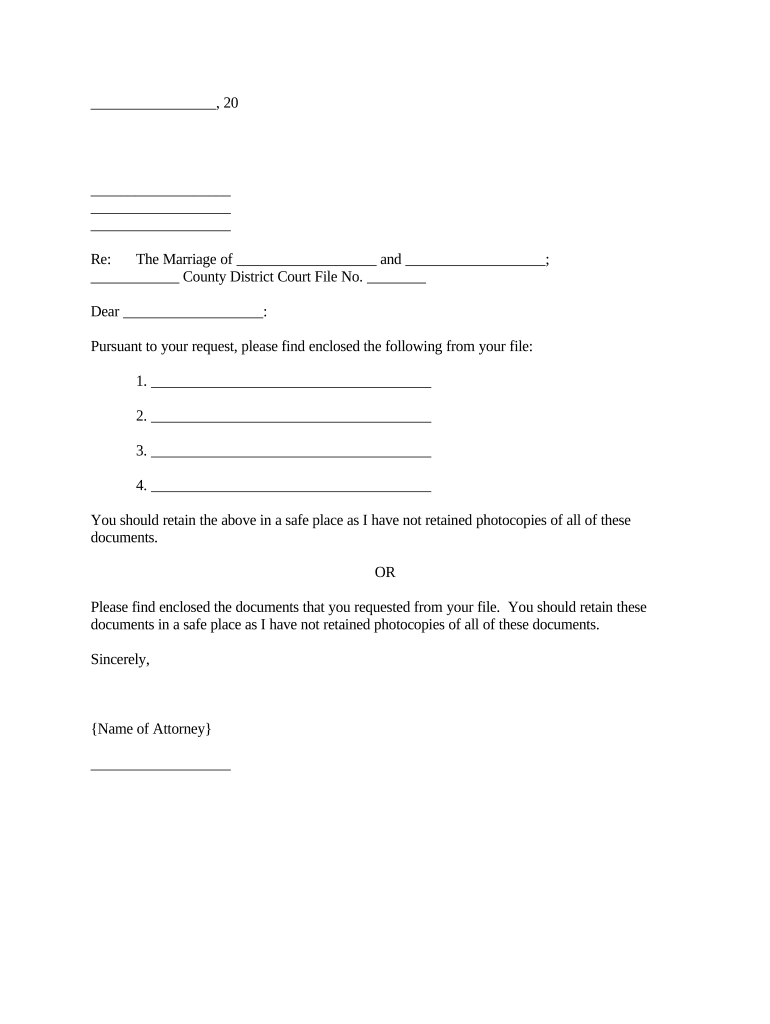
Letter to Client Enclosing Photocopies of Documents - Minnesota Preview on Page 1

Here's how it works

01. Edit your form online
Type text, add images, blackout confidential details, add comments, highlights and more.
02. Sign it in a few clicks
Draw your signature, type it, upload its image, or use your mobile device as a signature pad.
03. Share your form with others
Send it via email, link, or fax. You can also download it, export it or print it out.

How to use or fill out Letter to Client Enclosing Photocopies of Documents - Minnesota with our platform

Form edit decoration
9.5
Ease of Setup
DocHub User Ratings on G2
9.0
Ease of Use
DocHub User Ratings on G2
  1. Click ‘Get Form’ to open the Letter to Client Enclosing Photocopies of Documents - Minnesota in the editor.
  2. Begin by entering the date at the top of the document. This is essential for record-keeping and clarity.
  3. Fill in your name and address, followed by the recipient's name and address. Ensure accuracy to maintain professionalism.
  4. In the 'Re:' section, specify the names involved in the marriage and include the District Court File Number for reference.
  5. List each document you are enclosing in the numbered list provided. Be specific about what each document is to avoid confusion.
  6. Conclude with a professional closing, including your name as the attorney. Make sure all information is correct before finalizing.

Start using our platform today for free to streamline your document editing and signing process!

be ready to get more

Complete this form in 5 minutes or less

Get form

Got questions?

We have answers to the most popular questions from our customers. If you can't find an answer to your question, please contact us.
Contact us

Sure, and it’s really easy! DocHub is a web-based PDF editor with advanced document management functions that allow you promptly adjust your forms, fill out empty fields and insert new ones for other people to fill out, and create electronic signatures in several ways. Add your Letter to Client Enclosing Photocopies of Documents - Minnesota, provide information as required, and choose how you want to eSign your document - by typing your name, drawing your signature, uploading its picture, or utilizing a QR code.

You can easily edit fill out your Letter to Client Enclosing Photocopies of Documents - Minnesota on any iOS gadget. Open an internet browser of your choice, go to the DocHub website, authorize or create a new account, upload your file for editing, and make your desired adjustments. Our service is mobile-friendly, so utilizing its functions on your smartphone will be a no-brainer, even on the first try.

A termination of representation, or closing letter, is a formal document an attorney sends to their client to mark the end of their representation on a specific matter. This letter is part of the attorney-client relationship and provides clear documentation of the cases end and avoids any confusion.
Type Enclosure and the name of the enclosed document under your signature. If youve included an additional document to your letter or email, place an enclosure notation beneath your signature. Write or type Enclosure followed by the name of the document or content attached.

Security and compliance

At DocHub, your data security is our priority. We follow HIPAA, SOC2, GDPR, and other standards, so you can work on your documents with confidence.

Learn more
ccpa2
pci-dss
gdpr-compliance
hipaa
soc-compliance