Type text, add images, blackout confidential details, add comments, highlights and more.
02. Sign it in a few clicks
Draw your signature, type it, upload its image, or use your mobile device as a signature pad.
03. Share your form with others
Send pcra form pa via email, link, or fax. You can also download it, export it or print it out.
How to use or fill out the pcra form with our platform
Ease of Setup
DocHub User Ratings on G2
Ease of Use
DocHub User Ratings on G2
Click ‘Get Form’ to open the pcra form in the editor.
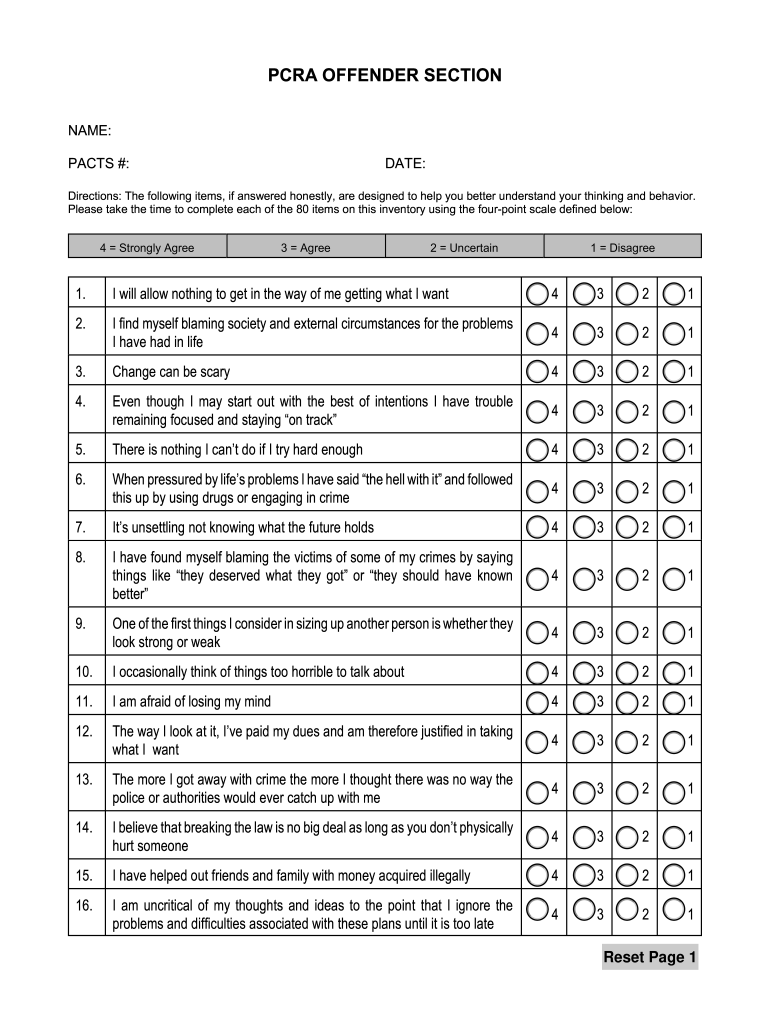
Begin by entering your name and PACTS number at the top of the form. This information is essential for identification purposes.
Next, fill in the date. Ensure that you enter the correct date to maintain accurate records.
Proceed to answer each of the 80 items on the inventory using the four-point scale provided: 4 for Strongly Agree, 3 for Agree, 2 for Uncertain, and 1 for Disagree. Click on your chosen option for each statement.
Review your responses carefully before submitting. Make sure all fields are completed accurately to reflect your thoughts and behaviors.
Start filling out your pcra form today using our platform for free!
All our forms are made available in PDF format. You will need DocHub Reader to view them. To download DocHub Reader (free), click the icon below.Read more
The perchlorate reductase complex itself is composed of four subunits located in the periplasm of the bacteria of the bacterium with the subunits being PcrA,Read more
Cookie consent notice
This site uses cookies to enhance site navigation and personalize your experience.
By using this site you agree to our use of cookies as described in our Privacy Notice.
You can modify your selections by visiting our Cookie and Advertising Notice.