Type text, add images, blackout confidential details, add comments, highlights and more.
02. Sign it in a few clicks
Draw your signature, type it, upload its image, or use your mobile device as a signature pad.
03. Share your form with others
Send it via email, link, or fax. You can also download it, export it or print it out.
How to use or fill out protective court order with our platform
Ease of Setup
DocHub User Ratings on G2
Ease of Use
DocHub User Ratings on G2
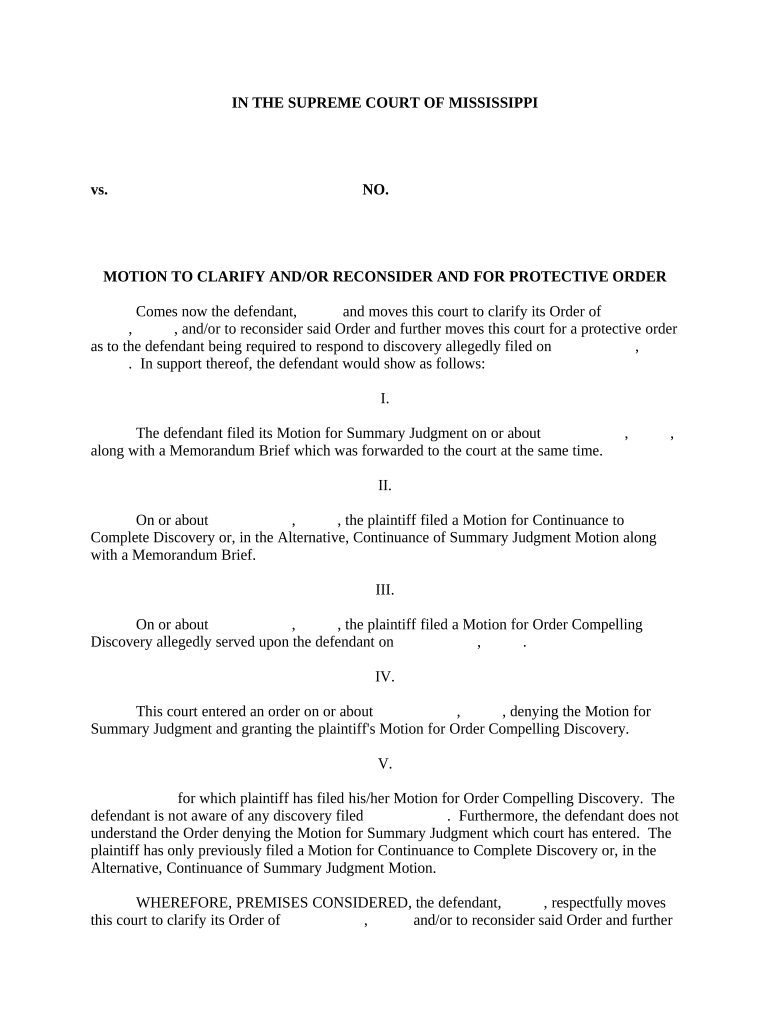
Click ‘Get Form’ to open the protective court order in the editor.
Begin by filling in the case number and the names of the parties involved at the top of the form. This ensures that your motion is properly identified.
In Section I, provide details about your Motion for Summary Judgment, including dates and any relevant documents you filed. This section establishes your position.
Continue to Section II, where you will summarize any motions filed by the plaintiff, ensuring clarity on their requests and timelines.
In Section III, clearly state any discovery motions served upon you. If there are none, indicate that explicitly to avoid confusion.
Section IV requires you to reference the court's previous orders. Be precise about what was denied or granted to support your request for clarification.
Finally, complete Section V by reiterating your request for a protective order and a hearing date. Sign off with your name and title as the attorney for the defendant.
Start using our platform today to easily fill out your protective court order for free!
Are protective orders public record in VirginiaProtective order VirginiaTypes of protective orders in VirginiaWhat happens if a protective order is not served in VirginiaNo contact order VirginiaVirginia protective Order RegistryEmergency protective order VirginiaRestraining order in va for harassment
Security and compliance
At DocHub, your data security is our priority. We follow HIPAA, SOC2, GDPR, and other standards, so you can work on your documents with confidence.
Sep 20, 2018 Major FOIA Cases. Administrator, Federal Aviation Administration v. Robertson, 422 U.S. 255 (1975). The FAA was permitted to withholdRead more
emergency protective order | Wex - Law.Cornell.Edu
Emergency protective orders are typically granted in domestic-violence cases where the victim is seeking a temporary restraining order that can only be issuedRead more
Cookie consent notice
This site uses cookies to enhance site navigation and personalize your experience.
By using this site you agree to our use of cookies as described in our Privacy Notice.
You can modify your selections by visiting our Cookie and Advertising Notice.