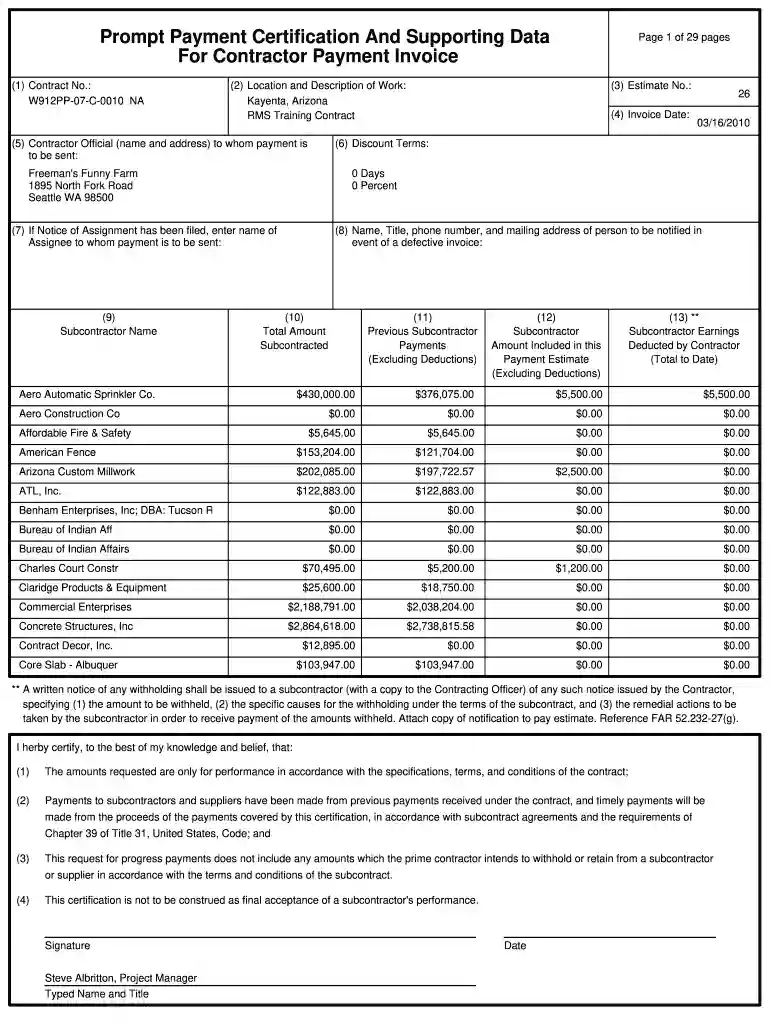
Prompt Payment Certification And Supporting Data 2026

Get Form
certification of payment Preview on Page 1

Here's how it works

01. Edit your certification of payment online
Type text, add images, blackout confidential details, add comments, highlights and more.

02. Sign it in a few clicks
Draw your signature, type it, upload its image, or use your mobile device as a signature pad.

03. Share your form with others
Send it via email, link, or fax. You can also download it, export it or print it out.

How to use or fill out Prompt Payment Certification And Supporting Data with DocHub

Form edit decoration
9.5
Ease of Setup
DocHub User Ratings on G2
9.0
Ease of Use
DocHub User Ratings on G2
  1. Click ‘Get Form’ to open the Prompt Payment Certification And Supporting Data in our editor.
  2. Begin by entering the Contract Number in field (1). This is essential for identifying the specific contract related to your payment request.
  3. In field (2), provide the Location and Description of Work. Be specific about the project location, such as 'Kayenta, Arizona' and include a brief description like 'RMS Training Contract'.
  4. Fill in fields (3) and (4) with the Estimate Number and Invoice Date respectively. Ensure these details match your records for accuracy.
  5. Complete section (5) with the Contractor Official's name and address where payments should be sent. This ensures that funds are directed correctly.
  6. Continue filling out fields (6) through (13), detailing discount terms, subcontractor names, amounts included in this payment estimate, and any deductions.
  7. Finally, review all entries for accuracy before signing at the bottom of the form. Use our platform’s signature feature to add your signature electronically.

Start using our platform today to streamline your document editing and ensure timely payments!

be ready to get more

Complete this form in 5 minutes or less

Get form

Got questions?

We have answers to the most popular questions from our customers. If you can't find an answer to your question, please contact us.
Contact us
For example, if a business agrees to pay for services rendered within 30 days, prompt payment means ensuring that the invoice is paid within that 30-day window.
Process of Issuing a Payment Certificate Verification of Work: Before a payment certificate is issued, the work completed by the contractor is typically reviewed by the project manager, architect, or quantity surveyor. Calculation of Payment: Issuance of Payment Certificate: Approval of Payment:
In the construction industry, Interim Payment Applications (IPA) and Interim Payment Certificates (IPC) are essential components of contract administration and cash flow management. They are used to facilitate progress payments to contractors based on work completed during a specific period.
Prompt payment is evaluated during the tender process through the PSQ. If you have stated you use a supply chain in the PSQ, you will need to answer further questions demonstrating you: are paying 95% of invoices within 60 days (90% with an action plan) are paying all invoices within an average of 45 days.

Security and compliance

At DocHub, your data security is our priority. We follow HIPAA, SOC2, GDPR, and other standards, so you can work on your documents with confidence.
Learn more
ccpa2
pci-dss
gdpr-compliance
hipaa
soc-compliance
be ready to get more

Complete this form in 5 minutes or less

Get form