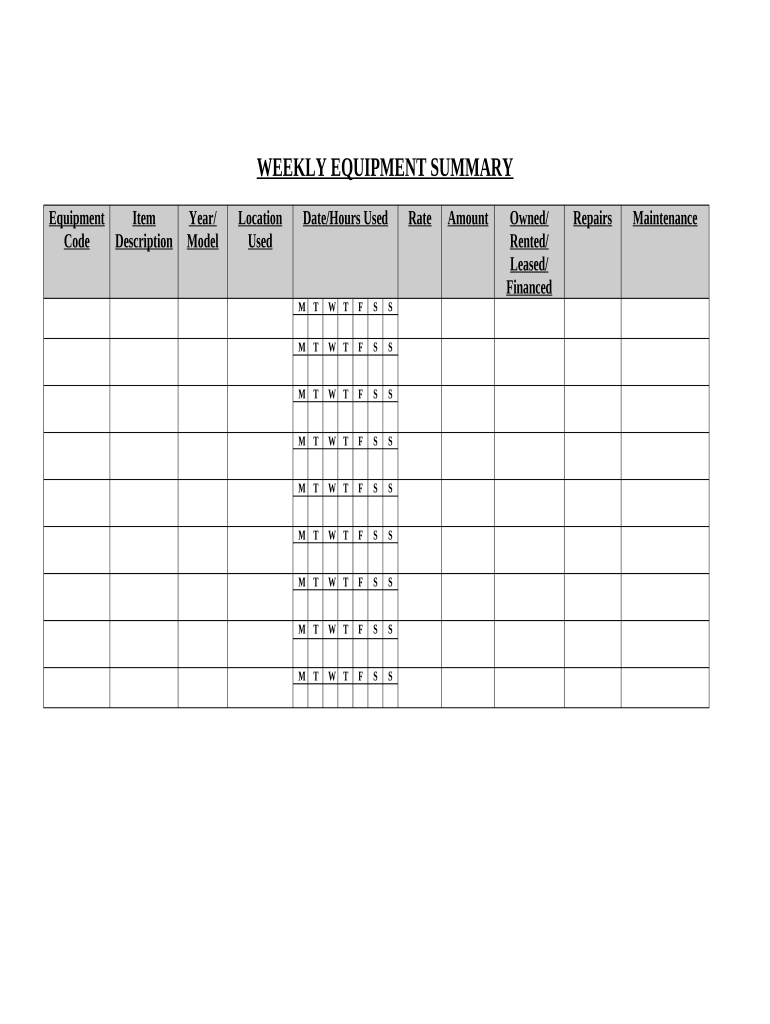
Contractor's Weekly Equipment Summary 2026

Get Form
Contractor's Weekly Equipment Summary Preview on Page 1

Here's how it works

01. Edit your form online
Type text, add images, blackout confidential details, add comments, highlights and more.
02. Sign it in a few clicks
Draw your signature, type it, upload its image, or use your mobile device as a signature pad.
03. Share your form with others
Send it via email, link, or fax. You can also download it, export it or print it out.

How to use or fill out Contractor's Weekly Equipment Summary with our platform

Form edit decoration
9.5
Ease of Setup
DocHub User Ratings on G2
9.0
Ease of Use
DocHub User Ratings on G2
  1. Click ‘Get Form’ to open the Contractor's Weekly Equipment Summary in the editor.
  2. Begin by filling out the 'Equipment Item Code' and 'Description' fields. This information is crucial for identifying the equipment used during the week.
  3. Next, enter the 'Year/Model' of each piece of equipment. Accurate details help maintain a clear record for future reference.
  4. In the 'Location Used' section, specify where each item was utilized. This can assist in tracking equipment deployment across various job sites.
  5. Record the 'Date/Hours Used' for each day of the week in the designated fields. Ensure you log hours accurately to reflect actual usage.
  6. Fill in the 'Rate' for each item based on your rental or leasing agreements. This will help calculate total costs effectively.
  7. Finally, complete sections for 'Repairs' and 'Maintenance'. Documenting these details ensures that all equipment is kept in optimal condition.

Start using our platform today to streamline your document editing and form completion process for free!

be ready to get more

Complete this form in 5 minutes or less

Get form

Got questions?

We have answers to the most popular questions from our customers. If you can't find an answer to your question, please contact us.
Contact us

With DocHub, you can quickly approve your Contractor's Weekly Equipment Summary or any other paperwork on iOS, even without setting up additional applications. You can access your DocHub account from any internet-connected browser and complete and sign your document in any way you like with just a few clicks.

If you use Chrome, there are two easy ways to modify your Contractor's Weekly Equipment Summary online. First, visit the DocHub website, add your file, and modify it utilizing our toolbar. You can also install our Chrome extension and modify any document by dragging and dropping it in your web browser tab.

Contractors are responsible for supplying the necessary equipment, material, labor, and services to complete your project. They hire specialized subcontractors to perform either a portion or all of the work. Contractors use Subcontractor Agreements to protect themselves and the subcontractors they hire.
Contractors are professionals who provide skills or services to companies for a set period. They may be contracted for a set number of hours, a certain time frame, or the duration of a project. Contractors can be self-employed, and work independently as sole traders, or they can run their own limited company.
An auto mechanic who has a station license, a resale license, buys the parts necessary for the repairs, sets his or her own prices, collects from the customer, sets his or her own hours and days of work, and owns or rents the shop from a third party is an example of an independent contractor.

Security and compliance

At DocHub, your data security is our priority. We follow HIPAA, SOC2, GDPR, and other standards, so you can work on your documents with confidence.

Learn more
be ready to get more

Complete this form in 5 minutes or less

Get form

People also ask

The 3 Types of Contractors General Contractors. The term general contractor is used in two ways, in my experience. Turn-Key (Specialty) Services. If you dont like the idea of paying someone to manage your schedules and hire sub-contractors, you can do this work yourself. Freelance Workers.

Related links