How to use or fill out resale certificate arizona with DocHub
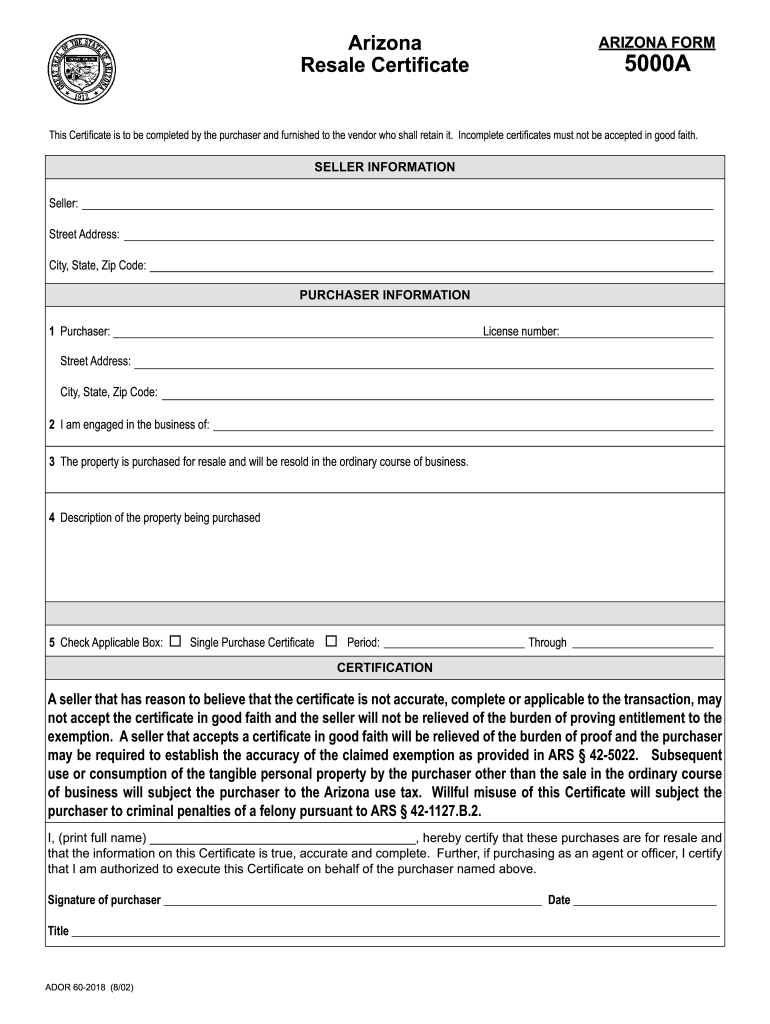
- Click ‘Get Form’ to open the resale certificate in our editor.
- Begin by filling out the 'Seller Information' section. Enter the seller's name, street address, city, state, and zip code.
- Next, move to the 'Purchaser Information' section. Input your license number and complete the purchaser's name, street address, city, state, and zip code.
- Indicate your business engagement by specifying what type of business you are involved in.
- Confirm that the property is purchased for resale by checking the appropriate box.
- Provide a detailed description of the property being purchased.
- Select whether this is a single purchase certificate and specify the period if applicable.
- Finally, certify the accuracy of your information by printing your full name, signing, and dating the form.
Start using our platform today to fill out your resale certificate quickly and for free!
Fill out resale certificate arizona online
It's free
It's free
See more resale certificate arizona versions
We've got more versions of the resale certificate arizona form. Select the right resale certificate arizona version from the list and start editing it straight away!
| Versions | Form popularity | Fillable & printable |
|---|---|---|
| 2002 | 4.9 Satisfied (334 Votes) |
Security and compliance
At DocHub, your data security is our priority. We follow HIPAA, SOC2, GDPR, and other standards, so you can work on your documents with confidence.
Learn more