Legal Last Will and Testament Form for Single Person with Adult and Minor Children - Wisconsin 2026

Get Form
last will and testament wisconsin Preview on Page 1

Here's how it works

01. Edit your last will and testament wisconsin online
Type text, add images, blackout confidential details, add comments, highlights and more.
02. Sign it in a few clicks
Draw your signature, type it, upload its image, or use your mobile device as a signature pad.
03. Share your form with others
Send it via email, link, or fax. You can also download it, export it or print it out.

How to use or fill out Legal Last Will and Testament Form for Single Person with Adult and Minor Children - Wisconsin

Form edit decoration
9.5
Ease of Setup
DocHub User Ratings on G2
9.0
Ease of Use
DocHub User Ratings on G2
  1. Click ‘Get Form’ to open it in the editor.
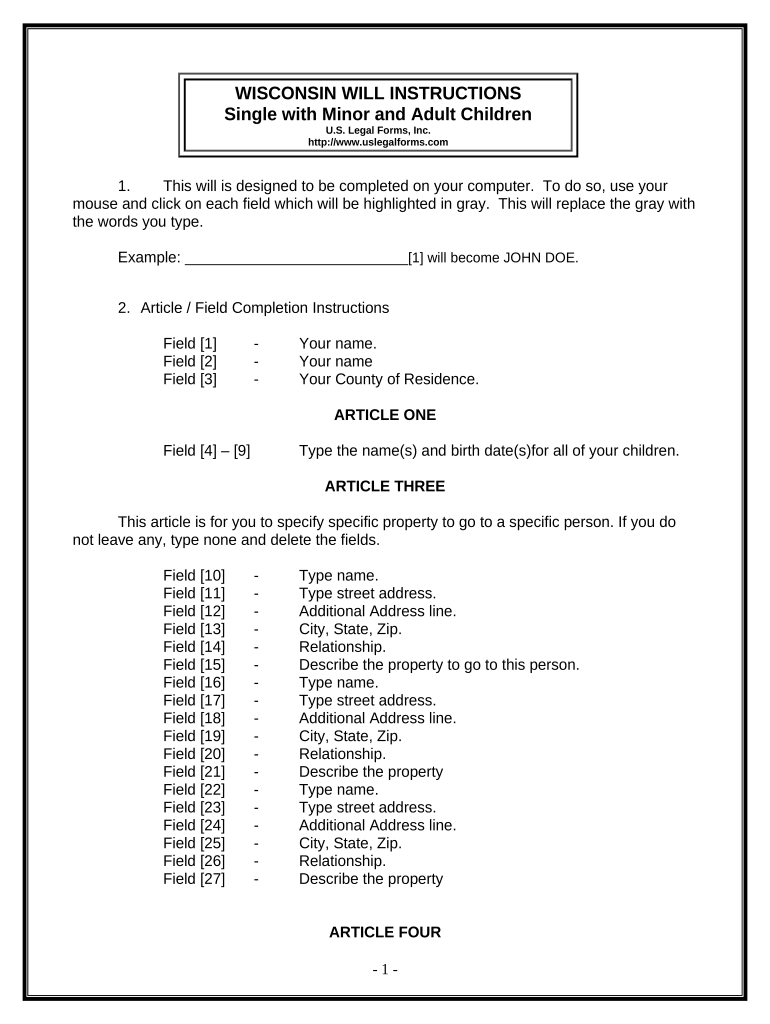
  2. Begin by entering your name in Field [1] and your county of residence in Field [3].
  3. In Article One, list the names and birth dates of all your children in Fields [4] to [9].
  4. For Article Three, specify any specific property you wish to bequeath. If none, type 'none' in Field [10]. Fill out the corresponding fields for each bequest.
  5. In Article Four, indicate the names of your children who will inherit your estate equally in Field [28].
  6. If you have minor children, complete Article Five by entering the age under which their property will be held in trust.
  7. Designate a Trustee and successor Trustee in Article Seven by filling out Fields [36] and [37].
  8. Appoint a guardian for your minor children in Article Eight by providing their name and desired age limit.
  9. Complete Articles Nine through Twelve as applicable, ensuring all necessary fields are filled out accurately.
  10. Once completed, review all entries carefully before printing. Ensure you sign the document in front of two witnesses.

Start using our platform today to easily fill out your Legal Last Will and Testament form for free!

be ready to get more

Complete this form in 5 minutes or less

Get form

Got questions?

We have answers to the most popular questions from our customers. If you can't find an answer to your question, please contact us.
Contact us

Electronic document signing demands a software solution that works in compliance with data protection and eSignature standards. DocHub is a perfect tool for that, because it meets all the above mentioned requirements. Whatever method you like to sign your Legal Last Will and Testament Form for Single Person with Adult and Minor Children - Wisconsin in DocHub, your electronic signature will be legally binding and court-admissible.

If you edit your Legal Last Will and Testament Form for Single Person with Adult and Minor Children - Wisconsin with DocHub, you simply will not need to look for other applications or services to sign it. An electronic signature is a component of DocHub’s comprehensive editing toolset, which enables you to apply changes in your form without jumping between websites. Just complete your form, double-check the correctness of the data and put your electronic signature at the end to make it submission-ready within a few minutes.

Pursuant to Wis. Stat. Sec. 856.05, the original Will for every deceased person shall be filed with the Register in Probate within 30 days of death.
Any person, other than a person named in the will to act as personal representative, having the custody of any will shall, within 30 days after he or she has knowledge of the death of the testator, file the will in the proper court or deliver it to the person named in the will to act as personal representative.
If your estate is worth very little and probate is not required, your Will remains a private document and only those named as Executors and Beneficiaries will be privy to its contents. You are therefore able to request a copy of someones Will if it has gone through probate via the government website.

Security and compliance

At DocHub, your data security is our priority. We follow HIPAA, SOC2, GDPR, and other standards, so you can work on your documents with confidence.

Learn more
ccpa2
pci-dss
gdpr-compliance
hipaa
soc-compliance

People also ask

You can make your own will in Wisconsin, using Quicken WillMaker Trust. However, you may want to consult a lawyer in some situations. For example, if you think that your will might be contested or if you want to disinherit your spouse, you should talk with an attorney.
Steps to Create a Will in Wisconsin Decide what property to include in your will. Decide who will inherit your property. Choose an executor to handle your estate. Choose a guardian for your children. Choose someone to manage childrens property. Make your will. Sign your will in front of witnesses.
You can make your own will in Wisconsin, using Quicken WillMaker Trust. However, you may want to consult a lawyer in some situations. For example, if you think that your will might be contested or if you want to disinherit your spouse, you should talk with an attorney.
Your will is valid in Wisconsin if you had capacity and signed a written will in the presence of two witnesses, and the witnesses signed your will. Upon your death, your will must be proven in order to be admitted to probate.
The basic requirements for a Wisconsin last will and testament include the following: Age: The testator must be at least 18 years old. Capacity: The testator must be of sound mind. Signature: The will must be signed by the testator or by someone else in the testators name in his conscious presence, by his direction.

Related links