Type text, add images, blackout confidential details, add comments, highlights and more.
02. Sign it in a few clicks
Draw your signature, type it, upload its image, or use your mobile device as a signature pad.
03. Share your form with others
Send it via email, link, or fax. You can also download it, export it or print it out.
How to use or fill out Amendment to Living Trust - Colorado with our platform
Ease of Setup
DocHub User Ratings on G2
Ease of Use
DocHub User Ratings on G2
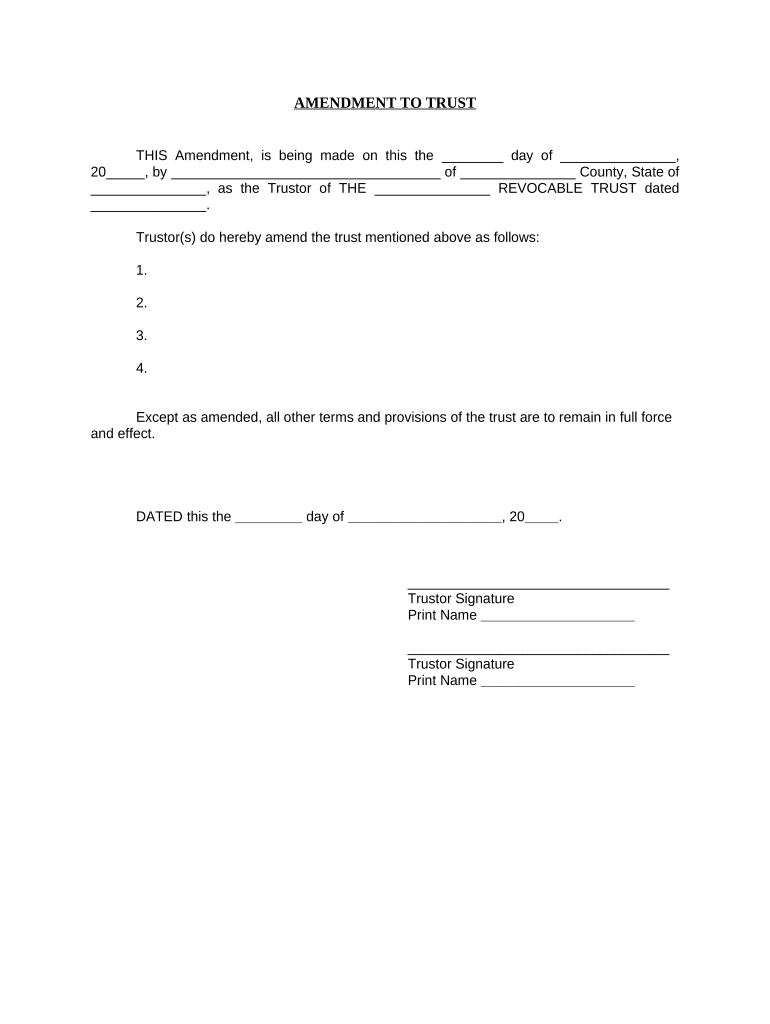
Click ‘Get Form’ to open the Amendment to Living Trust - Colorado in the editor.
Begin by entering the date of the amendment in the first blank field. This should reflect the day you are completing the document.
Next, fill in your name as the Trustor and specify your county and state in the designated fields.
In the section that begins with 'Trustor(s) do hereby amend...', list any amendments you wish to make to your trust. Number each amendment clearly for easy reference.
Complete the final date line at the bottom of the document, ensuring it matches your initial entry.
Sign and print your name in the provided signature fields. If there are multiple Trustors, ensure all signatures are included.
Lastly, if notarization is required, complete that section by having a notary public acknowledge your signatures.
Start editing your Amendment to Living Trust - Colorado for free today!
Fill out Amendment to Living Trust - Colorado online It's free
Amendment to living trust colorado templateAmendment to living trust colorado sampleAmendment to living trust colorado pdfFree amendment to living trust coloradoAmendment to living trust colorado formAmendment to living trust colorado example
Security and compliance
At DocHub, your data security is our priority. We follow HIPAA, SOC2, GDPR, and other standards, so you can work on your documents with confidence.
Revocation or amendment of revocable trust. 23. (1) UNLESS THE TERMS OF A TRUST EXPRESSLY PROVIDE THAT THE TRUST. 24. IS IRREVOCABLE, THE SETTLOR MAY REVOKE ORRead more
Citizen actions against fracking - Global Energy Monitor
Apr 29, 2021 The proposed charter amendment, which the group wants to see on the November ballot, would prohibit any company from engaging in the extractionRead more
Cookie consent notice
This site uses cookies to enhance site navigation and personalize your experience.
By using this site you agree to our use of cookies as described in our Privacy Notice.
You can modify your selections by visiting our Cookie and Advertising Notice.