Interrogatories - Mississippi 2026

Get Form
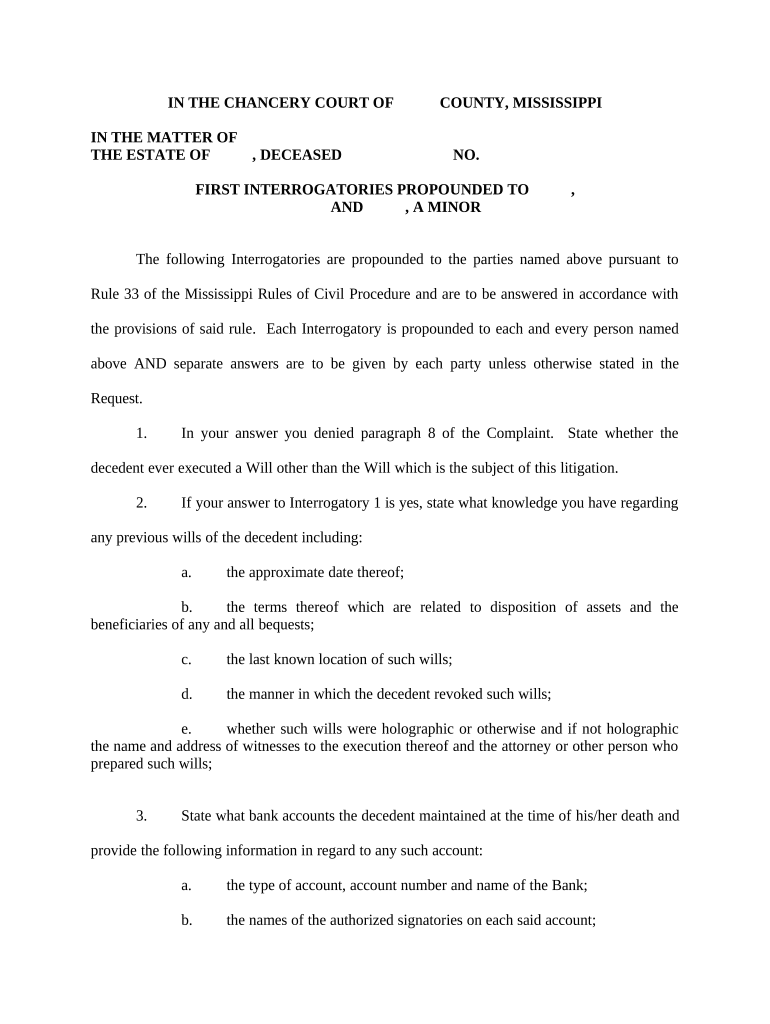
Interrogatories - Mississippi Preview on Page 1

Here's how it works

01. Edit your form online
Type text, add images, blackout confidential details, add comments, highlights and more.
02. Sign it in a few clicks
Draw your signature, type it, upload its image, or use your mobile device as a signature pad.
03. Share your form with others
Send it via email, link, or fax. You can also download it, export it or print it out.

How to use or fill out Interrogatories - Mississippi with our platform

Form edit decoration
9.5
Ease of Setup
DocHub User Ratings on G2
9.0
Ease of Use
DocHub User Ratings on G2
  1. Click ‘Get Form’ to open the Interrogatories - Mississippi document in the editor.
  2. Begin by filling in the names of the parties involved at the top of the form, ensuring accuracy as this information is crucial for identification.
  3. Proceed to answer each interrogatory carefully. For example, when addressing whether a will was executed, provide detailed information regarding any previous wills, including dates and terms.
  4. For questions about bank accounts, list all accounts maintained by the decedent at their time of death, including account types and authorized signatories.
  5. Continue through each interrogatory methodically, ensuring that you provide separate answers for each party as required. Use our platform’s features to highlight or comment on specific sections if needed.
  6. Once completed, review your answers for clarity and completeness before saving or exporting your document directly from our editor.

Start using our platform today to streamline your document editing and ensure your Interrogatories are filled out accurately and efficiently!

be ready to get more

Complete this form in 5 minutes or less

Get form

Got questions?

We have answers to the most popular questions from our customers. If you can't find an answer to your question, please contact us.
Contact us

Yes, electronically drawing your signature is acceptable, but only if you utilize a tool that complies with industry laws and regulations. Consider DocHub, which ensures eSignature validity under ESIGN and UETA requirements. All you need to eSign your Interrogatories - Mississippi is an account with DocHub and an internet connection. After you open your document in our editor, click Sign and select the Draw tool.

Document editing with DocHub is equally convenient on desktop and mobile devices. You just need an internet browser to revise your Interrogatories - Mississippi on Android. Open our site and sign in to access the instruments you need. Add your file and introduce your intended changes. Next, you can keep your form in your file storage or send it out immediately.

In California, you have 30 days to respond to an interrogatory. If you do not respond within this time, the opposing side can file a motion to compel with the court. The court may require them to first consult with you about your failure to respond before officially filing a motion to compel.
You have to respond to interrogatories in writing to the best of your ability. If you do not answer an interrogatory question, and then the other side learns that you did in fact know the answer, it could have a negative impact on your case at trial.

Security and compliance

At DocHub, your data security is our priority. We follow HIPAA, SOC2, GDPR, and other standards, so you can work on your documents with confidence.

Learn more
ccpa2
pci-dss
gdpr-compliance
hipaa
soc-compliance