Ucc3 financing statement 2026

Get Form
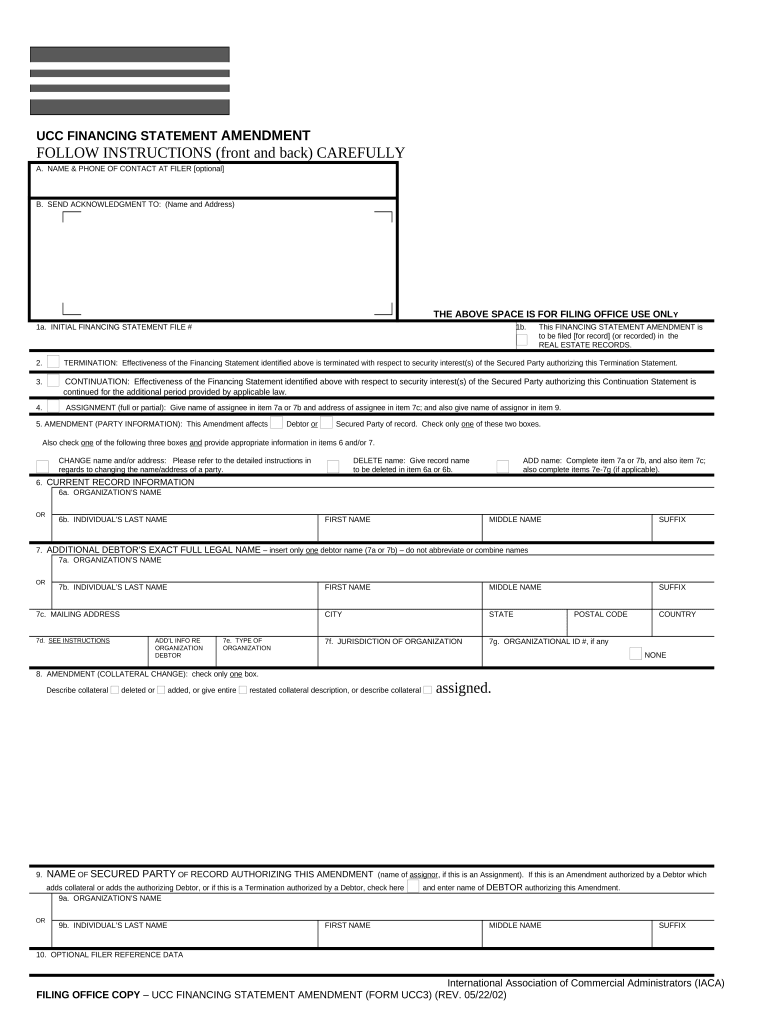
ucc 3 form Preview on Page 1

Here's how it works

01. Edit your ucc 3 form online
Type text, add images, blackout confidential details, add comments, highlights and more.
02. Sign it in a few clicks
Draw your signature, type it, upload its image, or use your mobile device as a signature pad.
03. Share your form with others
Send it via email, link, or fax. You can also download it, export it or print it out.

How to use or fill out UCC3 Financing Statement with our platform

Form edit decoration
9.5
Ease of Setup
DocHub User Ratings on G2
9.0
Ease of Use
DocHub User Ratings on G2
  1. Click ‘Get Form’ to open the UCC3 Financing Statement in the editor.
  2. Begin by filling in item A with the optional contact name and phone number for the filer. This can help filing offices reach you if needed.
  3. In item B, provide the name and address where you want the acknowledgment sent. This ensures you receive confirmation of your filing.
  4. Enter the initial financing statement file number in item 1a. If applicable, check box 1b if this amendment is to be recorded in real estate records.
  5. Select the appropriate purpose of your amendment by checking boxes 2, 3, 4, or 5 as necessary. Complete items 6 and/or 7 based on your selections.
  6. For any changes to party information, check box in item 5 indicating whether it’s a Debtor or Secured Party change and fill out items 6 and 7 accordingly.
  7. If there are collateral changes, describe them clearly in item 8. Ensure all relevant details are included for clarity.
  8. Finally, review all entries for accuracy before submitting your form to ensure compliance with legal requirements.

Start using our platform today for free to streamline your UCC filings!

be ready to get more

Complete this form in 5 minutes or less

Get form

Got questions?

We have answers to the most popular questions from our customers. If you can't find an answer to your question, please contact us.
Contact us

eSignatures are an excellent alternative to traditional signing, as they save time, effort, and money people spend on printing, scanning, and paper delivery. You can electronically sign your ucc3 financing statement utilizing a trustworthy and robust online document management services like DocHub. It complies with main eSignature policies (ESIGN and UETA), so all documents approved there are legally binding and have the same validity as physically signed ones.

As a comprehensive document editing platform, DocHub is accessible on smart phones. Open DocHub in your choice of mobile browser and employ our smart mobile-friendly toolset to complete your ucc3 financing statement.

A UCC-1 is a financing statement filed to provide notice that a creditor has a security interest in a debtors personal property.
Uniform Commercial Code Article 3 governs negotiable instruments: drafts (including checks) and notes representing a promise to pay a sum of money, and that have independent value because they are negotiable.
First, the debtor must send an authenticated demand to the secured party. The demand should be sent to the name/address of the secured party as indicated on the financing statement. The secured party has 20 days to either terminate the filing or send a termination statement to the debtor that the debtor can then file.

Security and compliance

At DocHub, your data security is our priority. We follow HIPAA, SOC2, GDPR, and other standards, so you can work on your documents with confidence.

Learn more
ccpa2
pci-dss
gdpr-compliance
hipaa
soc-compliance

People also ask

Also known as a UCC-3, and, depending on the context, a UCC-3 financing statement amendment, a UCC-3 termination statement, and a UCC-3 continuation statement. Under the Uniform Commercial Code, a UCC-3 is used to continue, assign, terminate, or amend an existing UCC-1 financing statement (UCC-1).
A UCC-3 is used as a way to amend that original lien filing and do things like terminate the UCC, edit any of the details of the lien, or assign your interests to another secured party for the lien.

Related links