Type text, add images, blackout confidential details, add comments, highlights and more.
02. Sign it in a few clicks
Draw your signature, type it, upload its image, or use your mobile device as a signature pad.
03. Share your form with others
Send it via email, link, or fax. You can also download it, export it or print it out.
How to use or fill out north dakota change with our platform
Ease of Setup
DocHub User Ratings on G2
Ease of Use
DocHub User Ratings on G2
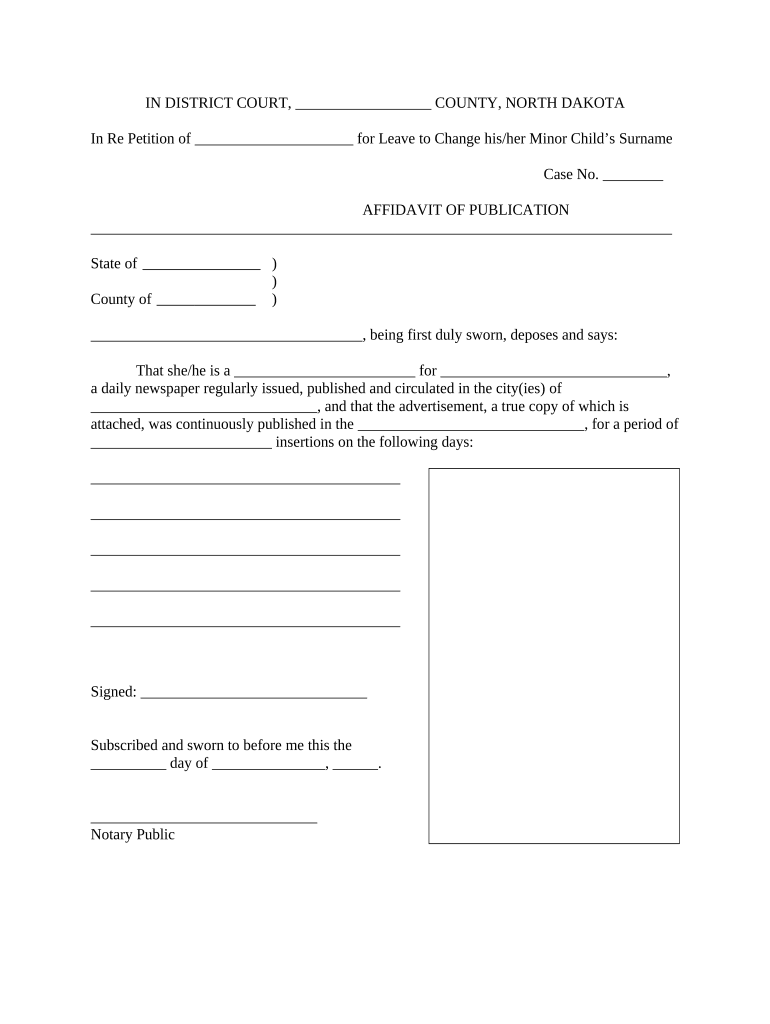
Click ‘Get Form’ to open the north dakota change document in the editor.
Begin by filling in your name and the case number at the top of the form. This information is crucial for identifying your petition.
In the affidavit section, provide your occupation and the name of the newspaper where the advertisement will be published. Ensure that this newspaper is a daily publication in your county.
Next, specify the city or cities where the newspaper circulates. This helps establish local awareness of your petition.
Indicate how many times you plan to publish the advertisement and list those specific dates in the designated area.
Finally, sign and date the affidavit section, ensuring it is notarized as required before submission.
Start using our platform today to easily complete your north dakota change form for free!
North dakota change mapNorth dakota change newsNorth Dakota Motor VehicleND Drivers License Status CheckBiggest city in North DakotaBismarck North DakotaCapital of South DakotaNorth Dakota Fargo
Security and compliance
At DocHub, your data security is our priority. We follow HIPAA, SOC2, GDPR, and other standards, so you can work on your documents with confidence.
The NDSU CHANGE program provides mentored research experiences to recent college graduates. Participants in the CHANGE network join a cohort of trainees.Read more
Bear Den - XTO Oil and Gas Asset (North Dakota, United States)
Mar 7, 2025 Bear Den - XTO Oil and Gas Asset (North Dakota, United States) was restructured due to methodological changes in GOGET dealing with unconventional USRead more
This system provides ND drivers the ability to change their Resident, Mailing, Email address or Emergency Contact. A new license will NOT be sent.Read more
Cookie consent notice
This site uses cookies to enhance site navigation and personalize your experience.
By using this site you agree to our use of cookies as described in our Privacy Notice.
You can modify your selections by visiting our Cookie and Advertising Notice.