Order interrogatories 2026

Get Form
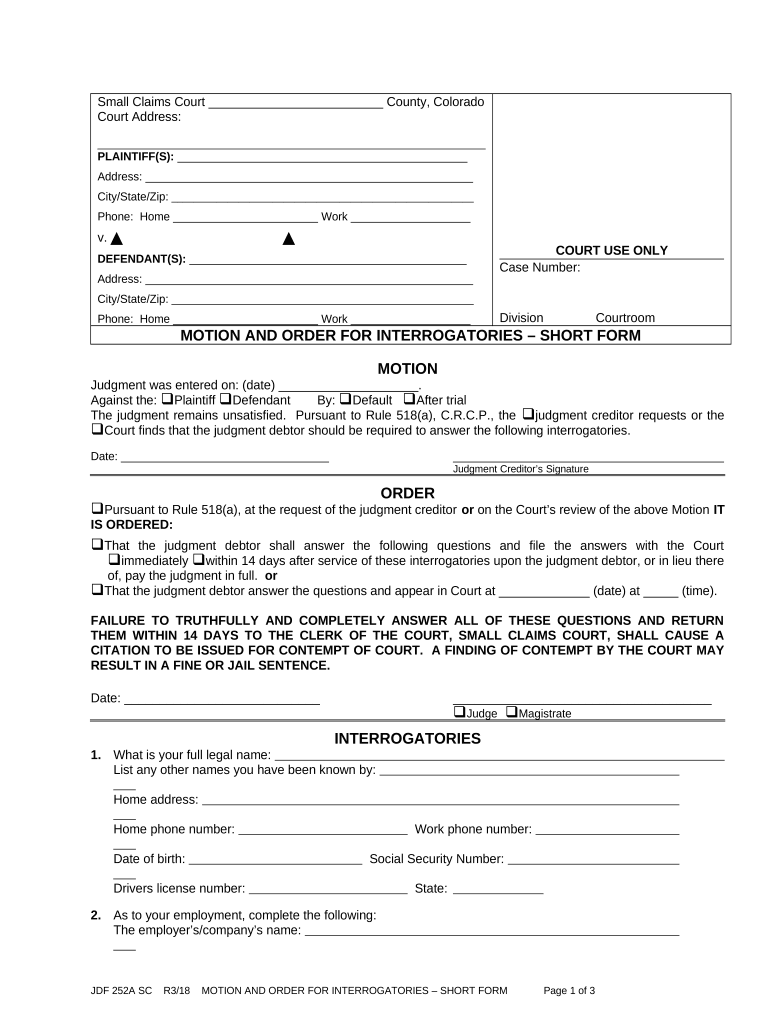
order interrogatories Preview on Page 1

Here's how it works

01. Edit your form online
Type text, add images, blackout confidential details, add comments, highlights and more.
02. Sign it in a few clicks
Draw your signature, type it, upload its image, or use your mobile device as a signature pad.
03. Share your form with others
Send it via email, link, or fax. You can also download it, export it or print it out.

How to use or fill out order interrogatories with our platform

Form edit decoration
9.5
Ease of Setup
DocHub User Ratings on G2
9.0
Ease of Use
DocHub User Ratings on G2
  1. Click ‘Get Form’ to open the order interrogatories in the editor.
  2. Begin by filling in the plaintiff and defendant information at the top of the form, including names, addresses, and contact numbers.
  3. In the 'MOTION' section, specify the date judgment was entered and indicate whether it was against the plaintiff or defendant. Select how the judgment was reached (default or after trial).
  4. Complete the 'ORDER' section by selecting how and when the judgment debtor should respond to the interrogatories. Ensure you check all applicable boxes.
  5. Proceed to fill out each interrogatory question carefully, providing accurate personal details such as full legal name, employment information, bank accounts, real estate interests, debts owed to you, and insurance coverage.
  6. Finally, complete the verification section by signing and dating it. Make sure to acknowledge any changes made to the original content if applicable.

Start using our platform today for free to streamline your document editing and completion process!

be ready to get more

Complete this form in 5 minutes or less

Get form

Got questions?

We have answers to the most popular questions from our customers. If you can't find an answer to your question, please contact us.
Contact us
If a party or partys officer, director, or managing agent fails to obey a discovery order, the court may issue further orders. A court must also order a disobedient party, the advising attorney, or both to pay expenses resulting from the failure to reply.
However, you can object to interrogatories that call for legal conclusions. You can also object to questions if they are not at all related to the court case. To object, you need to write out the reasons for the objection instead of answering the question.
Without leave of court or written stipulation, any party may serve upon any other party written interrogatories, not exceeding 25 in number including all discrete subparts, to be answered by the party served or, if the party served is a public or private corporation or a partnership or association or governmental
Interrogatories are written questions sent by one party to another, which the responding party must answer under penalty of perjury. Interrogatories allow the parties to ask who, what, when, where and why questions, making them a good method for obtaining new information.
Interrogatories are a discovery tool that the parties can use to have specific questions about a case answered before trial. Interrogatories are lists of questions sent to the other party that s/he must respond to in writing.

Security and compliance

At DocHub, your data security is our priority. We follow HIPAA, SOC2, GDPR, and other standards, so you can work on your documents with confidence.

Learn more
ccpa2
pci-dss
gdpr-compliance
hipaa
soc-compliance
be ready to get more

Complete this form in 5 minutes or less

Get form

People also ask

In law, interrogatories (also known as requests for further information) are a formal set of written questions propounded by one litigant and required to be answered by an adversary in order to clarify matters of fact and help to determine in advance what facts will be presented at any trial in the case.
Ask for a court order If the other person does not respond, or their response is still incomplete, you can ask the court to order them to respond. You have 45 days from the service of the most recent responses to ask the court to make an order requiring an answer.
If the opposing side does not respond to your form interrogatories, special interrogatories, or request for production, you may file a motion seeking an order compelling the opposing party to respond.

Related links