Escrow agent agreement 2026

Get Form
escrow agreements Preview on Page 1

Here's how it works

01. Edit your escrow agreements online
Type text, add images, blackout confidential details, add comments, highlights and more.
02. Sign it in a few clicks
Draw your signature, type it, upload its image, or use your mobile device as a signature pad.
03. Share your form with others
Send 5 love languages quiz pdf via email, link, or fax. You can also download it, export it or print it out.

How to use or fill out escrow agent agreement with our platform

Form edit decoration
9.5
Ease of Setup
DocHub User Ratings on G2
9.0
Ease of Use
DocHub User Ratings on G2
  1. Click ‘Get Form’ to open the escrow agent agreement in the editor.
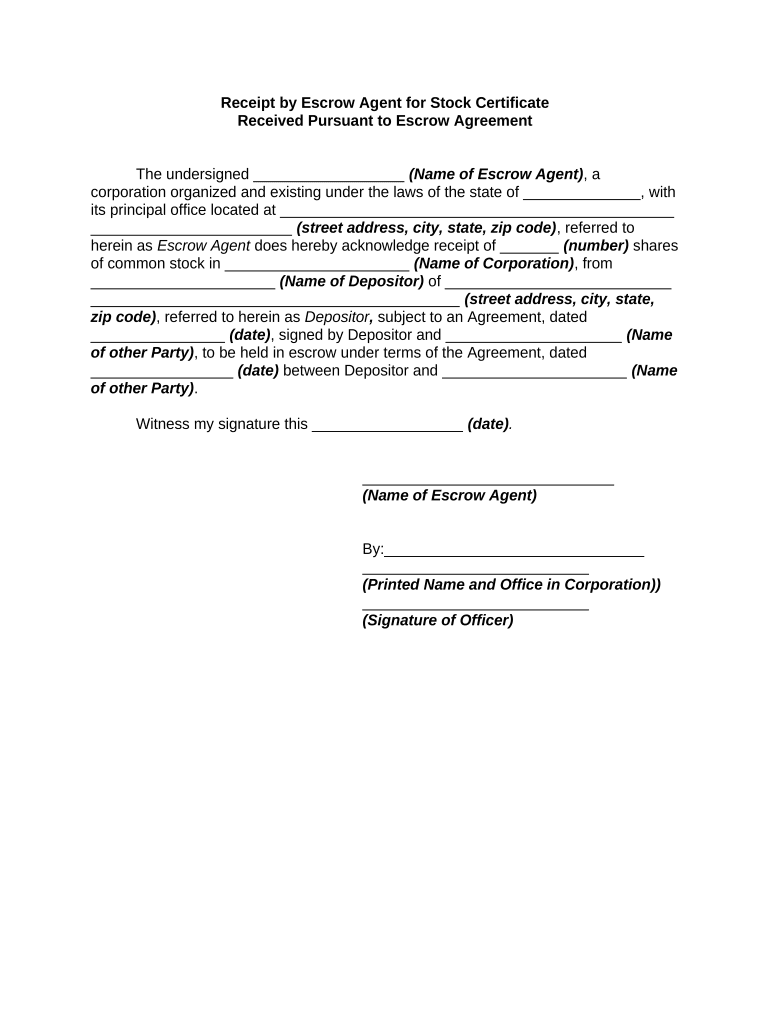
  2. Begin by entering the name of the Escrow Agent in the designated field. This should be the legal name of the corporation managing the escrow.
  3. Fill in the state where the Escrow Agent is organized, along with its principal office address, including street, city, state, and zip code.
  4. Indicate the number of shares being held in escrow and specify the name of the corporation that issued these shares.
  5. Provide the name and address of the Depositor who is placing shares into escrow. Ensure all details are accurate for proper identification.
  6. Enter the date of the Agreement between Depositor and any other party involved. This is crucial for establishing terms.
  7. Finally, have an authorized officer sign and print their name along with their title within your corporation before saving or sharing your completed document.

Start using our platform today to streamline your escrow agent agreement process for free!

be ready to get more

Complete this form in 5 minutes or less

Get form

Got questions?

We have answers to the most popular questions from our customers. If you can't find an answer to your question, please contact us.
Contact us

With DocHub, it’s pretty simple. The editor offers users an add-on called DocHub for Gmail, which you can find in the Google Workspace Marketplace free of charge. Install it and give it access to your Google account. Open your email with your escrow agent agreement attached and click on the add-on button in the right-side panel. Sign in to your DocHub account, and import the form to our editor, where you can complete it and sign.

As a comprehensive document editing service, DocHub is accessible on mobile devices. Open DocHub in your choice of mobile internet browser and employ our smart mobile-friendly toolset to fill out your escrow agent agreement.

An escrow agreement is a contract that outlines the conditions and terms of a transaction for an asset that is held by a third party, the escrow agent, until all conditions have been met. Such conditions are established by the parties before an escrow agent is appointed.
An escrow agreement is a legal document that ensures all parties fulfill their contractual obligations before the release of an asset. Escrow agents, often impartial third parties, hold assets like cash, stocks, or property deeds securely until contract conditions are satisfied.
Who owns the money in an escrow account? The buyer in a transaction owns the money held in escrow. This is because the escrow agent only has the money in trust. The ownership of the money is transferred to the seller once the transactions obligations are met.

Security and compliance

At DocHub, your data security is our priority. We follow HIPAA, SOC2, GDPR, and other standards, so you can work on your documents with confidence.

Learn more
ccpa2
pci-dss
gdpr-compliance
hipaa
soc-compliance

People also ask

An Escrow is an arrangement for a third party to hold the assets of a transaction temporarily. The assets are kept in a third-party account and are only released when all terms of the agreement have been met. The use of an escrow account in a transaction adds a degree of safety for both parties.
Protection for Both Parties Escrow holds the buyers earnest money safely until all agreed-upon steps are completed. This shows the buyer is serious while protecting them in case something goes wrong.

Related links