Type text, add images, blackout confidential details, add comments, highlights and more.
02. Sign it in a few clicks
Draw your signature, type it, upload its image, or use your mobile device as a signature pad.
03. Share your form with others
Send registration pan application via email, link, or fax. You can also download it, export it or print it out.
How to use or fill out Punjab Medical Council with our platform
Ease of Setup
DocHub User Ratings on G2
Ease of Use
DocHub User Ratings on G2
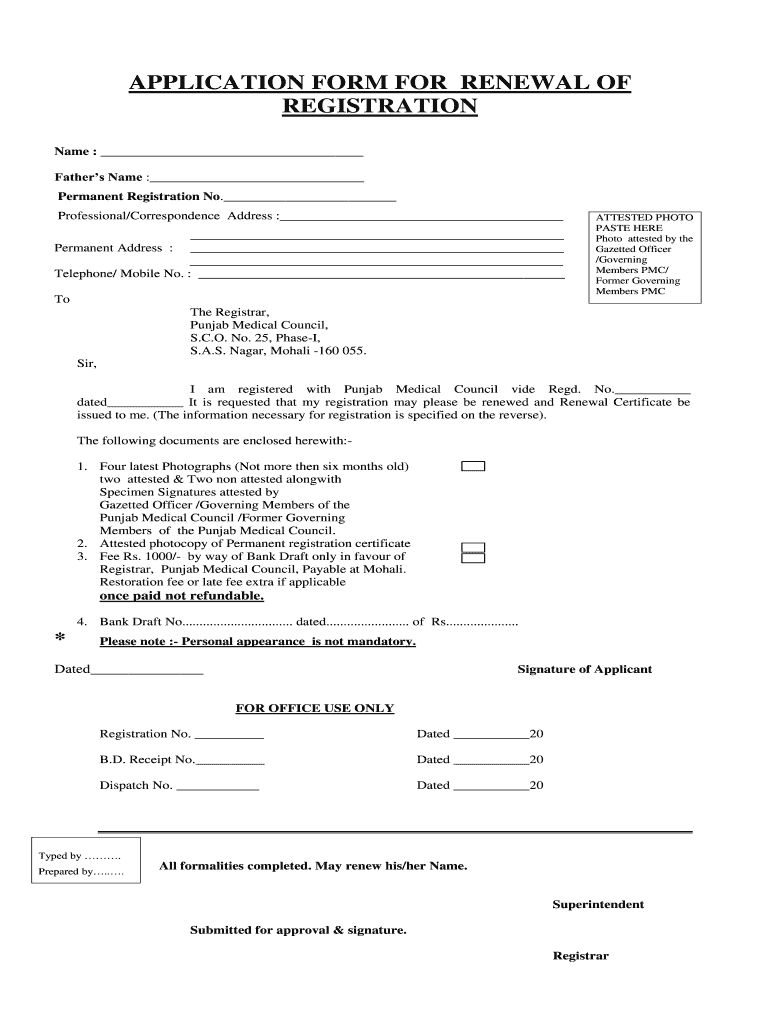
Click ‘Get Form’ to open the Punjab Medical Council application form in the editor.
Begin by filling in your name and father's name in the designated fields. Ensure that these details match your official documents.
Enter your Permanent Registration Number, which is crucial for processing your renewal request.
Provide your professional or correspondence address along with your telephone or mobile number for contact purposes.
Attach a recent passport-sized photograph in the specified area, ensuring it is attested by a Gazetted Officer or a member of the Punjab Medical Council.
In the section requesting additional information, fill out details such as date of birth, medical college attended, qualifications, and any remarks regarding past conduct.
Review all entered information for accuracy before submitting. Make sure to include required documents like photographs and bank draft details.
Start using our platform today to streamline your application process for free!
Punjab medical council loginPunjab Medical Council registration checkPunjab Medical Council registration RenewalPunjab Medical Council addressPunjab Medical Council helpline numberPunjab Medical Council contact NumberPunjab Medical Council registration Renewal pdfPunjab Medical Council Renewal Registration form
Security and compliance
At DocHub, your data security is our priority. We follow HIPAA, SOC2, GDPR, and other standards, so you can work on your documents with confidence.
by S Ravi 2017 Cited by 10 The Medical Council of India (MCI) was established in 1934 under the Indian Medical Council. (IMC) Act of 1933. At the time, its primaryRead more
Cookie consent notice
This site uses cookies to enhance site navigation and personalize your experience.
By using this site you agree to our use of cookies as described in our Privacy Notice.
You can modify your selections by visiting our Cookie and Advertising Notice.