Athletics automatic payment authorization form 2026

Get Form
payment authorization form Preview on Page 1

Here's how it works

01. Edit your payment authorization form online
Type text, add images, blackout confidential details, add comments, highlights and more.

02. Sign it in a few clicks
Draw your signature, type it, upload its image, or use your mobile device as a signature pad.

03. Share your form with others
Send it via email, link, or fax. You can also download it, export it or print it out.

How to use or fill out athletics automatic payment authorization form with our platform

Form edit decoration
9.5
Ease of Setup
DocHub User Ratings on G2
9.0
Ease of Use
DocHub User Ratings on G2
  1. Click ‘Get Form’ to open the athletics automatic payment authorization form in the editor.
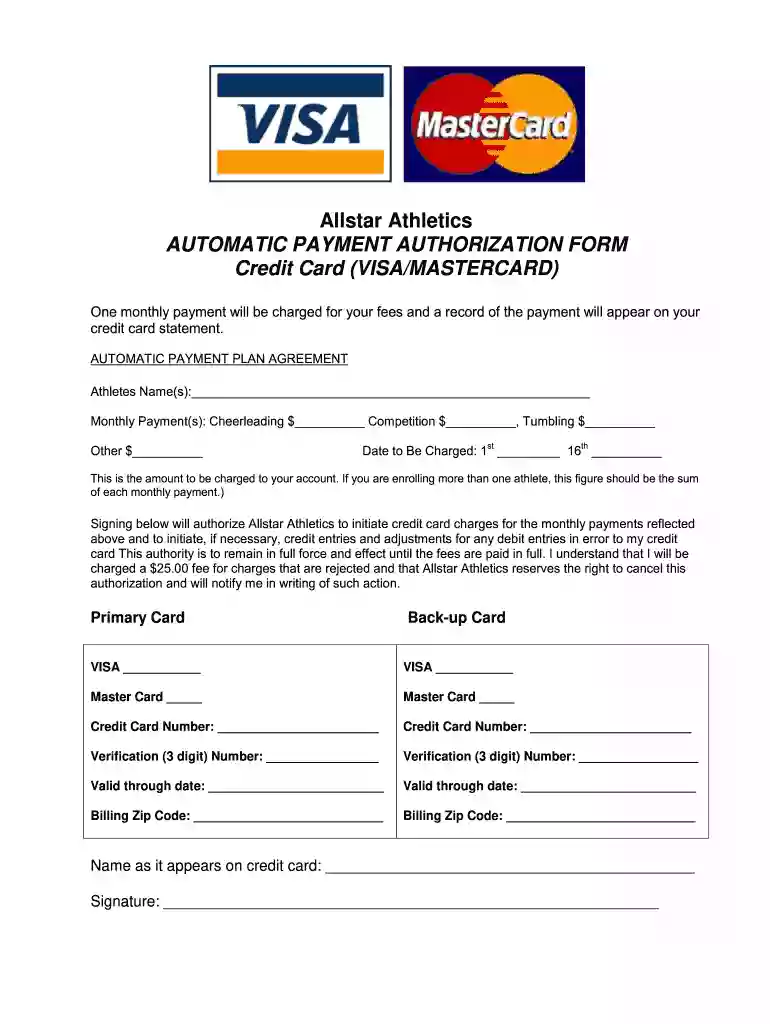
  2. Begin by entering the athlete's name(s) in the designated field. This ensures that the payments are correctly attributed.
  3. Fill in the monthly payment amounts for Cheerleading, Competition, Tumbling, and any other activities. If enrolling multiple athletes, sum their fees for accurate billing.
  4. Specify the date you wish to be charged each month by selecting either the 1st or 16th of the month.
  5. Provide your primary credit card details including card type (VISA/MASTERCARD), number, verification number, expiration date, and billing zip code.
  6. If applicable, enter your backup card information in the same manner as your primary card.
  7. Sign at the bottom of the form to authorize Allstar Athletics to process these payments. Ensure all information is accurate before submitting.

Start filling out your athletics automatic payment authorization form online for free today!

be ready to get more

Complete this form in 5 minutes or less

Get form

Got questions?

We have answers to the most popular questions from our customers. If you can't find an answer to your question, please contact us.
Contact us
An Automated Clearing House (ACH) authorization is a payment authorization that gives the lender permission to electronically take money from your bank, credit union, or prepaid card account when your payment is due. You can revoke this authorization.
Yes. The Automated Clearing House network , also called ACH, may be used to transfer funds to individuals or businesses in the United States or abroad.
Credit card authorization forms are a best practice for merchants. While its not legally required, It is highly recommended to ensure both you and your client are aware of how charges will be processed for future transactions.
To complete an ACH authorization form, essential information includes the account holders details, bank account information, transaction specifics, and a signed authorization statement.
The first step in using an ACH authorization form is to request this form from your bank or financial institution, or by downloading a template from the internet. Its important to make sure the ACH bank form you use is up-to-date and compliant with regulations.

Security and compliance

At DocHub, your data security is our priority. We follow HIPAA, SOC2, GDPR, and other standards, so you can work on your documents with confidence.

Learn more
ccpa2
pci-dss
gdpr-compliance
hipaa
soc-compliance
be ready to get more

Complete this form in 5 minutes or less

Get form

People also ask

A payment authorization form is a formal document that merchants ask customers to fill out when purchasing a product or service that requires future one-time or recurring payments. This is used by subscription-based businesses.
An Automated Clearing House (ACH) authorization is a payment authorization that gives the lender permission to electronically take money from your bank, credit union, or prepaid card account when your payment is due.
What to include on a credit card authorization form The card types your business accepts (VISA, MasterCard, AMEX, etc.) The cardholders name as shown on the card. The full credit card number. The cards expiration date. The cardholders billing address, including ZIP or postal code.

Related links