Braille intermittent cues 2026

Get Form
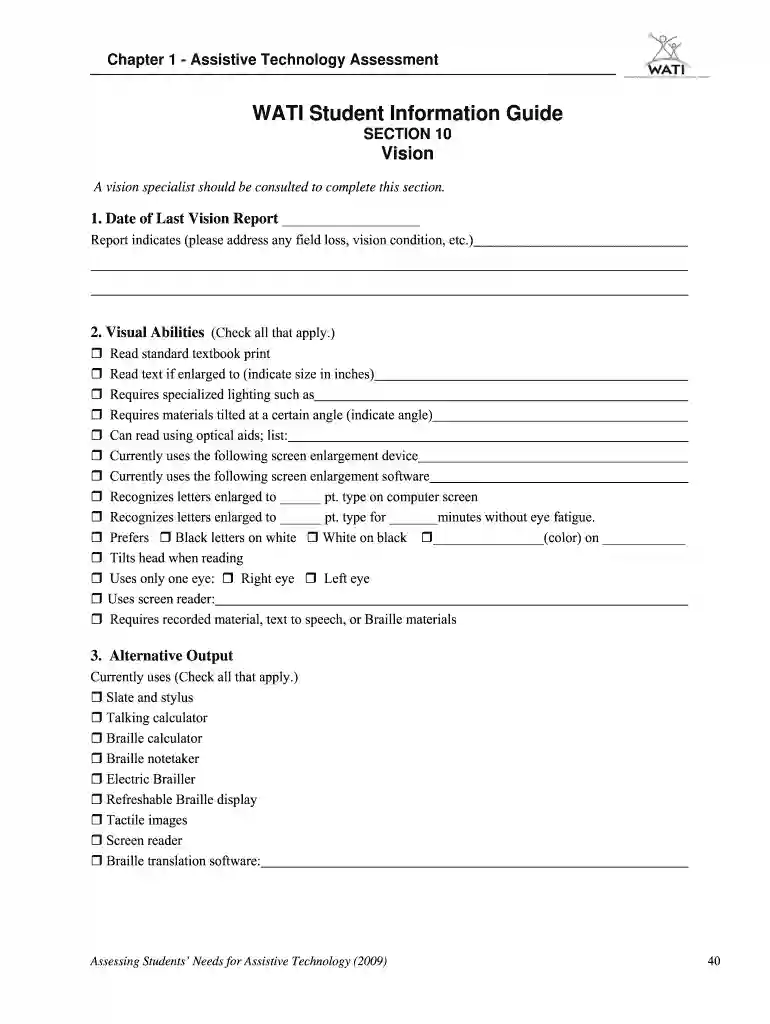
braille intermittent cues Preview on Page 1

Here's how it works

01. Edit your form online
Type text, add images, blackout confidential details, add comments, highlights and more.

02. Sign it in a few clicks
Draw your signature, type it, upload its image, or use your mobile device as a signature pad.

03. Share your form with others
Send it via email, link, or fax. You can also download it, export it or print it out.

How to use or fill out braille intermittent cues with our platform

Form edit decoration
9.5
Ease of Setup
DocHub User Ratings on G2
9.0
Ease of Use
DocHub User Ratings on G2
  1. Click ‘Get Form’ to open the braille intermittent cues document in the editor.
  2. Begin with Section 10: Vision. Enter the 'Date of Last Vision Report' and provide details regarding any field loss or vision conditions as indicated.
  3. In the 'Visual Abilities' section, check all applicable boxes that describe the student's visual capabilities, such as reading enlarged text or using optical aids.
  4. For 'Alternative Output', select all tools currently used by the student, including Braille notetakers or screen readers.
  5. Assess the student's level of proficiency by checking the option that best describes their needs for assistance with devices.
  6. In the 'Writing/Handwritten Materials' section, check all relevant boxes that reflect the student's writing abilities and requirements.

Start using our platform today to easily fill out your braille intermittent cues form for free!

See more braille intermittent cues versions

We've got more versions of the braille intermittent cues form. Select the right braille intermittent cues version from the list and start editing it straight away!
Versions Form popularity Fillable & printable
2009 4.8 Satisfied (163 Votes)
be ready to get more

Complete this form in 5 minutes or less

Get form

Got questions?

We have answers to the most popular questions from our customers. If you can't find an answer to your question, please contact us.
Contact us
Examples of verbal cues include words and phrases such as Listen, Lets review, Pay close attention, and what you need to do now. Verbal cues may be both direct, such as read this book, or indirect, such as find a book to read.
Braille is a unique tactile writing system of raised dots that blind and partially sighted people can read by touch. The ability to understand braille means that people with sight loss have the same access to written word as sighted people and are able to enjoy reading for life.
Four categories of visual cues include hand gestures, facial expressions, pictures, and language. Examples of visual cues include sentence frames, posted labels, graphics, charts, and schedules, pointing and gesturing, and manipulatives.
In this article, the author discusses two strategies--visual cues (modeling) and verbal cues (short, accurate phrases) which are related to teaching motor skills in maximizing learning in physical education classes. Both visual and verbal cues are strong influences in facilitating and promoting day-to-day learning.
Examples of verbal communication include: Talking/chatting face-to-face in conversation. Talking/chatting over the telephone. Recording a video. Public speaking. Preaching. Monologue. Lecturing. Dialogue.

Security and compliance

At DocHub, your data security is our priority. We follow HIPAA, SOC2, GDPR, and other standards, so you can work on your documents with confidence.

Learn more
ccpa2
pci-dss
gdpr-compliance
hipaa
soc-compliance
be ready to get more

Complete this form in 5 minutes or less

Get form

People also ask

Braille (/ˈbreɪl/ BRAYL, French: [bʁaj]) is a tactile writing system used by people who are visually impaired.
Verbal cues: Direct verbal announcements, like stating that its lunchtime. Auditory cues: Tapping on a table or making other auditory signals. Visual cues: Gestures or positioning oneself to indicate an action or direction. Tactile prompts: Providing an object that represents the activity or task.
Because they are spoken and can be very direct, it is easy to assume that verbal cues are more effective than visual or non-verbal cues. However, studies have found that visual and non-verbal cues are easier to remember and respond to because behavioral decoding provides a better impression of what is expected.

Related links