Type text, add images, blackout confidential details, add comments, highlights and more.
02. Sign it in a few clicks
Draw your signature, type it, upload its image, or use your mobile device as a signature pad.
03. Share your form with others
Send it via email, link, or fax. You can also download it, export it or print it out.
How to use or fill out FORM 144 - Glendale Securities, Inc. with our platform
Ease of Setup
DocHub User Ratings on G2
Ease of Use
DocHub User Ratings on G2
Click ‘Get Form’ to open FORM 144 in the editor.
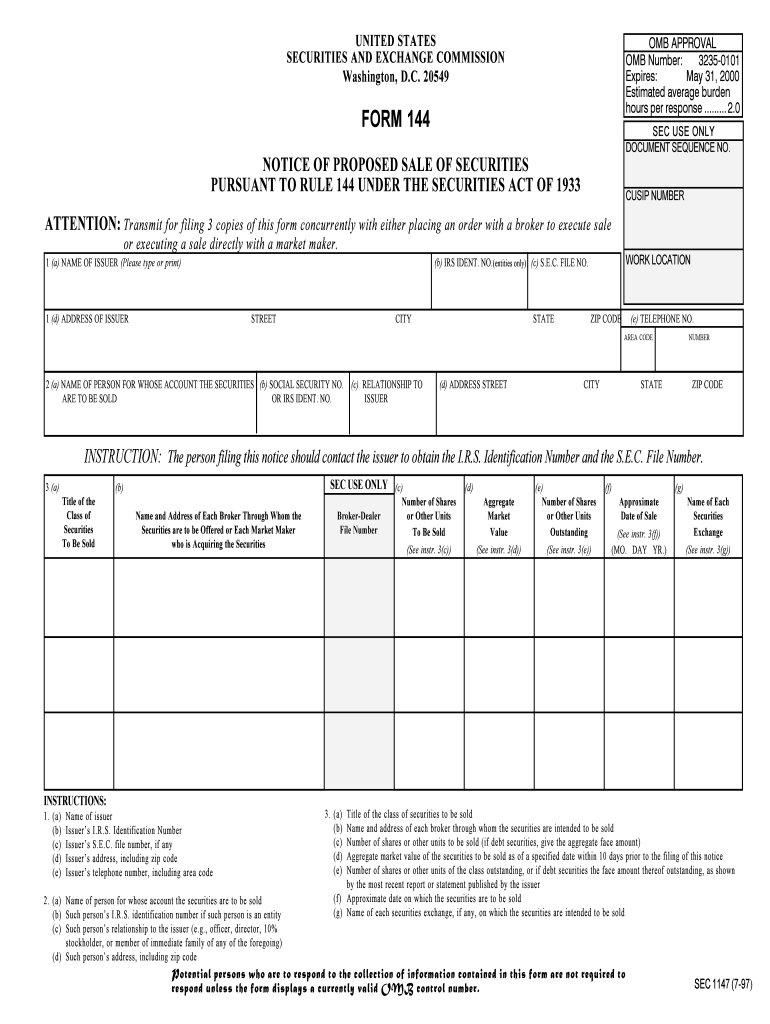
Begin by filling in Section 1 with the issuer's name, IRS identification number, SEC file number, address, and telephone number. Ensure all details are accurate for compliance.
In Section 2, provide the name of the person for whose account the securities are being sold. Include their social security or IRS identification number and relationship to the issuer.
Complete Section 3 by detailing the class of securities to be sold, including broker information and the number of shares. Be sure to specify the approximate date of sale.
Fill out Table I with acquisition details of the securities being sold, including nature of acquisition and payment information.
In Table II, list any securities sold in the past three months along with seller information and gross proceeds.
Finally, sign and date the notice at the bottom. Ensure at least one copy is manually signed before submission.
Start using our platform today to easily complete FORM 144 online for free!
Fill out FORM 144 - Glendale Securities, Inc. online It's free
See more FORM 144 - Glendale Securities, Inc. versions
We've got more versions of the FORM 144 - Glendale Securities, Inc. form. Select the right FORM 144 - Glendale Securities, Inc. version from the list and start editing it straight away!
NOTICE: The project that is the subject of this report was approved by the Govern- ing Board of the National Research Council, whose members are drawn fromRead more
by DR Fischel 2002 Cited by 51 But Glendale, a publicly traded company, faced an immediate and obvious problem in pursuing its damage claim-an event study of its stock price on relevantRead more
Cookie consent notice
This site uses cookies to enhance site navigation and personalize your experience.
By using this site you agree to our use of cookies as described in our Privacy Notice.
You can modify your selections by visiting our Cookie and Advertising Notice.