Electronic ACH Form - Atlanta Postal Credit Union 2026

Get Form
atlanta postal credit union app Preview on Page 1

Here's how it works

01. Edit your atlanta postal credit union app online
Type text, add images, blackout confidential details, add comments, highlights and more.

02. Sign it in a few clicks
Draw your signature, type it, upload its image, or use your mobile device as a signature pad.

03. Share your form with others
Send atlanta postal credit union login via email, link, or fax. You can also download it, export it or print it out.

How to use or fill out Electronic ACH Form - Atlanta Postal Credit Union with our platform

Form edit decoration
9.5
Ease of Setup
DocHub User Ratings on G2
9.0
Ease of Use
DocHub User Ratings on G2
  1. Click ‘Get Form’ to open it in the editor.
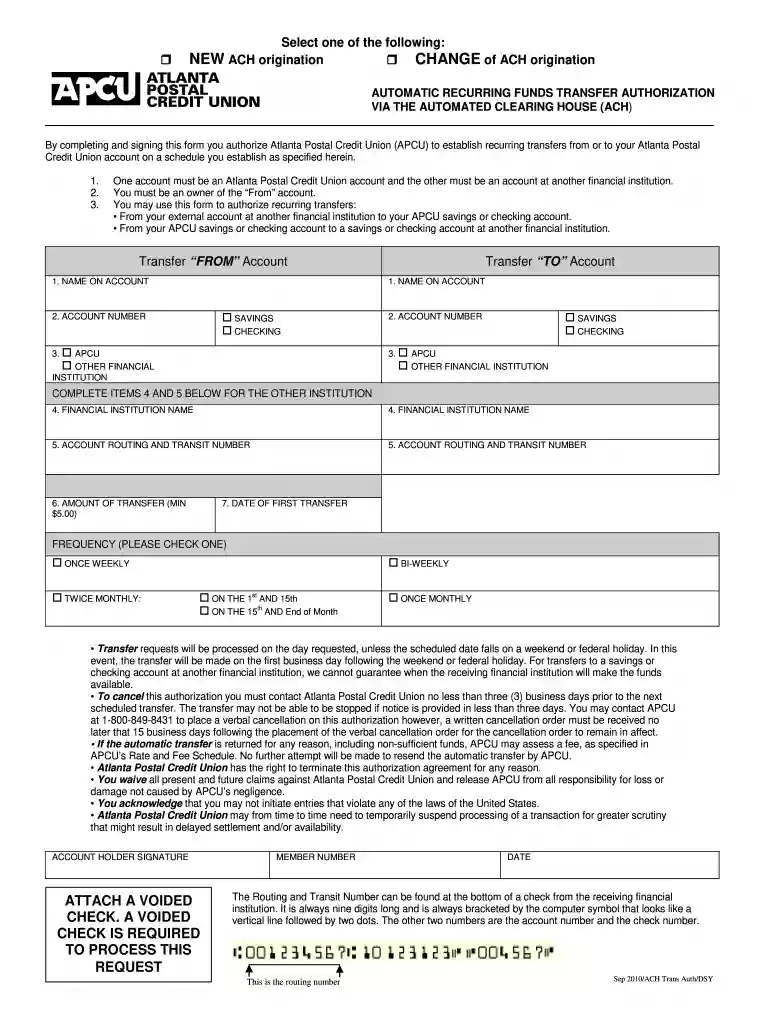
  2. Select whether you are initiating a CHANGE of ACH origination, NEW ACH origination, or AUTOMATIC RECURRING FUNDS TRANSFER AUTHORIZATION.
  3. Fill in the 'Transfer FROM Account' section by entering the name on the account, account number, and selecting whether it is an APCU or other financial institution account.
  4. Complete the 'Transfer TO Account' section similarly, ensuring to provide the necessary details for both accounts involved in the transfer.
  5. In items 4 and 5, provide the financial institution name and account routing and transit number for the other institution.
  6. Specify the amount of transfer (minimum $5.00) and date of first transfer.
  7. Choose your preferred frequency for transfers from the options provided.
  8. Sign at the bottom as the account holder and attach a voided check to process your request.

Start using our platform today to easily complete your Electronic ACH Form!

See more Electronic ACH Form - Atlanta Postal Credit Union versions

We've got more versions of the Electronic ACH Form - Atlanta Postal Credit Union form. Select the right Electronic ACH Form - Atlanta Postal Credit Union version from the list and start editing it straight away!
Versions Form popularity Fillable & printable
2016 4.8 Satisfied (56 Votes)
2010 4.8 Satisfied (260 Votes)
be ready to get more

Complete this form in 5 minutes or less

Get form

Got questions?

We have answers to the most popular questions from our customers. If you can't find an answer to your question, please contact us.
Contact us
For questions, you can contact 800-325-9905 or email membercontactcenter@togethercu.org. *Federally Insured by NCUA. Membership eligibility and account approval required. Select Employer Group benefits are only available to employees of Together Credit Union SEG partners.
We would like to inform you of convenient and easy payment options for your GPOFCU loans and Visa credit cards. How to make a loan/Visa payment by phone: Call GPOFCUs main number ((202) 512 - 1067, select Option 2) Or, email your callback contact information to: info@gpofcu.org.
What is Credit Union 1 email format? The widely used Credit Union 1 email format is {firstinitial}{last} (e.g. jsmith@creditunion1.org) with 100% adoption across the company.
You can also email us at BusinessServices@apcu.com. To assist State and Federal governments fight against the funding of terrorism and money laundering activities, Federal law mandates all financial institutions to obtain, verify, and record information that identifies each person or business that opens an account.
061293018. The routing number for ATLANTA POSTAL CREDIT UNION is 061293018.

Security and compliance

At DocHub, your data security is our priority. We follow HIPAA, SOC2, GDPR, and other standards, so you can work on your documents with confidence.

Learn more
ccpa2
pci-dss
gdpr-compliance
hipaa
soc-compliance
be ready to get more

Complete this form in 5 minutes or less

Get form

People also ask

The Automated Clearing House (ACH) system is a nationwide network through which depository institutions, such as credit unions and banks, send each other batches of electronic credit and debit transfers.
The easiest way to find your checking account number is through the Mobile Banking app. Log into the mobile app, then on the Accounts screen select your checking account.
For further assistance, please call us at our 24-hour Customer Service at (632) 8841-8600 or email us at customer.service@unionbankph.com.

Related links