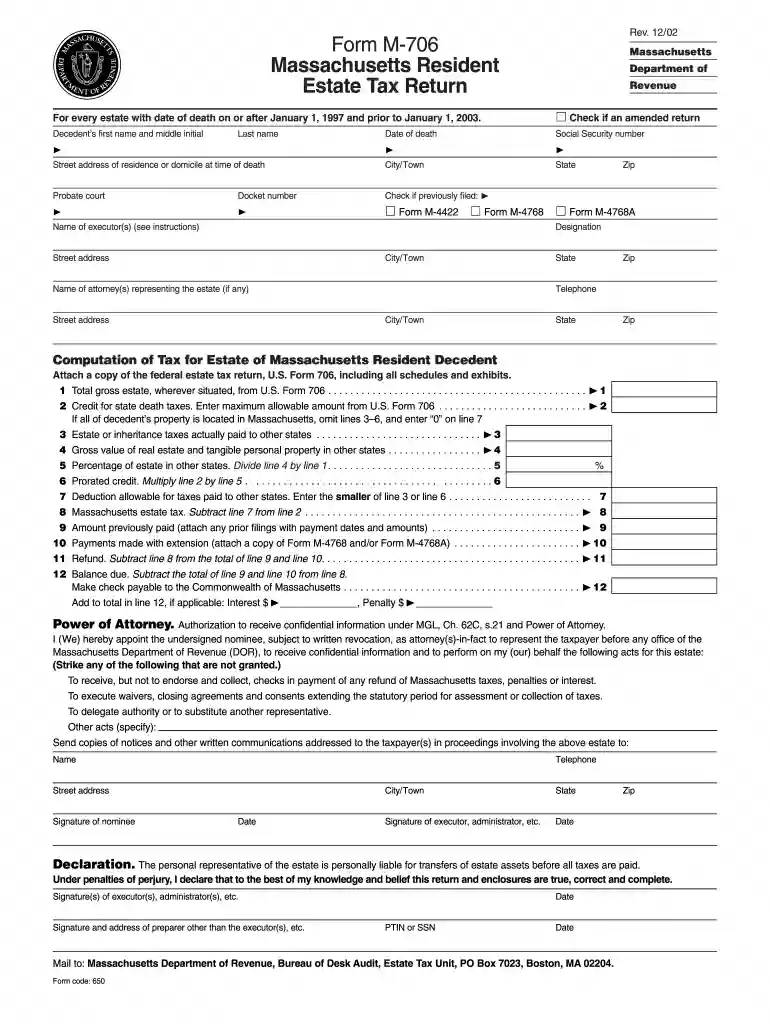
Massachusetts m 706 amended return 2002 form-2026

Get Form
form m 706 Preview on Page 1

Here's how it works

01. Edit your form m 706 online
Type text, add images, blackout confidential details, add comments, highlights and more.

02. Sign it in a few clicks
Draw your signature, type it, upload its image, or use your mobile device as a signature pad.

03. Share your form with others
Send it via email, link, or fax. You can also download it, export it or print it out.

How to use or fill out Massachusetts M-706 Amended Return 2002 Form

Form edit decoration
9.5
Ease of Setup
DocHub User Ratings on G2
9.0
Ease of Use
DocHub User Ratings on G2
  1. Click ‘Get Form’ to open it in the editor.
  2. Begin by entering the decedent’s first name, middle initial, and last name. Ensure accuracy as this information is crucial for identification.
  3. Indicate if this is an amended return by checking the appropriate box. This helps the Department of Revenue process your form correctly.
  4. Fill in the date of death and Social Security number. These details are essential for tax calculations and verification.
  5. Complete the address fields with the street address, city/town, state, and zip code where the decedent resided at the time of death.
  6. Provide information about the executor(s) and attorney(s) representing the estate, including names and contact details.
  7. Proceed to compute tax by filling out lines related to gross estate value, state death taxes, and any deductions applicable. Attach a copy of U.S. Form 706 as required.
  8. Finally, review all entries for accuracy before signing and dating the declaration section at the end of the form.

Start using our platform today to fill out your Massachusetts M-706 Amended Return form easily and for free!

See more massachusetts m 706 amended return 2002 form versions

We've got more versions of the massachusetts m 706 amended return 2002 form form. Select the right massachusetts m 706 amended return 2002 form version from the list and start editing it straight away!
Versions Form popularity Fillable & printable
2023 4.4 Satisfied (45 Votes)
2018 4.8 Satisfied (80 Votes)
2016 4.4 Satisfied (117 Votes)
2011 4.4 Satisfied (628 Votes)
2004 4.3 Satisfied (45 Votes)
2002 4 Satisfied (38 Votes)
be ready to get more

Complete this form in 5 minutes or less

Get form

Got questions?

We have answers to the most popular questions from our customers. If you can't find an answer to your question, please contact us.
Contact us
The IRS sends notices and letters for the following reasons: You have a balance due. The IRS changed your return - You are due a larger or smaller refund The IRS has a question about your tax return. The IRS needs to verify your identity. The IRS needs additional information.
Form 33X must be used if, after filing your Massachusetts income tax return, you discover one or more errors or omissions.
DOR has the legal authority to audit any type of return (e.g., income, sales/use, meals - food beverage etc.) including any amendments, corrections or supplements thereto, for up to three years after the original return was filed or up to three years after the original return was due (if the return was filed early).
Amending Form 706 If you find that you must change something on a return that has already been filed, you should: File another Form 706; Enter Supplemental Information across the top of page 1 of the form; and. Attach a copy of pages 1, 2, 3, and 4 of the original Form 706 that has already been filed.
The Massachusetts DOR has various types of notices and bills that are issued to individuals and businesses if it is determined that additional taxes might be or are owed. Notices and bills ask for and provide information and request payment when necessary.

Security and compliance

At DocHub, your data security is our priority. We follow HIPAA, SOC2, GDPR, and other standards, so you can work on your documents with confidence.

Learn more
ccpa2
pci-dss
gdpr-compliance
hipaa
soc-compliance

People also ask

Department of Revenue (DoR) The Department of Revenue administers the states tax system, collecting state taxes including income, sales and use, corporate, estate, and other taxes. It offers taxpayers assistance by toll-free telephone.
Option 1: Sign into your eFile.com account, modify your Return and download/print your Form 1 (resident form) or Form NR/PY (nonresidents and part-year residents) under My Account. Check off the space next to the amended return text on the top of your form to indicate that its an amended return.

Related links