




01. Edit your form online
Type text, add images, blackout confidential details, add comments, highlights and more.

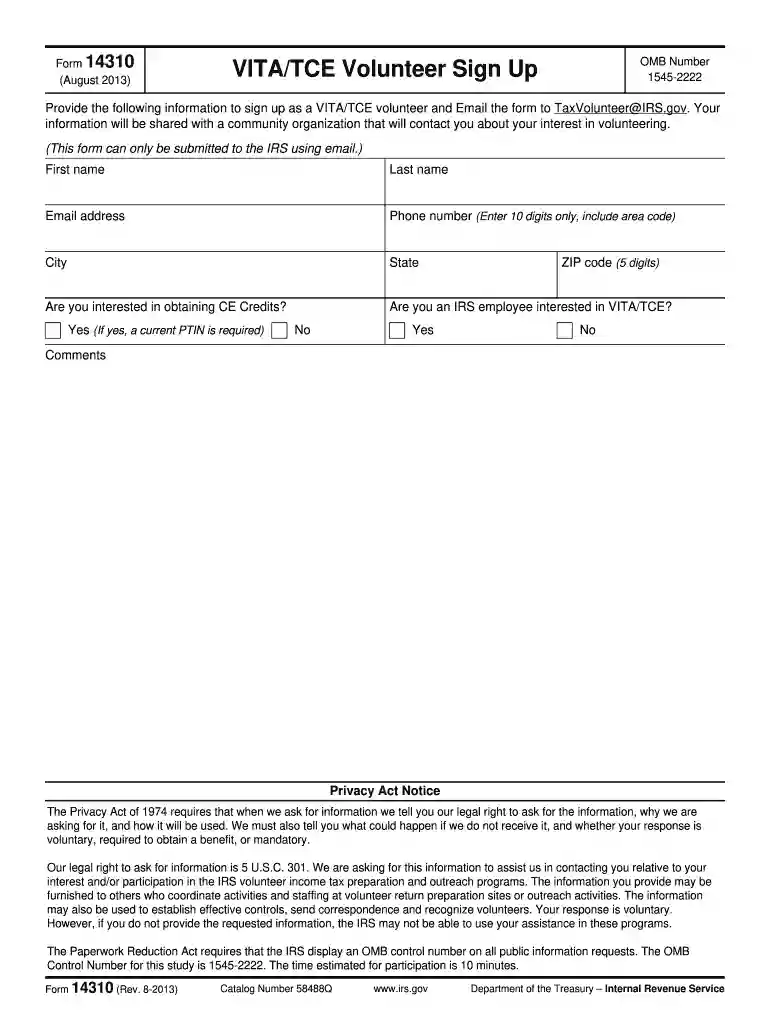
Type text, add images, blackout confidential details, add comments, highlights and more.

Draw your signature, type it, upload its image, or use your mobile device as a signature pad.

Send it via email, link, or fax. You can also download it, export it or print it out.
Form 14310, introduced in 2011, is an essential document for individuals interested in joining the Volunteer Income Tax Assistance (VITA) and Tax Counseling for the Elderly (TCE) programs. These programs are initiatives by the IRS designed to help low- to moderate-income taxpayers, individuals with disabilities, and those with limited English proficiency with free tax preparation. The primary aim of Form 14310 is to collect personal information and consent from volunteers who wish to contribute to these community service programs.
Volunteers’ participation in the VITA/TCE initiatives not only supports fellow citizens in understanding tax complexities but also allows them to gain valuable experience in tax preparation and related financial matters.
Acquiring Form 14310 is straightforward and can typically be accomplished via multiple channels. The IRS provides access to this form through their official website, allowing individuals to download it directly. Alternatively, those affiliated with VITA/TCE programs, such as program coordinators or IRS partners, may distribute the form during volunteer recruitment drives or training sessions.
Once obtained, ensure the form is the correct version for the 2011 tax season, as forms may undergo periodic updates or changes. Reviewing the version year is crucial to ensuring compliance with the appropriate IRS guidelines.
Filling out Form 14310 requires attention to detail. Here’s a step-by-step guide:
Personal Information: Start by entering your full name, address, and contact details. Pay attention to accuracy, as this information is crucial for your identification and communication purposes.
Experience and Education: Indicate your level of experience with tax preparation and whether you're interested in earning continuing education credits. This section helps align your skills and experiences with appropriate volunteer roles.
Availability: Specify your availability and preferences for participating in the program. This may include selecting the days and hours you can commit, ensuring efficient scheduling with program coordinators.
Consent and Privacy Notices: Carefully read all the privacy statements regarding the use of your personal information. Consent sections must be signed to participate, reflecting your understanding and agreement to the terms.
Submission: Submit the completed form to the designated program contact point, either via mail or electronically. Ensure all sections are filled and signed as required to avoid delays in processing.
Form 14310 is mainly used by individuals eager to volunteer in tax preparation services under the VITA and TCE programs. These volunteer roles attract a diverse crowd, including college students, retired professionals, financial consultants, and anyone passionate about assisting others with tax-related matters.
The form is also utilized by community service organizations aiming to recruit volunteers to enhance their tax assistance and outreach efforts. By leveraging such diverse backgrounds, the programs aim to foster an inclusive environment for both taxpayers and volunteers.
Several critical elements are highlighted within Form 14310 to ensure its optimal utility and compliance:
Attention to these elements ensures that all necessary data is systematically collected and processed, benefiting both the volunteer and the administering program.
Form 14310 is utilized legally to facilitate participation in IRS-sponsored volunteer programs, preserving the integrity and objectives of the VITA/TCE initiatives. Legal utilization implies:
Legal compliance with the form requires signers to be fully aware of the conditions underpinning their involvement with these tax assistance programs.
The IRS provides specific guidelines regarding the use of Form 14310 to ensure effective and lawful implementation in the VITA/TCE programs:
Guidelines also emphasize confidentiality and proper conduct, protecting both volunteer interests and taxpayer data confidentiality.
Volunteering for the VITA/TCE programs aligns with the tax season timeline, compelling awareness of key dates associated with Form 14310:
Understanding these critical timelines ensures smooth administrative flow and ample preparation for volunteers committed to assisting taxpayers effectively.
We've got more versions of the form 14310 2011 form. Select the right form 14310 2011 version from the list and start editing it straight away!
With DocHub, you can quickly sign your form 14310 2011 or any other document on iOS, even without installing extra applications. You can access your DocHub account from any web-connected browser and fill out and sign your form in any preferred method with just a few clicks.
If you are looking for a state-specific form 14310 2011 sample, you will find it in our DocHub Forms & Templates catalog. Use the search field, key in your form’s name, and search through the results for your state. You can also filter out irrelevant results while browsing our catalog by categories.
At DocHub, your data security is our priority. We follow HIPAA, SOC2, GDPR, and other standards, so you can work on your documents with confidence.


