Type text, add images, blackout confidential details, add comments, highlights and more.
02. Sign it in a few clicks
Draw your signature, type it, upload its image, or use your mobile device as a signature pad.
03. Share your form with others
Send it via email, link, or fax. You can also download it, export it or print it out.
How to use or fill out where to mail a QME complaint form
Ease of Setup
DocHub User Ratings on G2
Ease of Use
DocHub User Ratings on G2
Click ‘Get Form’ to open it in the editor.
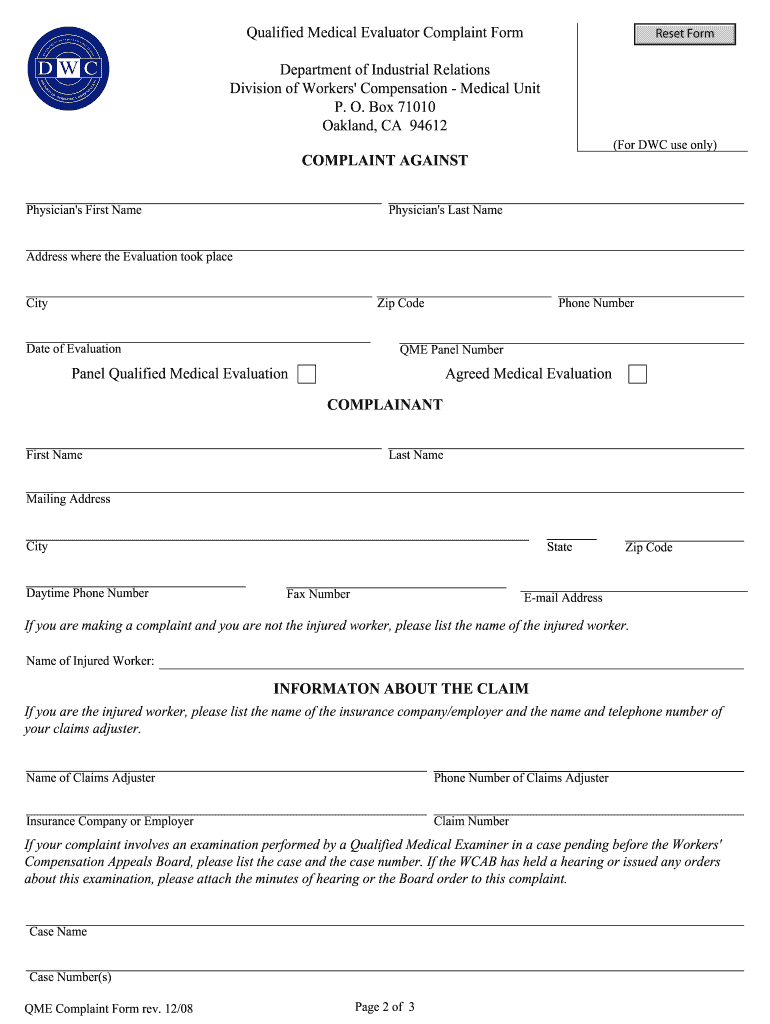
Begin by legibly printing or typing all required information. Start with the name of the Qualified Medical Evaluator and the date of evaluation.
Next, provide the address where the evaluation took place, including city and zip code.
If applicable, attach any medical reports related to your complaint about the evaluation process or report contents.
Complete your personal details as the complainant, including your first name, last name, mailing address, and contact information.
If you are not the injured worker, include their name. Provide details about the claim such as insurance company and claims adjuster’s contact information.
In the section for complaint details, clearly outline your concerns. Use additional sheets if necessary for comprehensive explanations.
Finally, sign and date the form before submitting it to ensure your complaint is processed efficiently.
Start using our platform today to fill out your QME complaint form online for free!
Fill out where to mail a qme complaint form online It's free
Apr 2, 2018 Please e-mail completed form to BAS-rgacreditgrp.us@dormakaba.com or Fax to 1-877-835-1030. NATURE OF PROBLEM. NOTE: All returns shall beRead more
If you are complaining about the contents of the report or the way the evaluation was conducted, please include the medical report of the QME, if available. 5.Read more
If you mail the form to your employer, use first-class or certified mail. If you buy a return receipt, you will be able to prove that the claim form was mailedRead more
Cookie consent notice
This site uses cookies to enhance site navigation and personalize your experience.
By using this site you agree to our use of cookies as described in our Privacy Notice.
You can modify your selections by visiting our Cookie and Advertising Notice.