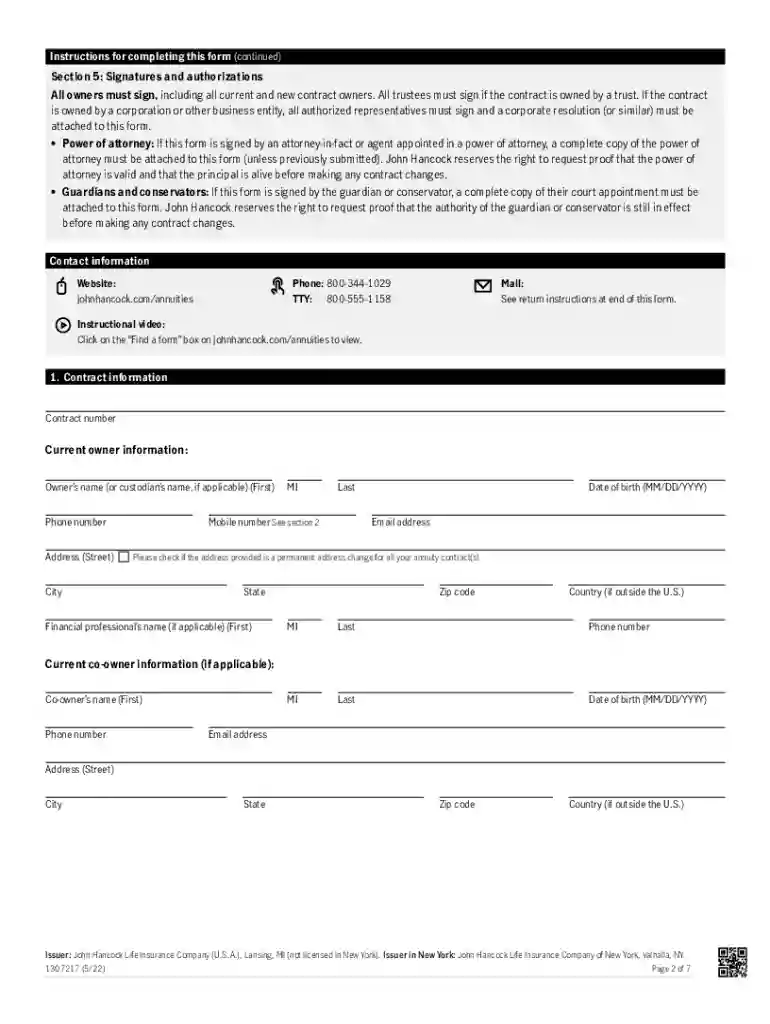
Designation change of beneficiary form 2026

Get Form
hancock beneficiary form Preview on Page 1

Here's how it works

01. Edit your hancock beneficiary form online
Type text, add images, blackout confidential details, add comments, highlights and more.

02. Sign it in a few clicks
Draw your signature, type it, upload its image, or use your mobile device as a signature pad.

03. Share your form with others
Send it via email, link, or fax. You can also download it, export it or print it out.

Definition and Purpose of the Designation Change of Beneficiary Form

The Designation Change of Beneficiary Form is primarily utilized to update the beneficiaries of financial products such as life insurance policies, retirement accounts, or annuity contracts. This form ensures that benefits are transferred to the rightful individuals upon the policyholder's death. Given its role in estate planning, the form is a critical document that must be kept up to date to reflect changes in the policyholder's personal circumstances such as marriage, divorce, or the birth of a child. By designating or updating beneficiaries, policyholders can ensure that their intentions are honored, and potential disputes among heirs are minimized.

How to Use the Designation Change of Beneficiary Form

  1. Acquire the Form: Obtain the form from your financial institution or service provider, either via their website or by requesting a mailed copy.
  2. Provide Policy Information: Clearly fill in the details of the policy or account number to which the changes apply.
  3. Update Beneficiary Information: Enter the full name, address, relationship to you, and percentage allocation for each new beneficiary you wish to designate.
  4. Signature and Date: Sign and date the form in the presence of a witness or notary if required by your institution.
  5. Submission: Submit the completed form as per the instructions provided—online, by mail, or in person.

Steps to Complete the Designation Change of Beneficiary Form

  1. Review Current Beneficiary Designations: Verify the existing beneficiaries against current records to ensure accuracy.
  2. Gather Necessary Information: Collect pertinent information for each new beneficiary, such as full legal names and contact details.
  3. Complete the Form: Carefully fill out each section as instructed. Pay close attention to any requirements for notarization or witnessing.
  4. Verify Compliance: Ensure that all parts of the form are compliant with the institution's specific submission guidelines to avoid processing delays.
  5. Record Keeping: Make a copy of the completed form and keep it with your important financial documents.

Key Elements of the Designation Change of Beneficiary Form

  • Policyholder Information: Includes the name, address, and contact details of the policyholder.
  • Policy Details: Identification of the policy or account whose beneficiary is being updated.
  • Beneficiary Details: Section where new beneficiary information is provided, including their allocation percentage.
  • Authorization: A segment for the policyholder's signature which may require a witness or notarial acknowledgment.

Legal Use of the Designation Change of Beneficiary Form

The form carries legal weight as it guides the distribution of assets to designated beneficiaries posthumously. Changes made must comply with the legal requirements of your state and the terms of the policy or account. Failure to update the form when necessary might lead to assets being distributed based on outdated information, which may not reflect the policyholder's latest wishes. It's important for individuals to review this document periodically, especially after significant life events.

State-Specific Rules for the Designation Change of Beneficiary Form

Though the form serves a universal purpose, there might be state-specific regulations that affect its use. Certain states may have additional protection laws for spouses or dependents that influence beneficiary designations. It's important to check local laws and perhaps consult with an estate planner or legal professional to ensure compliance with regional statutes when updating beneficiary details.

Digital vs. Paper Version of the Designation Change of Beneficiary Form

Many financial institutions offer both paper and digital versions of the form. The digital format often allows for expedited processing and ease of submission through secure online portals. Conversely, the paper version may be preferable for policyholders who are less comfortable with digital submissions or prefer a tangible record. Regardless of format, ensure that all identification and privacy protocols are followed to maintain the integrity of the form.

Examples of Using the Designation Change of Beneficiary Form

Consider a scenario where an individual has recently remarried. They might use this form to update the primary beneficiary of their life insurance policy to their new spouse. Similarly, a policyholder who has been divorced might want to remove an ex-spouse from their retirement account beneficiary list. These examples illustrate the form's critical role in ensuring that the current personal and family dynamics are accurately reflected in the asset distribution plan.

Important Terms Related to the Designation Change of Beneficiary Form

  • Primary Beneficiary: The individual or entity entitled to receive benefits first.
  • Contingent Beneficiary: Secondary in line to receive benefits if the primary beneficiary predeceases the policyholder.
  • Per Stirpes: A legal designation that allows a beneficiary's share to be passed to their heirs should they predecease the policyholder.
  • Notarial Acknowledgment: A formal declaration before a notary confirming the authenticity of a signature on the form.

See more Designation change of beneficiary form versions

We've got more versions of the Designation change of beneficiary form form. Select the right Designation change of beneficiary form version from the list and start editing it straight away!
Versions Form popularity Fillable & printable
2022 4.6 Satisfied (52 Votes)
2020 4.8 Satisfied (46 Votes)
2017 4.3 Satisfied (200 Votes)
2012 4.3 Satisfied (322 Votes)
be ready to get more

Complete this form in 5 minutes or less

Get form

Got questions?

We have answers to the most popular questions from our customers. If you can't find an answer to your question, please contact us.
Contact us
An irrevocable beneficiary is a person or entity who is designated to receive the assets in your life insurance policy and cannot easily be changed or removed unless they consent. As an irrevocable beneficiary, the person or entity chosen has certain rights with regard to the death benefit of your policy.
If any portion of your service was under the Federal Employees Retirement System, use Standard Form (SF) 3102. This Designation of Beneficiary form is used to designate who is to receive a lump-sum payment which may become payable after your death.
SF 2823, Designation For FEGLI Determines how proceeds from the life insurance are distributed. fill/sf2823.
Forms for Designations We recommend that you designate beneficiaries to receive your life insurance benefits. However, if you are happy with the order of precedence(PDF file), you dont have to do anything.
Change a beneficiary Generally, you can review and update your beneficiary designations by contacting the company or organization that provides your insurance or retirement plan. You can sometimes do this online. Otherwise, youll have to complete, sign, and mail a paper form.

Security and compliance

At DocHub, your data security is our priority. We follow HIPAA, SOC2, GDPR, and other standards, so you can work on your documents with confidence.

Learn more
ccpa2
pci-dss
gdpr-compliance
hipaa
soc-compliance

People also ask

Standard Form 3102 is used by an employee or an annuitant covered under the Federal Employees Retirement System to designate a beneficiary to receive any lump sum due in the event of his/her death.

Related links