Plano fault current 2026

Get Form
fault current letter Preview on Page 1

Here's how it works

01. Edit your fault current letter online
Type text, add images, blackout confidential details, add comments, highlights and more.

02. Sign it in a few clicks
Draw your signature, type it, upload its image, or use your mobile device as a signature pad.

03. Share your form with others
Send w137a via email, link, or fax. You can also download it, export it or print it out.

How to use or fill out plano fault current with our platform

Form edit decoration
9.5
Ease of Setup
DocHub User Ratings on G2
9.0
Ease of Use
DocHub User Ratings on G2
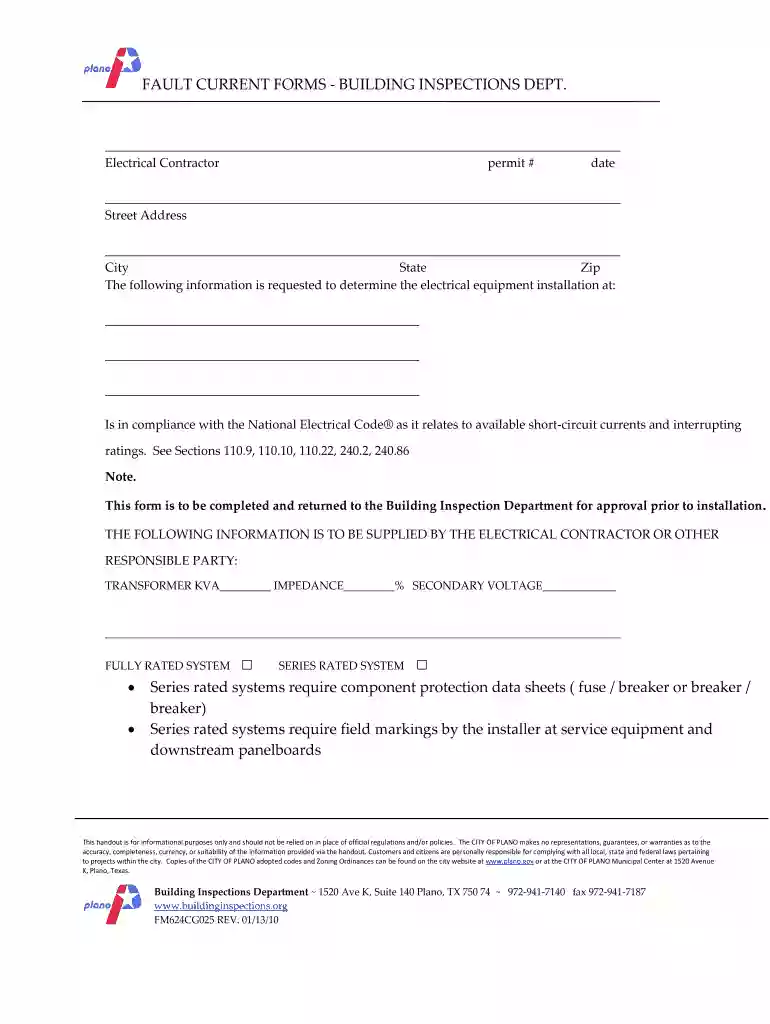
  1. Click ‘Get Form’ to open the plano fault current document in the editor.
  2. Begin by entering your details as the Electrical Contractor, including your permit number and date at the top of the form.
  3. Fill in the street address, city, state, and zip code where the electrical equipment installation will occur.
  4. Provide information about the transformer: KVA rating, impedance percentage, and secondary voltage. This data is crucial for compliance with National Electrical Code® standards.
  5. Indicate whether you are using a fully rated system or a series rated system by checking the appropriate box. If using a series rated system, ensure to attach component protection data sheets.
  6. Complete sections regarding conductor types (copper or aluminum), sizes, lengths from transformer to auxiliary gutter, and service disconnects. Be thorough to avoid delays in approval.
  7. Finally, sign and date the form at the bottom before submitting it back to the Building Inspection Department for approval.

Start filling out your plano fault current form online for free today!

See more plano fault current versions

We've got more versions of the plano fault current form. Select the right plano fault current version from the list and start editing it straight away!
Versions Form popularity Fillable & printable
2010 4.8 Satisfied (41 Votes)
be ready to get more

Complete this form in 5 minutes or less

Get form

Got questions?

We have answers to the most popular questions from our customers. If you can't find an answer to your question, please contact us.
Contact us
Fault current is the abnormal current that flows in the circuit in the failure condition which will be several times larger in magnitude than the normal expected current.
If a breaker or fuse isnt rated to handle the maximum available fault current it might see, it may not operate properly and its internal parts could fuse together or the device may blow up under the destructive stresses of a fault condition, which can cause serious injury and or property damage.
Types of Electrical Faults Three-phase short-circuit: Occurs between one or more phases, generating the highest fault typically currents.
Fault level is also referred to as fault current. It is the extra flow of electrical energy on a network during a short circuit or fault.
The prospective short-circuit current (PSCC), available fault current, or short-circuit making current is the highest electric current which can exist in a particular electrical system under short-circuit conditions. It is determined by the voltage and impedance of the supply system.

Security and compliance

At DocHub, your data security is our priority. We follow HIPAA, SOC2, GDPR, and other standards, so you can work on your documents with confidence.

Learn more
ccpa2
pci-dss
gdpr-compliance
hipaa
soc-compliance
be ready to get more

Complete this form in 5 minutes or less

Get form

People also ask

Maximum available fault current, also known as available short-circuit current, is the highest amount of current that can flow through an electrical system during a short circuit event. This value is determined by several factors, including: The capacity and impedance of the utility power supply.
In an electric power system, a fault or fault current is any abnormal electric current. For example, a short circuit is a fault in which a live wire touches a neutral or ground wire.
Fault current calculations are based on Ohms Law (V=IR). To determine the maximum current available at any given point in a distribution system, the equation is rearranged to solve for current (I=VR).

Related links