Wv state tax form 2015-2026

Get Form
wv state tax forms Preview on Page 1

Here's how it works

01. Edit your wv state tax forms online
Type text, add images, blackout confidential details, add comments, highlights and more.
02. Sign it in a few clicks
Draw your signature, type it, upload its image, or use your mobile device as a signature pad.
03. Share your form with others
Send it via email, link, or fax. You can also download it, export it or print it out.

How to use or fill out wv state tax form 2015 with DocHub

Form edit decoration
9.5
Ease of Setup
DocHub User Ratings on G2
9.0
Ease of Use
DocHub User Ratings on G2
  1. Click ‘Get Form’ to open the WV State Tax Form 2015 in our editor.
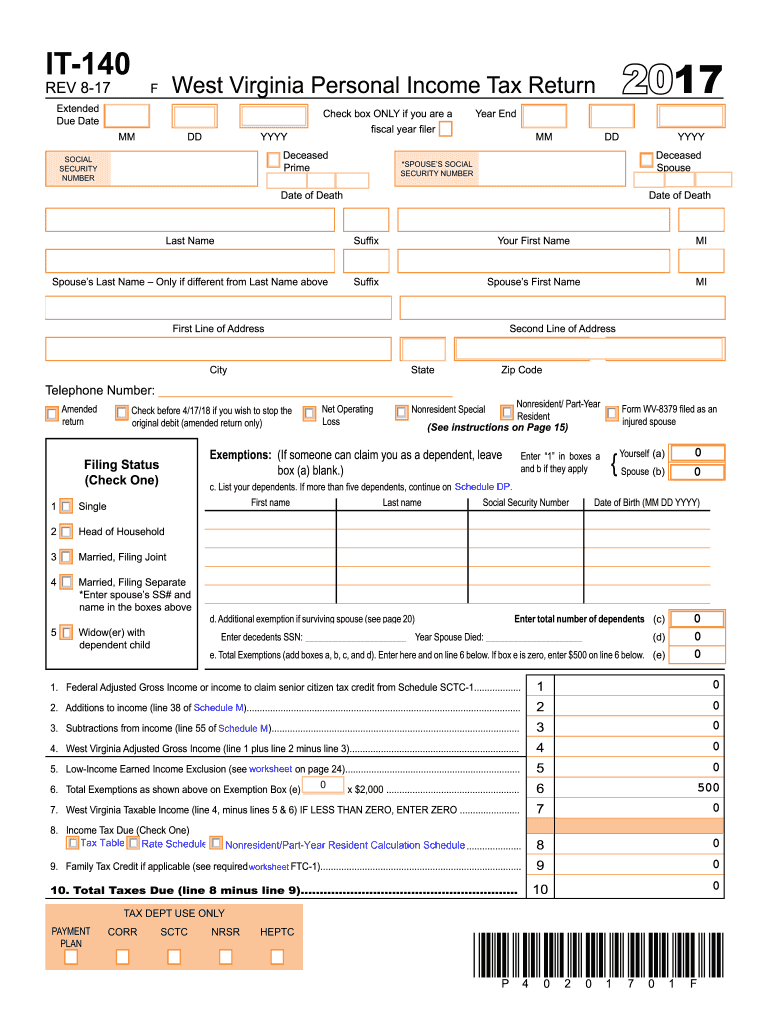
  2. Begin by entering your personal information, including your name, Social Security number, and address in the designated fields at the top of the form.
  3. Select your filing status by checking the appropriate box. This is crucial as it affects your tax calculations.
  4. Fill in your income details. Start with your Federal Adjusted Gross Income on line 1, followed by any additions or subtractions as specified in the instructions.
  5. Complete the exemptions section by listing dependents and calculating total exemptions based on the provided guidelines.
  6. Calculate your West Virginia taxable income by following the steps outlined in the form, ensuring all figures are accurate.
  7. Review all entries for accuracy before submitting. Use our platform's features to save and share your completed form easily.

Start filling out your WV State Tax Form 2015 today using our free online editor!

See more wv state tax form 2015 versions

We've got more versions of the wv state tax form 2015 form. Select the right wv state tax form 2015 version from the list and start editing it straight away!
Versions Form popularity Fillable & printable
2022 4.1 Satisfied (31 Votes)
2021 4.8 Satisfied (100 Votes)
2020 4.3 Satisfied (195 Votes)
2019 4.3 Satisfied (103 Votes)
2018 3.8 Satisfied (29 Votes)
2017 4.4 Satisfied (100 Votes)
2016 4.4 Satisfied (117 Votes)
2015 4 Satisfied (23 Votes)
2014 4.2 Satisfied (48 Votes)
2013 4 Satisfied (49 Votes)
2012 4 Satisfied (59 Votes)
2011 4 Satisfied (53 Votes)
2008 4 Satisfied (33 Votes)
be ready to get more

Complete this form in 5 minutes or less

Get form

Got questions?

We have answers to the most popular questions from our customers. If you can't find an answer to your question, please contact us.
Contact us
You must file a resident return and report all of your income in the same manner as any other resident individual unless you did not maintain a physical presence in West Virginia for more than 30 days during the taxable year.
The Income Tax Work page is displayed when you login to eFiling. It is within this page that you request, complete, save and file your ITR12 return to SARS. A message will appear informing you that your ITR12 return has been generated and contains the latest information SARS has on record for you.
Prior year returns MeF allows filing of prior year 1040 returns. As a new tax form type is added to the MeF platform, tax returns will be accepted for the current tax year only. As subsequent tax years are added to the system, MeF will accept the current tax year and two prior tax years.
If you are due a refund for withholding or estimated taxes, you must file your return to claim it within 3 years of the return due date. The same rule applies to a right to claim tax credits such as the Earned Income Credit.
How can I check the status of my refund? You can check the status of your refund online by using our Wheres My Refund? web service. In order to view status information, you can visit our website at Tax.WV.Gov and click on the Wheres My Refund? banner at the top of the page.

Security and compliance

At DocHub, your data security is our priority. We follow HIPAA, SOC2, GDPR, and other standards, so you can work on your documents with confidence.

Learn more
ccpa2
pci-dss
gdpr-compliance
hipaa
soc-compliance
be ready to get more

Complete this form in 5 minutes or less

Get form

People also ask

Most individuals who wish to file their own prior-year return will need to print and mail it. If you have been issued an Identity Protection Personal Identification Number (IP PIN) from the IRS, however, you can e-file a prior-return.
West Virginia Form IT140 Personal Income Tax Return for Residents. West Virginia Form IT140NRC Nonresident Composite Return. West Virginia Schedule A Part-Year / Nonresident Schedule A Income and Adjustments.
The CRA EFILE service allows you to electronically transmit T1 tax returns of prior years, up to a maximum of three preceding years, using your current-year transmission credentials. However, prior year T1 returns (2015, 2016 and 2017) should be transmitted before the 2018 T1 returns.

Related links