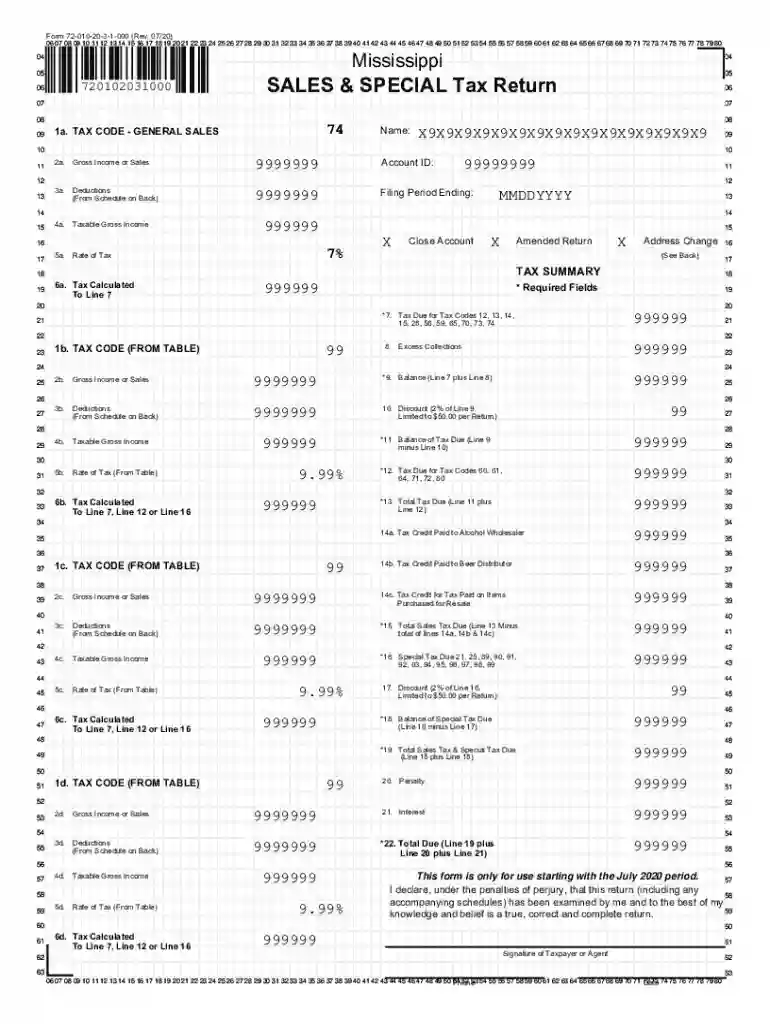
Ms sales tax form 2026

Get Form
ms sales tax form Preview on Page 1

Here's how it works

01. Edit your ms sales tax form online
Type text, add images, blackout confidential details, add comments, highlights and more.

02. Sign it in a few clicks
Draw your signature, type it, upload its image, or use your mobile device as a signature pad.

03. Share your form with others
Send mississippi sales tax forms via email, link, or fax. You can also download it, export it or print it out.

How to use or fill out ms sales tax form with our platform

Form edit decoration
9.5
Ease of Setup
DocHub User Ratings on G2
9.0
Ease of Use
DocHub User Ratings on G2
  1. Click ‘Get Form’ to open the ms sales tax form in the editor.
  2. Begin by entering your name and account ID in the designated fields at the top of the form. Ensure that all required fields are filled out accurately.
  3. In Section 1, input your gross income or sales amount under Line 2a. Follow this by detailing any deductions from Schedule on the back in Line 3a.
  4. Calculate your taxable gross income by subtracting deductions from your gross income, and enter this value in Line 4a.
  5. Proceed to calculate the tax due based on applicable rates. Enter these calculations in Lines 6a through 12 as instructed.
  6. Finally, review all entries for accuracy before signing and submitting your return. Use our platform's features to save and share your completed form easily.

Start using our platform today for free to streamline your ms sales tax form completion!

See more ms sales tax form versions

We've got more versions of the ms sales tax form form. Select the right ms sales tax form version from the list and start editing it straight away!
Versions Form popularity Fillable & printable
2020 4.9 Satisfied (42 Votes)
2019 4.2 Satisfied (135 Votes)
2018 4.4 Satisfied (199 Votes)
2014 4.1 Satisfied (52 Votes)
2002 4.3 Satisfied (141 Votes)
be ready to get more

Complete this form in 5 minutes or less

Get form

Got questions?

We have answers to the most popular questions from our customers. If you can't find an answer to your question, please contact us.
Contact us

Yes, you can use DocHub for signing any business and personal paperwork, including your mississippi sales tax form. All electronic signatures you create with our tool are legally binding and court-admissible, as DocHub complies with standards required by ESIGN and UETA. Save your completed paperwork with a detailed Audit Trail if needed.

If you use Chrome, there are two simple methods to edit your ms sales tax return 72 010 online. First, go to the DocHub website, add your file, and edit it using our toolbar. You may also install our Chrome extension and edit any document by dragging and dropping it in your browser window.

Each employee must provide you with a completed and signed Form 89-350, Mississippi Employees Withholding Exemption Certificate. You should use these forms along with the tax tables to determine how much income tax should be withheld from each employees paycheck.
General Requirements Records must be kept to determine the amount of tax due and reported for each transaction. Records must be written in English. All records such as bills, receipts, checks, invoices, and cash register tapes must include the transaction date. Records must be kept at least three (3) years.
The filing process forces you to detail your total sales in the state, the amount of sales tax collected, and the location of each sale. Filing form 72-010 can be downloaded and used to file sales and use tax returns, but online filing via the Mississippi Taxpayer Access Point (TAP) is recommended.

Security and compliance

At DocHub, your data security is our priority. We follow HIPAA, SOC2, GDPR, and other standards, so you can work on your documents with confidence.

Learn more
ccpa2
pci-dss
gdpr-compliance
hipaa
soc-compliance
be ready to get more

Complete this form in 5 minutes or less

Get form

People also ask

Sales tax returns specify the tax your company is required to pay on the sale of products and services across jurisdictions. Sales tax returns outline the amount of product and services tax your company (and its subsidiaries) is liable to pay, across various jurisdictions.
In Mississippi, you will be required to file and remit sales tax either monthly, quarterly, or annually. Mississippi sales tax returns are always due the 20th of the month following the reporting period.
Filing form 72-010 can be downloaded and used to file sales and use tax returns, but online filing via the Mississippi Taxpayer Access Point (TAP) is recommended. For more information, see Mississippi reporting requirements.
You can view and reprint these permits on your TAP account. If you are not registered, go to .dor.ms.gov and click on Taxpayer Access Point. From there, follow instructions to sign-up for online access.
Sellers have two options for filing their California sales tax: File online through the California Department of Tax and Fee Administration. File by mail using Californias Short FormSales and Use Tax Return. You must pay online if your estimated monthly tax liability is $10,000 or more.

mississippi sales tax exemption form