2010 ssa form-2026

Get Form
2010 ssa form Preview on Page 1

Here's how it works

01. Edit your form online
Type text, add images, blackout confidential details, add comments, highlights and more.

02. Sign it in a few clicks
Draw your signature, type it, upload its image, or use your mobile device as a signature pad.

03. Share your form with others
Send it via email, link, or fax. You can also download it, export it or print it out.

How to use or fill out 2010 SSA form with our platform

Form edit decoration
9.5
Ease of Setup
DocHub User Ratings on G2
9.0
Ease of Use
DocHub User Ratings on G2
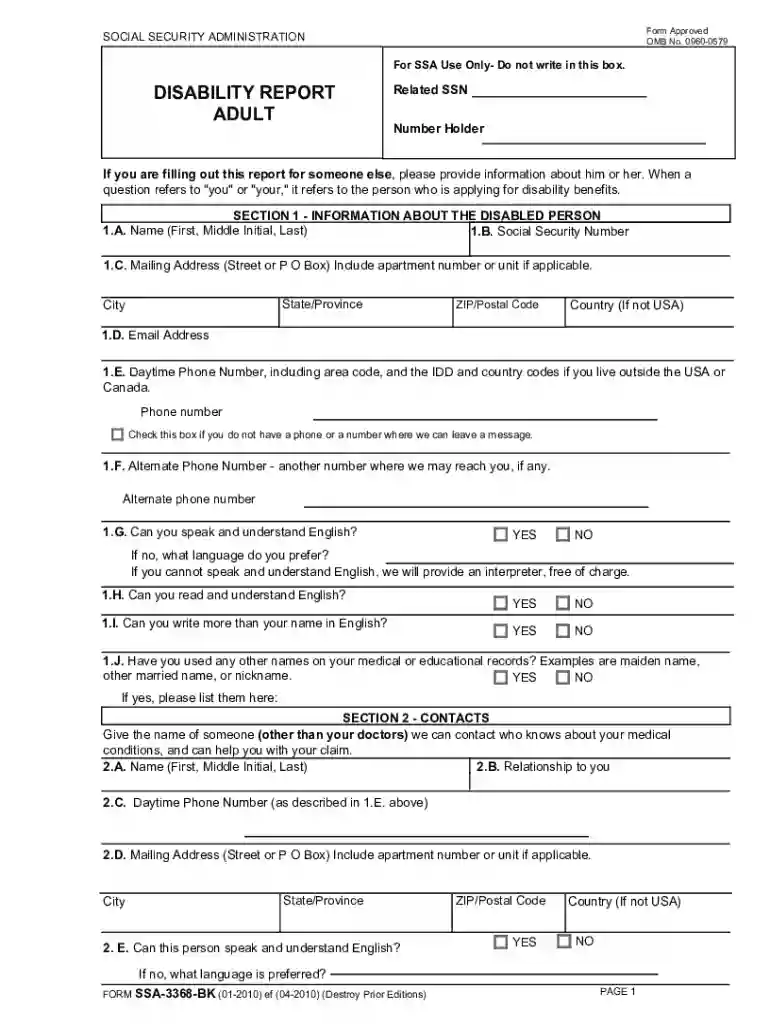
  1. Click ‘Get Form’ to open the 2010 SSA form in the editor.
  2. Begin with Section 1, providing your name, Social Security Number, and mailing address. Ensure all information is clear and complete.
  3. In Section 2, list a contact person who can provide additional information about your medical conditions. Include their relationship to you and contact details.
  4. Move to Section 3 and detail all physical or mental conditions that limit your ability to work. Be specific and list each condition separately.
  5. For Section 4, indicate your current work status. If you are not working, specify when you became unable to work due to your conditions.
  6. Continue through Sections 5 to 10, providing educational background, job history, medications, and any vocational rehabilitation services received.
  7. Finally, use Section 11 for any additional remarks or information that could support your claim.

Start filling out your 2010 SSA form today for free using our platform!

See more 2010 ssa form versions

We've got more versions of the 2010 ssa form form. Select the right 2010 ssa form version from the list and start editing it straight away!
Versions Form popularity Fillable & printable
2024 4.3 Satisfied (26 Votes)
2020 4.4 Satisfied (170 Votes)
2020 4.8 Satisfied (120 Votes)
2015 4.3 Satisfied (320 Votes)
2012 4.4 Satisfied (220 Votes)
2010 4 Satisfied (40 Votes)
2008 4 Satisfied (75 Votes)
2004 4 Satisfied (34 Votes)
be ready to get more

Complete this form in 5 minutes or less

Get form

Got questions?

We have answers to the most popular questions from our customers. If you can't find an answer to your question, please contact us.
Contact us

Electronic document signing demands a software solution that complies with data security and eSignature standards. DocHub is a perfect tool for that, as it meets all the aforementioned requirements. Whatever method you prefer to sign your 2010 ssa form in DocHub, your eSignature will be legally binding and court-admissible.

If you are searching for a state-specific 2010 ssa form sample, you can find it in our DocHub Forms & Templates catalog. Use the search field, enter your form’s name, and search through the results for your state. You can also filter out irrelevant results while exploring our catalog by categories.

1. General information for recording statements on the SSA-795. Use an SSA-795 whenever a signed statement is required or desirable, except when we request some other form or questionnaire or we can readily adapt for the statement.
All forms are FREE. Not all forms are listed. If you can't find the form you need, or you need help completing a form, please call us at 1-800-772-1213 (TTY 1-800-325-0778) or contact your local Social Security office and we will help you.
With this application, you are applying for all insurance benefits for which you are eligible under. Title II (Federal Old-Age, Survivors, and Disability Insurance) and Part A of Title XVIII (Health. Insurance for the Aged and Disabled) of the Social Security Act as presently amended.

Security and compliance

At DocHub, your data security is our priority. We follow HIPAA, SOC2, GDPR, and other standards, so you can work on your documents with confidence.

Learn more
ccpa2
pci-dss
gdpr-compliance
hipaa
soc-compliance

People also ask

l Report of Confidential Social Security Benefit Information (SSA-2458). This is a report sent to the client, although a third party may have requested the information. l Annual notice of cost of living adjustment (COLA) sent to the client by SSA.

Related links