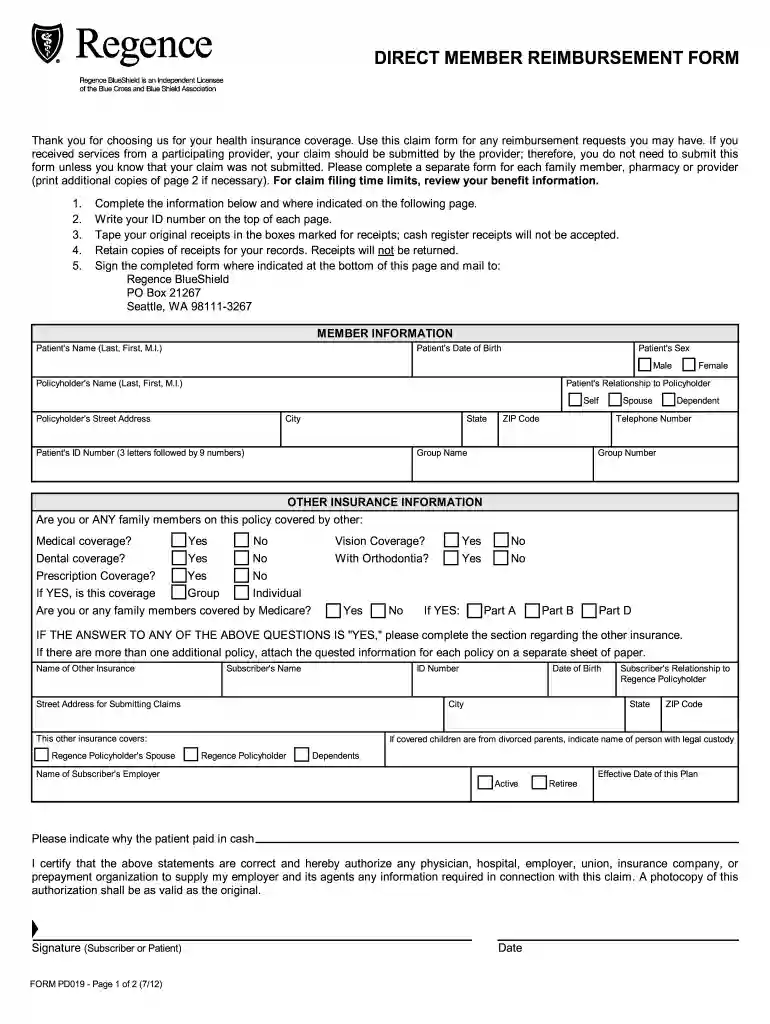
rergence of washington member reimbursement form Preview on Page 1

Rergence of washington member reimbursement form 2026

Here's how it works

  • 01. Edit your form online

    Type text, add images, blackout confidential details, add comments, highlights and more.

  • 02. Sign it in a few clicks

    Draw your signature, type it, upload its image, or use your mobile device as a signature pad.

  • 03. Share your form with others

    Send it via email, link, or fax. You can also download it, export it or print it out.

How to use or fill out rergence of washington member reimbursement form with our platform

Form edit decoration
9.5
Ease of Setup
DocHub User Ratings on G2
9.0
Ease of Use
DocHub User Ratings on G2
  1. Click ‘Get Form’ to open the rergence of washington member reimbursement form in the editor.
  2. Begin by entering your personal information in the 'MEMBER INFORMATION' section. Fill in the patient's name, date of birth, sex, and relationship to the policyholder.
  3. Next, provide the policyholder's details including their name, address, and ID number. Ensure you write your ID number on the top of each page for easy reference.
  4. In the 'OTHER INSURANCE INFORMATION' section, indicate if you or any family members have additional medical, dental, or prescription coverage. If applicable, complete the required fields regarding other insurance policies.
  5. Tape your original receipts in the designated boxes on page two. Remember that cash register receipts will not be accepted; retain copies for your records.
  6. Finally, sign and date the form at the bottom before mailing it to Regence BlueShield at the provided address.

Start using our platform today to easily fill out your rergence of washington member reimbursement form for free!

See more rergence of washington member reimbursement form versions

We've got more versions of the rergence of washington member reimbursement form form. Select the right rergence of washington member reimbursement form version from the list and start editing it straight away!

VersionsForm popularityFillable & printable
20144.8 Satisfied (162 Votes)
20124.4 Satisfied (39 Votes)

be ready to get more

Complete this form in 5 minutes or less

Got questions?

We have answers to the most popular questions from our customers. If you can't find an answer to your question, please contact us.

How to submit reimbursement claims? STEP 1: Notify us in advance of your upcoming claim. STEP 2: Upload your documents online. STEP 3: Await confirmation on completeness of documents. STEP 4: Send hard copies of your claim documents.
In simpler terms, a medical claim form is a formal written request that a healthcare provider submits to an insurance company, Medicare or Medicaid, or another affiliated entity seeking compensation for the healthcare services provided to a patient.
A Direct Member Reimbursement (DMR) is when you ask us to pay you back for prescription drugs you paid for out-of-pocket.

Security and compliance

At DocHub, your data security is our priority. We follow HIPAA, SOC2, GDPR, and other standards, so you can work on your documents with confidence.

Related links

UMP (Regence) Medical Claim Form

Use this form to submit reimbursement requests for services received from a non-network provider. Please complete a separate form for each family member.Read more

Learn more
Regence Direct Member Reimbursement Form - lclark.edu

Use this claim form for any reimbursement requests you may have or if you prefer, send a copy of your bill with your Group and ID Numbers written at the top and.Read more

Learn more
Health Benefits Claim Form - CareFirst BlueCross BlueShield

HEALTH BENEFITS CLAIM FORM. PLEASE COMPLETE A SEPARATE CLAIM FORM FOR EACH FAMILY MEMBER. (SEE REVERSE SIDE FOR FILING INFORMATION). PLEASE COMPLETE EACH

Learn more
If you believe that this page should be taken down, please follow our DMCA take down process here