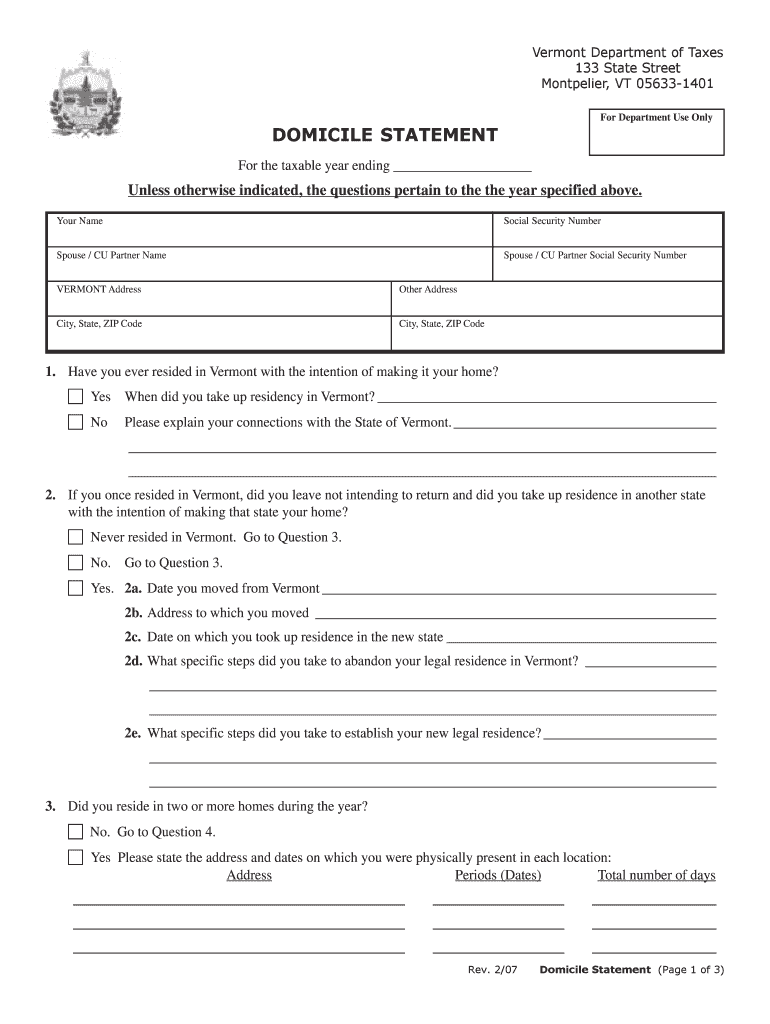
Type text, add images, blackout confidential details, add comments, highlights and more.
02. Sign it in a few clicks
Draw your signature, type it, upload its image, or use your mobile device as a signature pad.
03. Share your form with others
Send it via email, link, or fax. You can also download it, export it or print it out.
How to use or fill out content domicile with our platform
Ease of Setup
DocHub User Ratings on G2
Ease of Use
DocHub User Ratings on G2
Click ‘Get Form’ to open the content domicile in the editor.
Begin by entering your name and Social Security Number in the designated fields. If applicable, include your spouse or civil union partner's information.
Provide your Vermont address and any other addresses you may have lived at during the taxable year. Ensure all fields are filled accurately.
Answer the residency questions thoroughly. For instance, if you have ever resided in Vermont, indicate 'Yes' and provide the date of residency.
If applicable, detail any connections to Vermont and explain your living situation if you have moved from Vermont to another state.
Continue through each question, providing necessary details about property ownership, family residence, and tax exemptions as prompted.
Finally, review all entries for accuracy before signing and dating the document at the end of the form.
Start filling out your content domicile today for free using our platform!
Content domicile meaningContent domicile synonymContent domicile exampleDomicile vs residenceDomicile exampleDomicile person meaningDomicile adjectiveTypes of domicile
Security and compliance
At DocHub, your data security is our priority. We follow HIPAA, SOC2, GDPR, and other standards, so you can work on your documents with confidence.
domicile | Wex | US Law | LII / Legal Information Institute
The function of a domicile is to correlate a person with a particular place. A person may have several residences but may only have one domicile at a time.Read more
The State must require any person holding a CDL issued by another State to apply for a transfer CDL from the State within 30 days after establishing domicileRead more
Aug 4, 2025 This content is only available during Hell is Missing! For the Current Domicile Your Lodgings Black Storylets. Add comment. anonymousRead more
Cookie consent notice
This site uses cookies to enhance site navigation and personalize your experience.
By using this site you agree to our use of cookies as described in our Privacy Notice.
You can modify your selections by visiting our Cookie and Advertising Notice.