Type text, add images, blackout confidential details, add comments, highlights and more.
02. Sign it in a few clicks
Draw your signature, type it, upload its image, or use your mobile device as a signature pad.
03. Share your form with others
Send meetrapport ventilatie via email, link, or fax. You can also download it, export it or print it out.
How to use or fill out Meetrapport mechanische ventilatiedebieten - metingen - bouwenwonen with our platform
Ease of Setup
DocHub User Ratings on G2
Ease of Use
DocHub User Ratings on G2
Click ‘Get Form’ to open it in the editor.
Begin by entering the 'Naam van de opdrachtgever' (Name of the client) and the 'EPB-dossier' (EPB file) details. This information is crucial for identifying the project.
Fill in the address fields: 'Straat' (Street), 'Nr.' (Number), 'Postcode' (Postal code), 'Bus' (Box), and 'Plaats' (Place). Ensure accuracy for proper documentation.
Specify the type of ventilation system and name of the room. Indicate whether it is an intake ('Toevoer') or exhaust ('Afvoer') system.
In the measurements section, provide details such as 'Ventielreferentie', brand and model of measuring equipment, and whether recirculation is applicable.
Record nominal positions and measured flow rates in cubic meters per hour ([m³/h]). Include any additional positions if necessary.
Document calibration date, company name conducting measurements, enterprise number, measurement date, responsible person's name, and signature.
Start using our platform today to streamline your document editing experience for free!
Fill out Meetrapport mechanische ventilatiedebieten - metingen - bouwenwonen online It's free
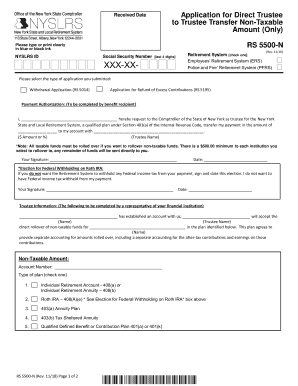
Application for Direct Trustee to Trustee Transfer Non-Taxable Amount (Only) (RS5500-N). To request the direct transfer of member contributions or voluntary (excess) contributions to a qualified plan, when the contribution amount that you are withdra
Application for Direct Trustee to Trustee Transfer Non-Taxable Amount (Only) (RS5500-N). To request the direct transfer of member contributions or voluntary (excess) contributions to a qualified plan, when the contribution amount that you are withdra
The document is an application form for transferring non-taxable amounts from the New York State and Local Retirement Sy ...
Cookie consent notice
This site uses cookies to enhance site navigation and personalize your experience.
By using this site you agree to our use of cookies as described in our Privacy Notice.
You can modify your selections by visiting our Cookie and Advertising Notice.