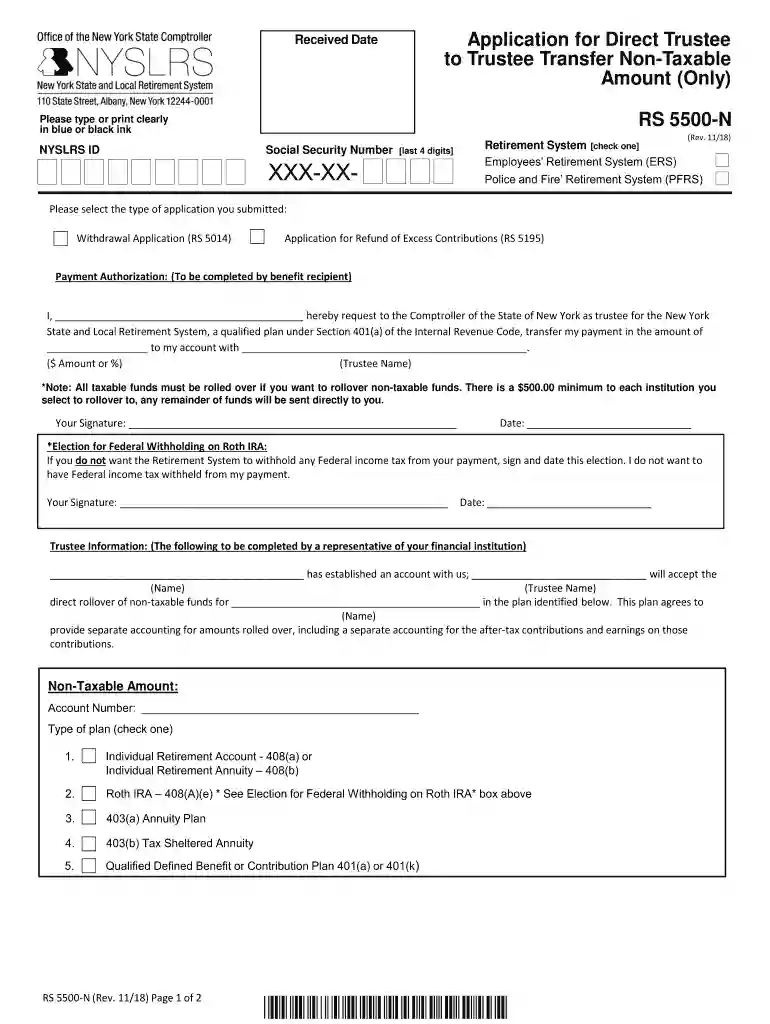
Application for Direct Trustee to Trustee Transfer Non-Taxable Amount (Only) (RS5500-N). To request the direct transfer of member contributions or voluntary (excess) contributions to a qualified plan, when the contribution amount that you are withdra 2026

Get Form
nyslrs trustee to trustee transfer form Preview on Page 1

Here's how it works

01. Edit your nyslrs trustee to trustee transfer form online
Type text, add images, blackout confidential details, add comments, highlights and more.

02. Sign it in a few clicks
Draw your signature, type it, upload its image, or use your mobile device as a signature pad.

03. Share your form with others
Send it via email, link, or fax. You can also download it, export it or print it out.

Understanding the Application for Direct Trustee to Trustee Transfer Non-Taxable Amount (RS5500-N)

Definition and Purpose of the RS5500-N Form

The Application for Direct Trustee to Trustee Transfer Non-Taxable Amount (RS5500-N) is a critical document used for initiating the direct transfer of retirement contributions within qualified plans. Its primary purpose is to facilitate the transfer of member contributions or voluntary (excess) contributions from one trustee to another without incurring tax liabilities. This ensures that funds remain within the tax-advantaged retirement system, preserving their growth potential for the member's future.

Key Sections of the Form

The form consists of several sections which require specific information to be filled out for effective processing:

  • Personal Identification: This section gathers essential details such as the member's name, Social Security number, and contact information.
  • Type of Retirement System: Participants must indicate which retirement system the funds are being transferred from, ensuring accurate processing.
  • Payment Authorization: This section contains the authorization required for the transfer, confirming the member's consent for the funds to be moved.
  • Trustee Information: Information regarding the receiving trustee or plan must be included to direct where the contributions will be sent.

Step-by-Step Instructions for Completing the RS5500-N

Completing the RS5500-N form involves several critical steps to ensure that the application is processed smoothly:

  1. Gather Personal Information: Collect your Social Security number, retirement account details, and contacting preferences in advance.
  2. Determine the Retirement System: Clearly identify the retirement system that holds the current funds to avoid any confusion during the submission process.
  3. Fill Out Payment Authorization: Review the terms of the transfer and ensure that you understand the implications of moving your funds.
  4. Complete Trustee Information: Accurately input the receiving trustee's name, address, and any other required identifiers to ensure that the funds are directed correctly.
  5. Review and Sign: Carefully check all sections for accuracy before providing your signature to authorize the transfer.

Important Considerations and Eligibility Criteria

When submitting the RS5500-N, it’s crucial to be aware of the specific eligibility criteria and considerations:


  • Eligible Transfers: Only non-taxable amounts, such as member contributions and voluntary excess contributions, are eligible for direct transfers under this form.
  • Minimum Amounts: Verify if the amount being transferred meets the minimum requirements established by the receiving plan to avoid complications.
  • Deadline Awareness: Ensure that all submissions comply with any deadlines to prevent potential tax liabilities.
decoration image ratings of Dochub

Relevant IRS Guidelines and Compliance

The Internal Revenue Service (IRS) has outlined specific guidelines regarding trustee to trustee transfers:

  • Tax Implications: Direct transfers such as those requested through the RS5500-N Form must adhere to IRS rules to maintain tax-advantaged status. If any taxable amounts are included, they may incur immediate tax liabilities.
  • Record-Keeping: It is advisable to maintain copies of submitted documentation for your records, as they may be needed for future tax reporting or verification.

Variants and Alternatives to the RS5500-N

While the RS5500-N is specifically designed for non-taxable amounts, there may be other forms for different types of transfers:

  • Taxable Amount Transfers: Members wishing to transfer taxable amounts should consult a tax professional to ensure compliance with IRS regulations.
  • Alternative Forms: Depending on the retirement plan type, members may need to utilize different forms such as rollover applications or specific state-mandated forms.

Security and Confidentiality

When handling the RS5500-N, maintaining the confidentiality and security of your personal and financial information should be a priority:

  • Secure Submission: Whether submitting online or via mail, ensure that your documents are sent through secure channels, using encryption where applicable.
  • Data Protection Measures: Utilize services that offer 256-bit SSL encryption and secure authentication methods, such as those that adhere to OAuth 2.0 standards. This is particularly significant when dealing with personal identification information and financial details.

Common Use Cases for the RS5500-N

The application is widely used by individuals changing jobs or those reorganizing their retirement funds. Common scenarios include:

  • Retiring Employees: Individuals nearing retirement may wish to consolidate their retirement funds into a single qualified plan to simplify management and improve investment options.
  • Financial Planning: This form is frequently used by those working with financial planners or tax advisors to create a tax-efficient withdrawal strategy.

Utilizing the RS5500-N Application for a Direct Trustee to Trustee Transfer Non-Taxable Amount ensures optimizing retirement savings while preserving considerable tax advantages as per IRS guidelines.

See more Application for Direct Trustee to Trustee Transfer Non-Taxable Amount (Only) (RS5500-N). To request the direct transfer of member contributions or voluntary (excess) contributions to a qualified plan, when the contribution amount that you are withdra versions

We've got more versions of the Application for Direct Trustee to Trustee Transfer Non-Taxable Amount (Only) (RS5500-N). To request the direct transfer of member contributions or voluntary (excess) contributions to a qualified plan, when the contribution amount that you are withdra form. Select the right Application for Direct Trustee to Trustee Transfer Non-Taxable Amount (Only) (RS5500-N). To request the direct transfer of member contributions or voluntary (excess) contributions to a qualified plan, when the contribution amount that you are withdra version from the list and start editing it straight away!
Versions Form popularity Fillable & printable
2018 4.8 Satisfied (116 Votes)
be ready to get more

Complete this form in 5 minutes or less

Get form

Got questions?

We have answers to the most popular questions from our customers. If you can't find an answer to your question, please contact us.
Contact us

Managing your documentation with DocHub this way is very straightforward after you have downloaded its extension for Google Chrome. Go to the Chrome Web Store and install DocHub - Sign PDF from Gmail to obtain it. Give our tool access to your Google account, and then open an email with the Application for Direct Trustee to Trustee Transfer Non-Taxable Amount (Only) (RS5500-N). To request the direct transfer of member contributions or voluntary (excess) contributions to a qualified plan, when the contribution amount that you are withdra attached and point to the file with your cursor - the DocHub extension key will automatically show up there. Click on it to open your file in our editor. Make any required adjustments, complete the blanks, and click Sign to create your legally-binding electronic signature.

You can find the latest and most relevant version of the Application for Direct Trustee to Trustee Transfer Non-Taxable Amount (Only) (RS5500-N). To request the direct transfer of member contributions or voluntary (excess) contributions to a qualified plan, when the contribution amount that you are withdra in our DocHub forms collection. Browse it by categories or use the search field to locate the exact template that fits your situation. You can open this form for editing after you find it.

Security and compliance

At DocHub, your data security is our priority. We follow HIPAA, SOC2, GDPR, and other standards, so you can work on your documents with confidence.

Learn more
ccpa2
pci-dss
gdpr-compliance
hipaa
soc-compliance
be ready to get more

Complete this form in 5 minutes or less

Get form