Library Program Proposal Form - Kent Free Library - kentfreelibrary 2026

Get Form
library program proposal template Preview on Page 1

Here's how it works

01. Edit your library program proposal template online
Type text, add images, blackout confidential details, add comments, highlights and more.
02. Sign it in a few clicks
Draw your signature, type it, upload its image, or use your mobile device as a signature pad.
03. Share your form with others
Send library program planning template via email, link, or fax. You can also download it, export it or print it out.

How to use or fill out Library Program Proposal Form - Kent Free Library - kentfreelibrary with our platform

Form edit decoration
9.5
Ease of Setup
DocHub User Ratings on G2
9.0
Ease of Use
DocHub User Ratings on G2
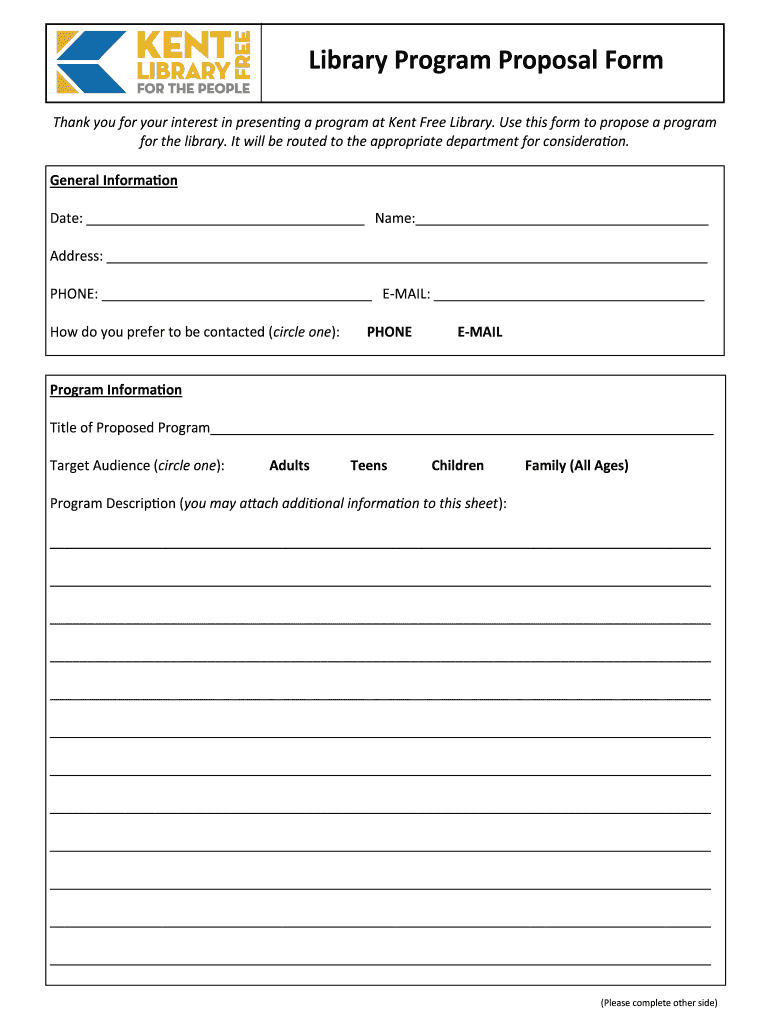
  1. Click ‘Get Form’ to open the Library Program Proposal Form in the editor.
  2. Begin by filling out the General Information section. Enter the date, your name, address, phone number, and email. Choose your preferred contact method by circling either PHONE or E-MAIL.
  3. In the Program Information section, provide the title of your proposed program. Select the target audience by circling one of the options: Adults, Teens, Children, or Family (All Ages).
  4. Describe your program in detail in the Program Description field. You may attach additional information if necessary.
  5. Complete the Additional Information section by indicating whether you charge a fee for your program and if it is negotiable. If you have previously presented this program, provide details about where and when.
  6. If applicable, list professional references in the designated area. Ensure all sections are filled out accurately before submission.

Start using our platform today to easily complete and submit your Library Program Proposal Form for free!

be ready to get more

Complete this form in 5 minutes or less

Get form

Got questions?

We have answers to the most popular questions from our customers. If you can't find an answer to your question, please contact us.
Contact us

With DocHub, you can easily sign your library program proposal or any other document on iOS, even without installing additional applications. You can access your DocHub account from any web-connected browser and fill out and sign your form in any way you like with just a couple of clicks.

You can get and edit your kentlibrary online with the help of DocHub. Its straightforward yet feature-rich design allows you to start productive work right after you sign up your account. Create your profile and add your file, and then our user interface will guide you via our stress-free form completion experience.

The Little Free Library app makes it easy to find little library locations near you! Use the search filters to narrow in on little libraries you want to visit, easily get directions to the nearest ones, or create a route.
A common finished size for Little Free Libraries is 20 wide x 18 to 28 tall x 12 to 15 deep.
How to Get Started Identify a Location Steward. First decide where you can legally and safely the library. Get a Library. Register Your Library. Set Up Your Steward Account. Build Community Support.

Security and compliance

At DocHub, your data security is our priority. We follow HIPAA, SOC2, GDPR, and other standards, so you can work on your documents with confidence.

Learn more
ccpa2
pci-dss
gdpr-compliance
hipaa
soc-compliance
be ready to get more

Complete this form in 5 minutes or less

Get form