




Here's how it works

01. Edit your form online
Type text, add images, blackout confidential details, add comments, highlights and more.

02. Sign it in a few clicks
Draw your signature, type it, upload its image, or use your mobile device as a signature pad.

03. Share your form with others
Send it via email, link, or fax. You can also download it, export it or print it out.
How to use or fill out Grievance from-english-FL 3-13-07 - insurance company with our platform

- Click ‘Get Form’ to open it in the editor.
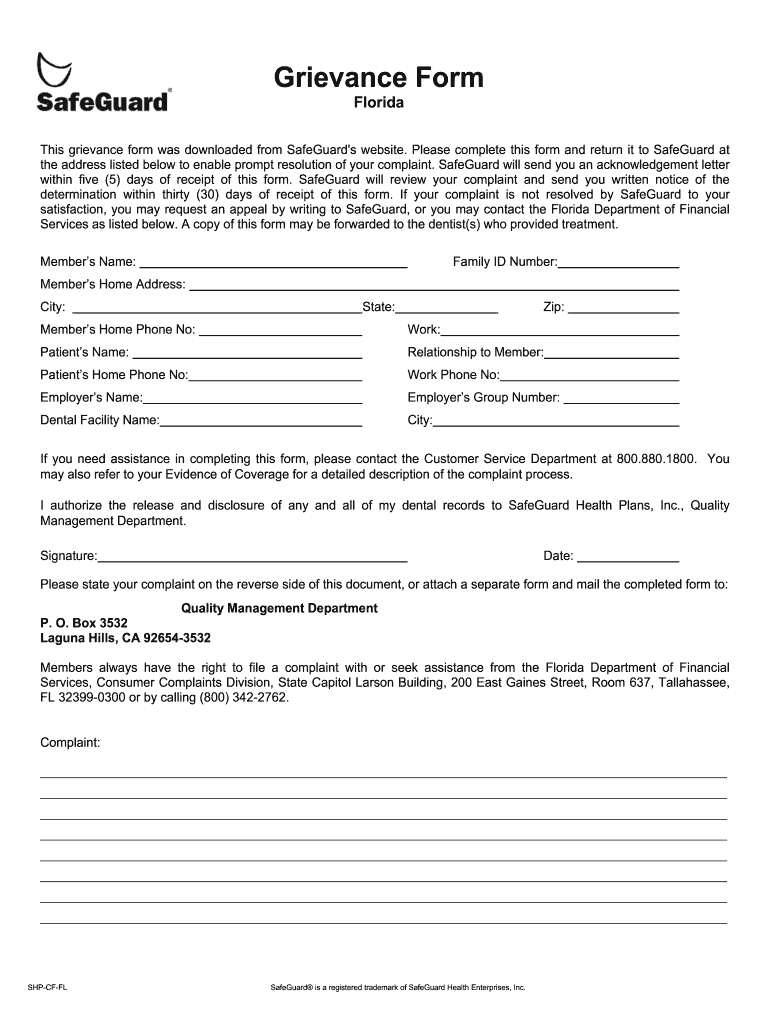
- Begin by entering the Member’s Name and Family ID Number in the designated fields. This information is crucial for identifying your account.
- Fill in the Member’s Home Address, including City, State, and Zip Code. Accurate address details ensure prompt communication regarding your grievance.
- Provide both Home and Work Phone Numbers for the member. This allows SafeGuard to reach you easily if further information is needed.
- Complete the Patient’s Name and their Relationship to the Member. If applicable, include their Home and Work Phone Numbers as well.
- Enter the Employer’s Name and Group Number, along with the Dental Facility Name and its City. This contextualizes your grievance within your dental care experience.
- In the complaint section, clearly state your issue on the reverse side of this document or attach a separate form. Be as detailed as possible to facilitate resolution.
- Sign and date the form at the bottom to authorize SafeGuard to access your dental records necessary for processing your grievance.
- Finally, submit your completed form to SafeGuard's Quality Management Department at the provided address.
Start using our platform today for free to streamline your grievance submission process!
Fill out Grievance from-english-FL 3-13-07 - insurance company online
It's free
It's free
See more Grievance from-english-FL 3-13-07 - insurance company versions
We've got more versions of the Grievance from-english-FL 3-13-07 - insurance company form. Select the right Grievance from-english-FL 3-13-07 - insurance company version from the list and start editing it straight away!
Security and compliance
At DocHub, your data security is our priority. We follow HIPAA, SOC2, GDPR, and other standards, so you can work on your documents with confidence.
Learn more


