Demurrer-Bombarda to-Unlawful-Detainer-Complaint-for-Calif 2026

Get Form
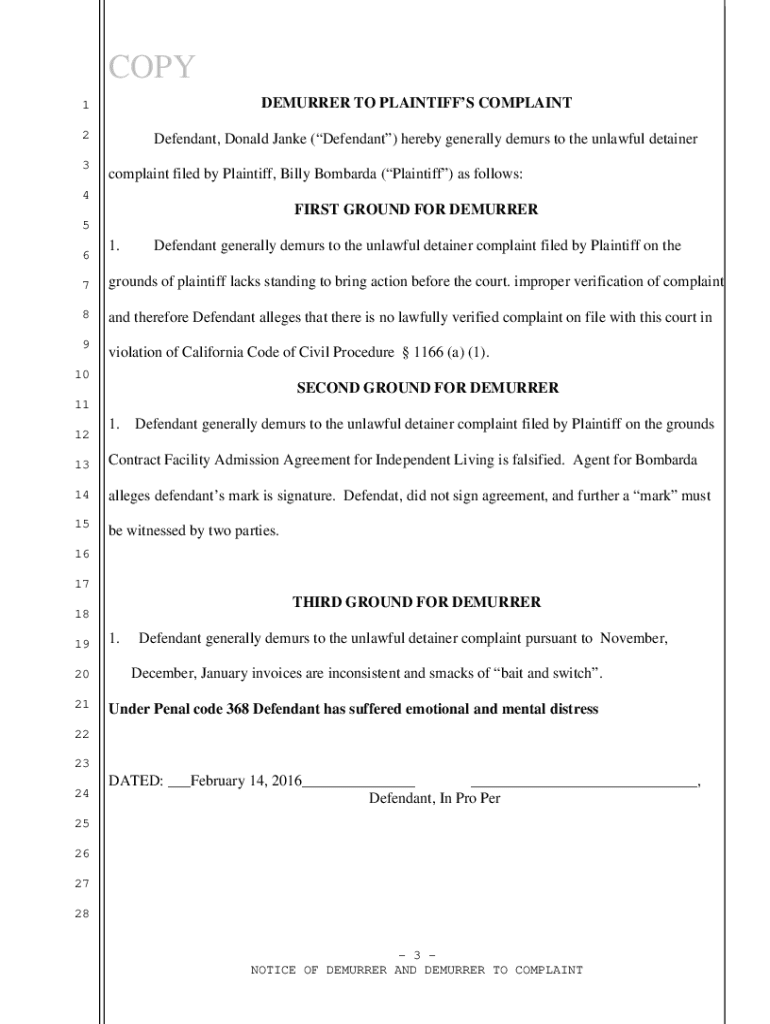
demurrer Preview on Page 1

Here's how it works

01. Edit your demurrer online
Type text, add images, blackout confidential details, add comments, highlights and more.
02. Sign it in a few clicks
Draw your signature, type it, upload its image, or use your mobile device as a signature pad.
03. Share your form with others
Send demurrers via email, link, or fax. You can also download it, export it or print it out.

How to use or fill out Demurrer-Bombarda to-Unlawful-Detainer-Complaint-for-Calif

Form edit decoration
9.5
Ease of Setup
DocHub User Ratings on G2
9.0
Ease of Use
DocHub User Ratings on G2
  1. Click ‘Get Form’ to open it in the editor.
  2. Begin by entering your personal information in the designated fields, including your name, address, and contact details. Ensure accuracy as this information is crucial for court records.
  3. In the section labeled 'Case No.', input the case number provided in your notice. This helps in identifying your specific case within the court system.
  4. Proceed to fill out the grounds for demurrer. Clearly articulate each reason you believe the complaint is invalid, referencing relevant California Civil Code sections where applicable.
  5. Complete the 'Argument' section by outlining your legal reasoning and supporting evidence. This is essential for persuading the court of your position.
  6. Finally, review all entries for completeness and accuracy before saving or printing your document. Utilize our platform's features to ensure everything is correctly formatted.

Start using our platform today to streamline your document editing and filing process for free!

be ready to get more

Complete this form in 5 minutes or less

Get form

Got questions?

We have answers to the most popular questions from our customers. If you can't find an answer to your question, please contact us.
Contact us
The complaint must be served on all named defendants and proofs of service on those defendants must be filed with the court within 60 days after the filing of the complaint.
If the two sides cannot docHub an agreement, the defendant has to file and serve the demurrer or motion to strike within the deadline (usually 30 days) for responding to the Complaint.
In actual court, Demurrers rarely result in the dismissal of a lawsuit, although sometimes they may successfully remove parts of it.
To determine the amount of the court lien for waived fees and costs, any party to a civil action in which an initial fee waiver has been granted may ask the clerk to calculate the total amount of court fees and costs that have been waived as of the date of the request. Rule 3.57 adopted effective July 1, 2009.
If the two sides cannot docHub an agreement, the defendant has to file and serve the demurrer or motion to strike within the deadline (usually 30 days) for responding to the Complaint. The other side then gets a chance to file a response before a court date where the judge will make a decision.

Security and compliance

At DocHub, your data security is our priority. We follow HIPAA, SOC2, GDPR, and other standards, so you can work on your documents with confidence.

Learn more
ccpa2
pci-dss
gdpr-compliance
hipaa
soc-compliance

People also ask

In California civil cases, a party may file a single opposition brief addressing both a demurrer and a motion to strike if the arguments overlap. The opposition should clearly respond to each motions points for all causes of action.

sample demurrer california