Type text, add images, blackout confidential details, add comments, highlights and more.

02. Sign it in a few clicks
Draw your signature, type it, upload its image, or use your mobile device as a signature pad.

03. Share your form with others
Send signature policy via email, link, or fax. You can also download it, export it or print it out.

How to use or fill out sic transcript with our platform
Ease of Setup
DocHub User Ratings on G2
Ease of Use
DocHub User Ratings on G2
Click ‘Get Form’ to open the SIC Transcript in the editor.
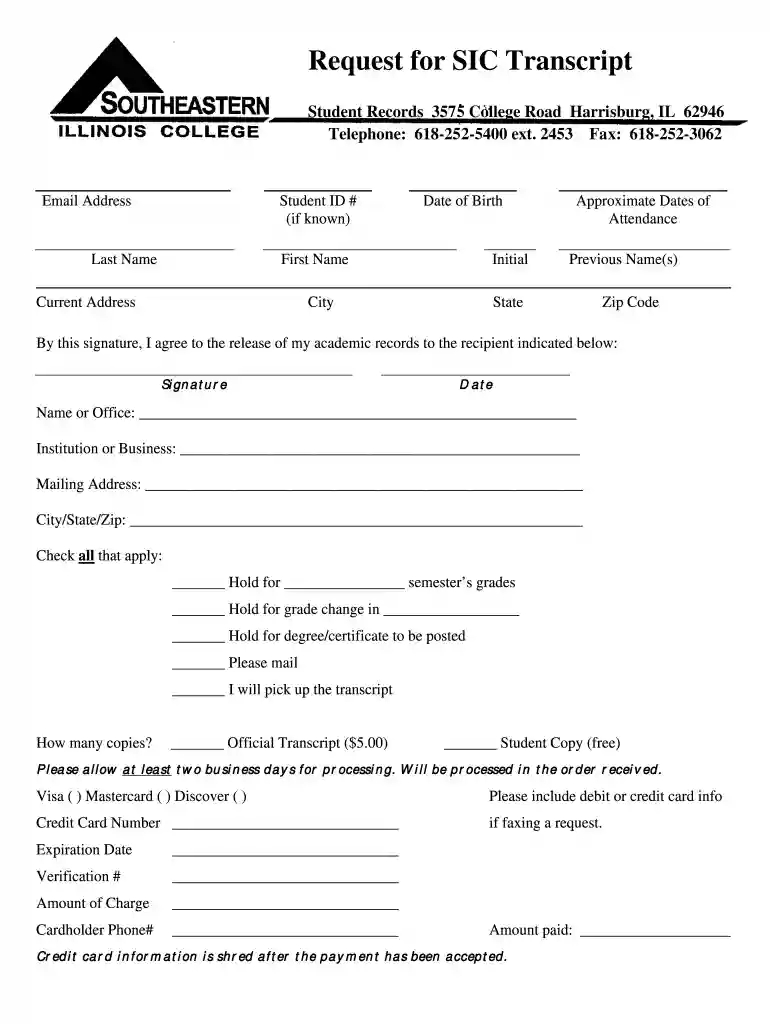
Begin by entering your Student ID number, if known, followed by your Last Name, First Name, and Initial. This information is crucial for identifying your records.
Fill in your Date of Birth and Approximate Dates of Attendance to further assist in locating your academic history.
If applicable, provide any Previous Names you may have used during your time at the institution.
Complete your Current Address along with City, State, and Zip Code to ensure proper delivery of the transcript.
Sign and date the form to authorize the release of your academic records. Clearly indicate the Name or Office and Institution or Business where the transcript should be sent.
Select any applicable options regarding holds on grades or degree postings, and specify how many copies you need—official or student copy.
If paying by credit card, enter your Credit Card Number, Expiration Date, Verification Number, and Cardholder Phone Number. Ensure all details are accurate before submission.
Start filling out your SIC Transcript today for free using our platform!
Official transcript requests can be made online, by mail, by fax (618-252-3062), or in person. An official transcript request should include: Students name (Read more
Sic throughout. If an incorrect or non-existent word or phrase is consistently used throughout a transcript, place SIC THROUGHOUT in parentheses immediatelyRead more
Cookie consent notice
This site uses cookies to enhance site navigation and personalize your experience.
By using this site you agree to our use of cookies as described in our Privacy Notice.
You can modify your selections by visiting our Cookie and Advertising Notice.