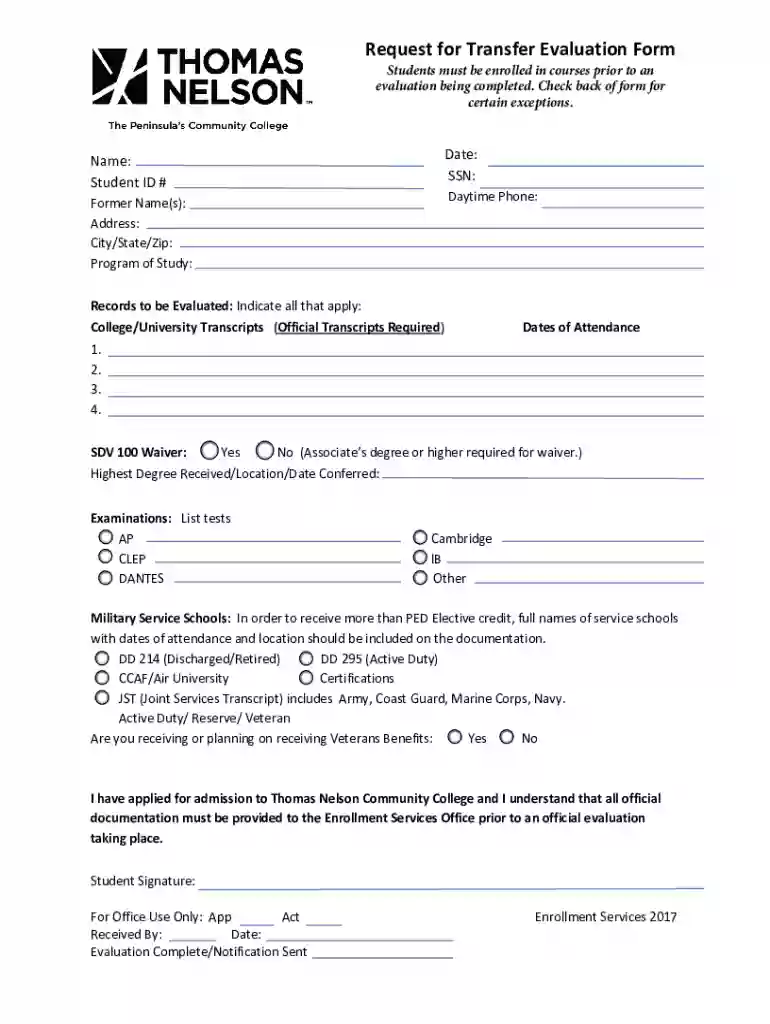
Course Evaluation Request Form - University of California 2026

Get Form
tncc evaluation Preview on Page 1

Here's how it works

01. Edit your tncc evaluation online
Type text, add images, blackout confidential details, add comments, highlights and more.

02. Sign it in a few clicks
Draw your signature, type it, upload its image, or use your mobile device as a signature pad.

03. Share your form with others
Send transfer evaluation form via email, link, or fax. You can also download it, export it or print it out.

How to use or fill out Course Evaluation Request Form - University of California with our platform

Form edit decoration
9.5
Ease of Setup
DocHub User Ratings on G2
9.0
Ease of Use
DocHub User Ratings on G2
  1. Click ‘Get Form’ to open the Course Evaluation Request Form in the editor.
  2. Begin by entering your personal information, including your name, student ID number, and daytime phone number. This ensures that your request is processed efficiently.
  3. Indicate your program of study and provide details about the records you wish to have evaluated. Be sure to check all applicable boxes for college/university transcripts and any examinations taken.
  4. If applicable, fill out the section regarding military service schools and indicate whether you are receiving or planning to receive Veterans Benefits.
  5. Review all entered information for accuracy before signing the form. Your signature confirms that you understand the requirements for evaluation.
  6. Once completed, save your form and submit it via fax or in person as instructed on the document.

Start using our platform today to streamline your Course Evaluation Request process effortlessly!

See more Course Evaluation Request Form - University of California versions

We've got more versions of the Course Evaluation Request Form - University of California form. Select the right Course Evaluation Request Form - University of California version from the list and start editing it straight away!
Versions Form popularity Fillable & printable
2017 4.8 Satisfied (69 Votes)
2014 4.2 Satisfied (63 Votes)
be ready to get more

Complete this form in 5 minutes or less

Get form

Got questions?

We have answers to the most popular questions from our customers. If you can't find an answer to your question, please contact us.
Contact us
On MyUCLA, students are able to retrieve the evaluations by clicking on the Classes menu and then Evaluation of Instruction. For more information on how students can access the online evaluations, please visit Student Access to Online Evaluations.
A course evaluation is a short survey conducted by an educator at the end of a class or course of study. The evaluation form aims to collect general information on what each student liked and disliked most about the class with the goal of improving the educational experience for future students.
A course evaluation, also known as a student course feedback form, is a survey used in education to collect student feedback about a courses content, teaching methods, and overall effectiveness.
Navigate to your Brightspace Homepage (your landing page when you log onto Brightspace) and click on Course Evaluation under the Tools menu on the Nav Bar. This will open the Course Evaluations Portal.
Course Evaluations are Anonymous Cal Poly Humboldt understands that anonymity is one of your primary concerns when you complete an online course evaluation. Be assured that your identity and evaluation answers are completely protected.

Security and compliance

At DocHub, your data security is our priority. We follow HIPAA, SOC2, GDPR, and other standards, so you can work on your documents with confidence.

Learn more
ccpa2
pci-dss
gdpr-compliance
hipaa
soc-compliance

People also ask

10 Steps to Create a Bulletproof Course Evaluation Identify a Goal. One of the most important things you can do when building a course evaluation survey is identify a goal. Target Your Goal. Communicate Your Goal. Be Clear. Vary the Question Format. Make It Brief. Strive for Readability. Engage the Student.

Related links