Type text, add images, blackout confidential details, add comments, highlights and more.
02. Sign it in a few clicks
Draw your signature, type it, upload its image, or use your mobile device as a signature pad.
03. Share your form with others
Send abm form via email, link, or fax. You can also download it, export it or print it out.
How to use or fill out abmw2 abm com with our platform
Ease of Setup
DocHub User Ratings on G2
Ease of Use
DocHub User Ratings on G2
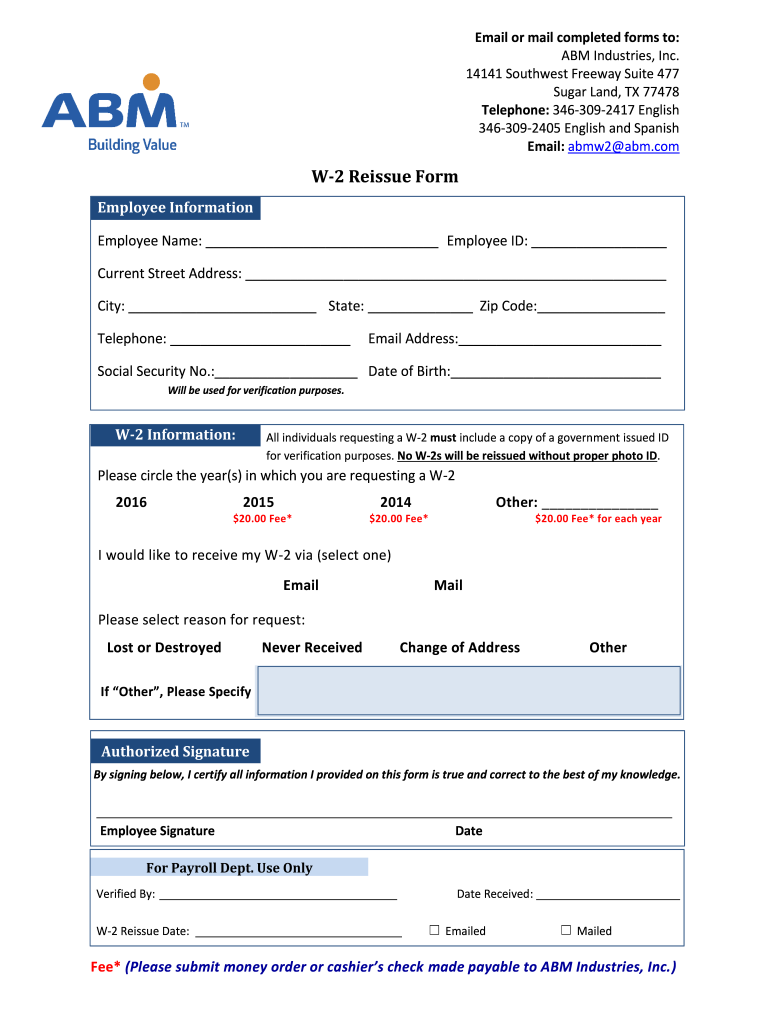
Click ‘Get Form’ to open the W-2 Reissue Form in the editor.
Begin by filling out the Employee Information section. Enter your name, employee ID, current address, city, state, zip code, telephone number, email address, social security number, and date of birth. Ensure all details are accurate for verification purposes.
In the W-2 Information section, circle the year(s) for which you are requesting a W-2. Remember to include a copy of a government-issued ID for verification.
Indicate how you would like to receive your W-2 by selecting either Email or Mail.
Select the reason for your request from options such as Lost or Destroyed, Never Received, Change of Address, or Other. If you select 'Other', please specify.
Sign and date the form in the Authorized Signature section to certify that all information provided is true and correct.
Start using our platform today to fill out your W-2 Reissue Form easily and for free!
by AH Bridle 1984 Cited by 1287 ADS Classic is now deprecated. It will be completely retired in October 2019. This page will automatically redirect to the new ADS interface at that point. SAO/Read more
Cookie consent notice
This site uses cookies to enhance site navigation and personalize your experience.
By using this site you agree to our use of cookies as described in our Privacy Notice.
You can modify your selections by visiting our Cookie and Advertising Notice.