Urinalysis report 2025

Get Form
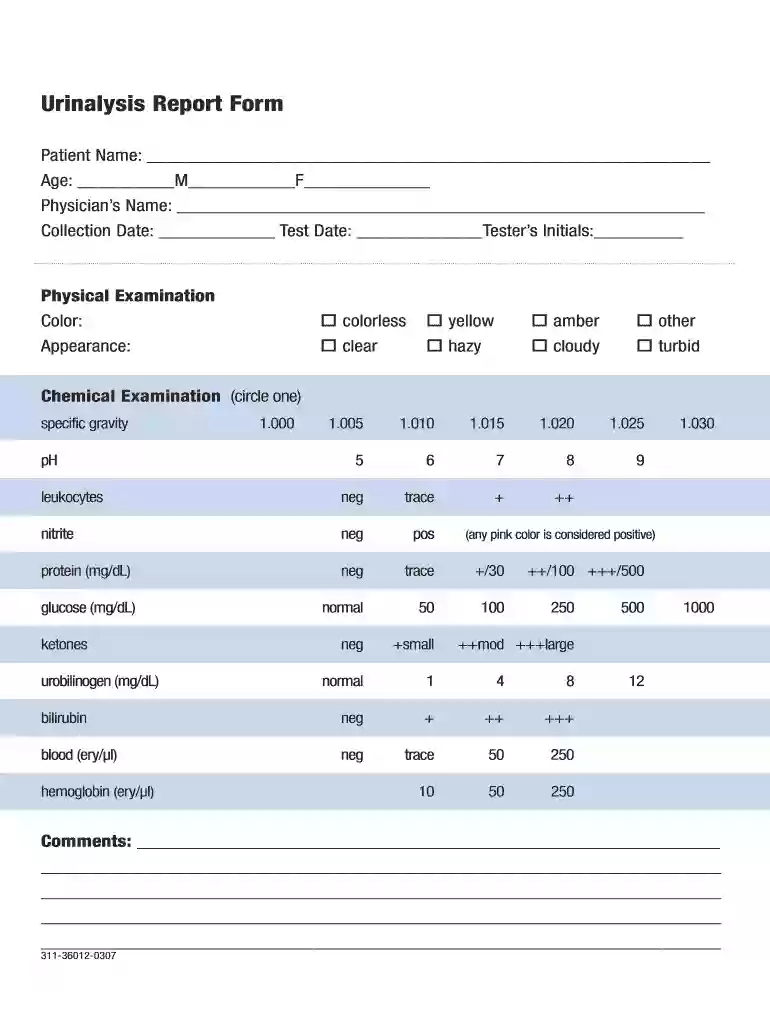
urine analysis form Preview on Page 1

Here's how it works

01. Edit your urine analysis form online
Type text, add images, blackout confidential details, add comments, highlights and more.

02. Sign it in a few clicks
Draw your signature, type it, upload its image, or use your mobile device as a signature pad.

03. Share your form with others
Send urinalysis report form pdf via email, link, or fax. You can also download it, export it or print it out.

How to use or fill out urinalysis report with our platform

Form edit decoration
9.5
Ease of Setup
DocHub User Ratings on G2
9.0
Ease of Use
DocHub User Ratings on G2
  1. Click ‘Get Form’ to open the urinalysis report in the editor.
  2. Begin by entering the Patient Name, Age, and Physician’s Name in the designated fields. Ensure accuracy for proper identification.
  3. Fill in the Collection Date and Test Date along with the Tester’s Initials to document when and by whom the test was conducted.
  4. In the Physical Examination section, select the appropriate Color and Appearance from the options provided. You can easily circle your choice using our editing tools.
  5. Proceed to the Chemical Examination section. Circle the values for specific gravity, leukocytes, nitrite, protein, glucose, bilirubin, blood, pH, ketones, and urobilinogen as applicable. Make sure to review each option carefully.
  6. Add any additional comments in the Comments section at the bottom of the form to provide further context or observations related to the urinalysis.

Start using our platform today for free to streamline your urinalysis report completion!

be ready to get more

Complete this form in 5 minutes or less

Get form

Got questions?

We have answers to the most popular questions from our customers. If you can't find an answer to your question, please contact us.
Contact us
Summary. A urinalysis is a test of your . It is often done to check for a urinary tract infection, kidney problems, or diabetes. You may also have one during a checkup, if you are admitted to the hospital, before you have surgery, or if you are pregnant. It can also monitor some medical conditions and treatments.
A test is used to assess bladder or kidney infections, diabetes, dehydration, and Preeclampsia by screening for high levels of sugars, proteins, ketones, and bacteria. High levels of sugars may suggest Gestational Diabetes, which may develop around the 20th week of pregnancy.
Normal Range for Routine Test pH: 4.5 to 8.0. Protein: Less than 20 mg/dL. Glucose: Negative or trace. Red Blood Cells: 0-5 cells per high power field (HPF)

Security and compliance

At DocHub, your data security is our priority. We follow HIPAA, SOC2, GDPR, and other standards, so you can work on your documents with confidence.


Learn more