Type text, add images, blackout confidential details, add comments, highlights and more.
02. Sign it in a few clicks
Draw your signature, type it, upload its image, or use your mobile device as a signature pad.
03. Share your form with others
Send it via email, link, or fax. You can also download it, export it or print it out.
How to use or fill out farm lease with our platform
Ease of Setup
DocHub User Ratings on G2
Ease of Use
DocHub User Ratings on G2
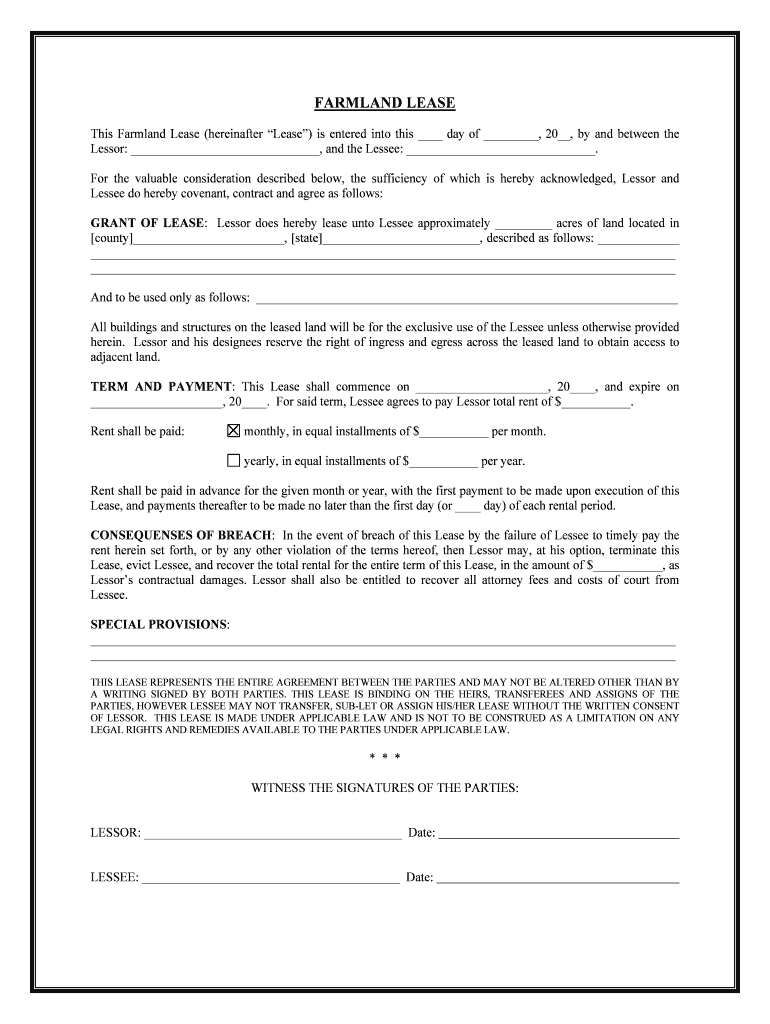
Click ‘Get Form’ to open the farm lease in the editor.
Begin by filling in the date at the top of the document, followed by the names of both the Lessor and Lessee. This establishes who is entering into the agreement.
In the 'Grant of Lease' section, specify the number of acres being leased and provide a detailed description of the land's location. Ensure that you clearly state how the land will be used.
Next, move to 'Term and Payment.' Fill in the start and end dates of the lease term, along with total rent amount. Indicate whether rent is paid monthly or yearly, and specify payment amounts.
Review any special provisions that may apply to your lease. Use this section to add any additional terms or conditions that are important for both parties.
Finally, ensure both parties sign and date at the bottom of the document to finalize the agreement.
Start using our platform today for free to streamline your farm lease process!
Kansas law says that notice to terminate farm and pastureland leases must be given: This means you should put a termination notice in the certified mail.Read more
Cookie consent notice
This site uses cookies to enhance site navigation and personalize your experience.
By using this site you agree to our use of cookies as described in our Privacy Notice.
You can modify your selections by visiting our Cookie and Advertising Notice.