




Here's how it works



How to use or fill out completed sample of a part822 chemical dependence outpatient services comprehensive psychosocial evaluation 2011 form

- Click ‘Get Form’ to open it in the editor.
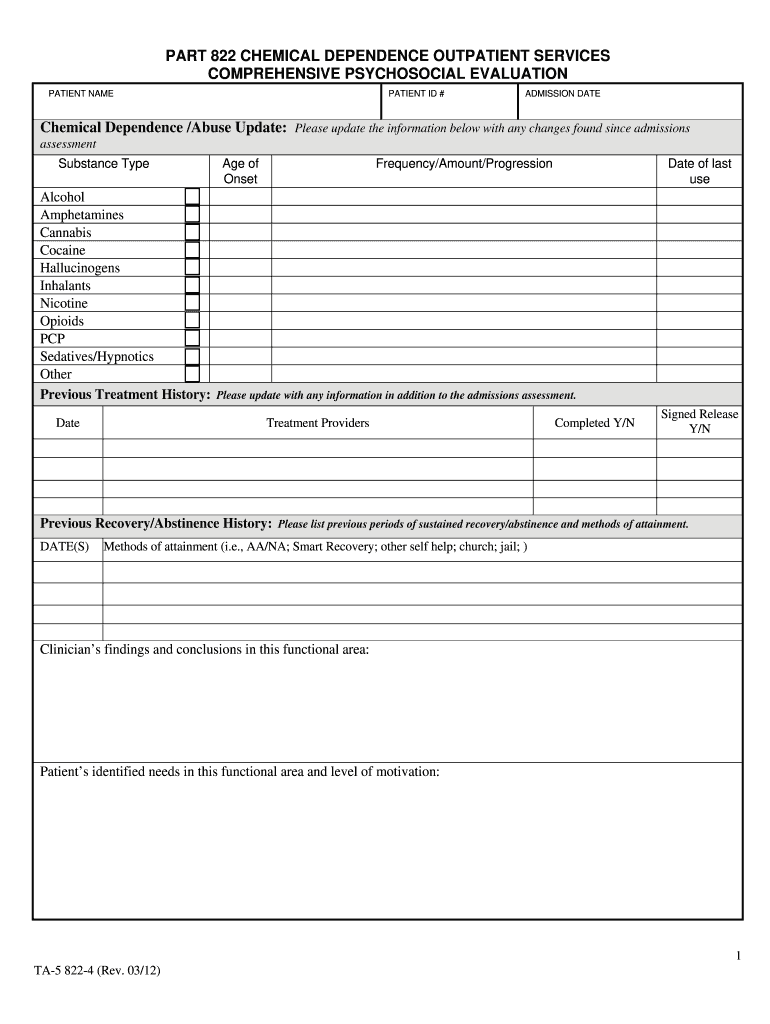
- Begin with the 'Patient Name' and 'Patient ID #' fields. Enter the patient's full name and identification number for accurate record-keeping.
- In the 'Admission Date' section, input the date when the patient was admitted for treatment.
- Update the 'Chemical Dependence /Abuse Update' section by filling in details about substance type, age of onset, frequency, amount, progression, and date of last use.
- Proceed to 'Previous Treatment History' and document any past treatments, including dates and whether releases were signed.
- Continue through each section such as 'Physical Health', 'Mental Health History', and others, ensuring all relevant information is accurately filled out based on patient assessments.
- Review all entries for completeness and accuracy before saving or sharing the document.
Start using our platform today to streamline your form completion process for free!
It's free
See more completed sample of a part822 chemical dependence outpatient services comprehensive psychosocial evaluation 2011 form versions
Got questions?
Can I use DocHub to generate legal eSignatures on my completed sample of a part822 chemical dependence outpatient services comprehensive psychosocial evaluation 2011 form?
Yes, you can utilize DocHub for signing any business and private documentation, including your completed sample of a part822 chemical dependence outpatient services comprehensive psychosocial evaluation 2011 form. All eSignatures you create with our service are legally binding and court-admissible, as DocHub complies with criteria required by ESIGN and UETA. Save your completed document with a detailed Audit Trail if needed.
How do you fill out completed sample of a part822 chemical dependence outpatient services comprehensive psychosocial evaluation 2011 form on Android?
It is a no-brainer on a computer or via a mobile device to fill out a completed sample of a part822 chemical dependence outpatient services comprehensive psychosocial evaluation 2011 form with DocHub. All you need to do is open any installed web browser on your smartphone and proceed to the DocHub site. Once authenticated, add your file and open it in editing mode. Use our toolbar to make your edits and save modifications. Optionally, keep your file in your files or send it to a recipient immediately.
Security and compliance
At DocHub, your data security is our priority. We follow HIPAA, SOC2, GDPR, and other standards, so you can work on your documents with confidence.
Learn more




