




01. Edit your wisconsin schedule sb 2021 fillable online
Type text, add images, blackout confidential details, add comments, highlights and more.

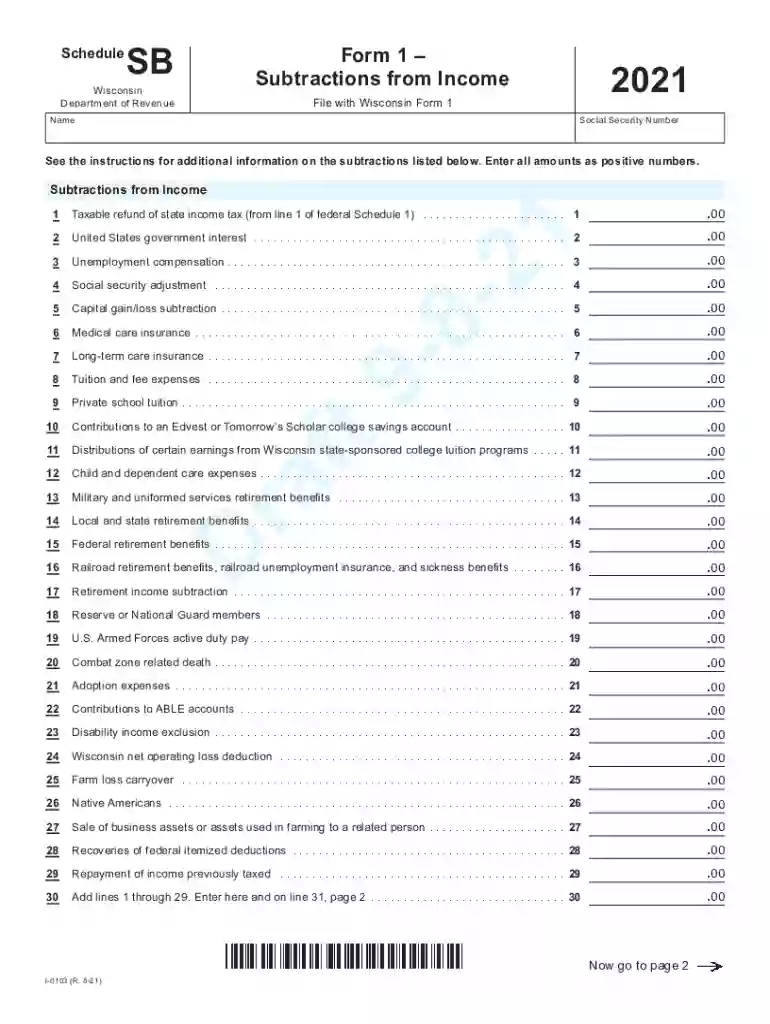
Type text, add images, blackout confidential details, add comments, highlights and more.

Draw your signature, type it, upload its image, or use your mobile device as a signature pad.

Send wisconsin schedule sb 2021 via email, link, or fax. You can also download it, export it or print it out.
The "Form 1 Subtractions from Income" is specifically used in Wisconsin for reporting specific types of income subtractions from taxable income. This form enables taxpayers to adjust their income by accounting for eligible deductions that are specific to the state's tax laws. By completing this form accurately, Wisconsin residents can ensure they pay only the taxes they legally owe, potentially reducing their taxable income and resulting tax liability. Subtractions may include items such as certain retirement benefits, U.S. government bond interest, and disability income exclusions.
To effectively use the "Form 1 Subtractions from Income," follow these steps:
Identify Eligible Subtractions: Determine which income categories are applicable for subtractions under Wisconsin state tax laws. Examples include taxable refunds, unemployment compensation, and specific types of interest income.
Obtain Necessary Documentation: Gather all financial statements and documents that support your claims for each subtraction category, such as 1099 forms or official government statements.
Calculate Each Subtraction: Carefully calculate the amount for each category of subtraction, ensuring you adhere to any thresholds or limits specified in the state's tax guidelines.
Complete the Form: Fill out the form with accurate and detailed information, correctly aligning each subtraction with the appropriate section of the form.
Attach Supporting Documents: Include copies of supporting documents that substantiate the subtractions claimed on the form.
Review and Submit: Before submission, double-check all entries for accuracy. Submit the completed form according to Wisconsin's guidelines, either electronically or via mail.
Completing the "Form 1 Subtractions from Income" involves careful attention to detail. Here is a step-by-step guide:
Personal Information: Start by filling in your basic personal information, including name, address, and taxpayer identification number.
Income Adjustments: Sections are divided to accommodate various types of income adjustments. Enter the specific amounts eligible for subtraction including retirement income, government interest, and any specified unemployment compensation.
Cross-Reference with Tax Documents: Ensure that the amounts match those on referenced tax forms like the federal 1040 or other state-specific documentation.
Deductions: Calculate total eligible deductions and subtract them from your gross income to adjust your overall taxable income.
Details and Special Cases: The form may require additional detail for special case subtractions, such as contributions to Wisconsin state savings plans or certain insurance premiums paid.
Final Verification: Ensure completeness by verifying that all sections and fields are filled correctly before submission.
Wisconsin has specific regulations governing what qualifies as an income subtraction. Here are some key considerations:
Each of these categories comes with particular rules and regulations, and understanding these is critical for maximizing benefits.
Consider the following scenarios:
Retired Public Employee: A retired teacher in Wisconsin receiving a pension from the state retirement system can subtract this pension amount from total income.
Government Interest Income: An individual holding U.S. government savings bonds can exclude interest earned from state-taxable income.
Disability Exclusions: A taxpayer receiving disability benefits under a federal law could also subtract this from their taxable income in Wisconsin.
These examples illustrate possible financial scenarios where the form significantly impacts an individual's state tax responsibilities.
Typically, the "Form 1 Subtractions from Income" aligns with the federal tax deadline, usually April 15. However, taxpayers should verify any state-specific extensions or alterations based on extraordinary circumstances (such as public declarations or extensions).
Gathering these documents ensures that any claimed subtractions can be accurately substantiated.
Understanding these terms is crucial for accurate completion and utilization of this form.
At DocHub, your data security is our priority. We follow HIPAA, SOC2, GDPR, and other standards, so you can work on your documents with confidence.





Dec 31, 2019 Line 11 of Form 1 has space to fill in five subtractions from income. line 1 as your subtraction on line 11 of Form 1 with code 24.Read more
Jan 26, 2017 If you exclude from income canceled debt un der situation (1) or (2), you may have to reduce the basis of your depreciable and nondeprecia bleRead more
See the instructions for additional information on the subtractions listed below. Enter all amounts as positive numbers.


