




Form It 203 AttFill Out and Use This PDF 2026

Get Form
Form It 203 AttFill Out and Use This PDF Preview on Page 1

Here's how it works

01. Edit your form online
Type text, add images, blackout confidential details, add comments, highlights and more.
02. Sign it in a few clicks
Draw your signature, type it, upload its image, or use your mobile device as a signature pad.
03. Share your form with others
Send it via email, link, or fax. You can also download it, export it or print it out.

Understanding Form IT-203-ATT: Purpose and Usage

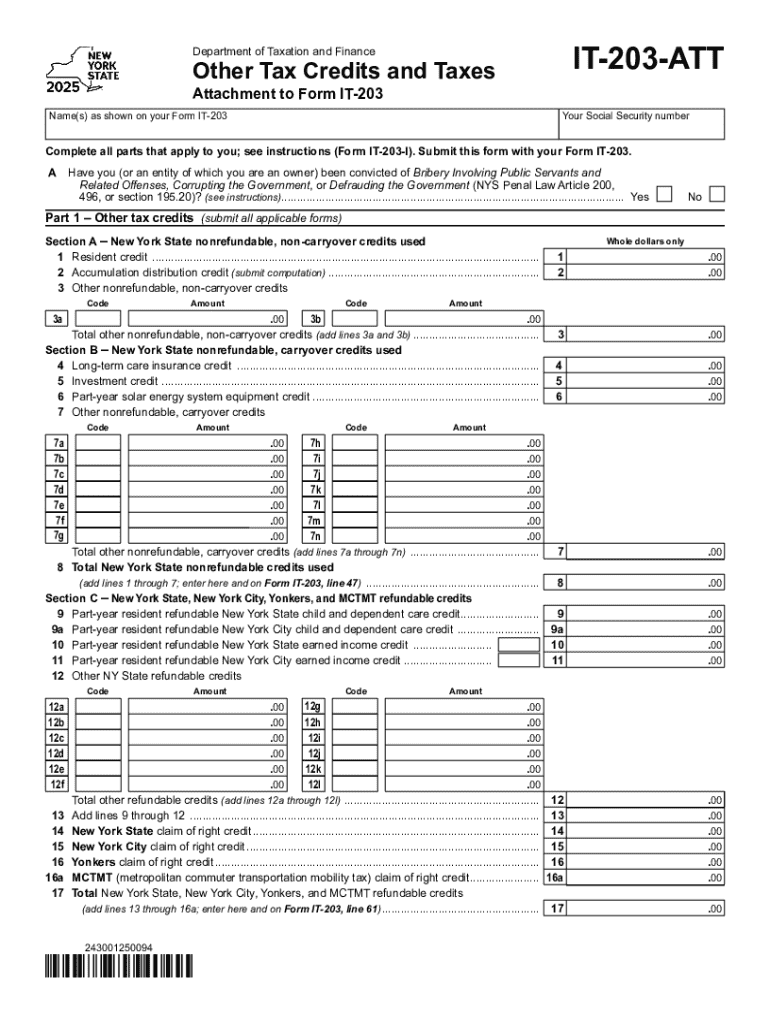
Form IT-203-ATT is an essential document used by the New York State Department of Taxation and Finance as an attachment to the IT-203 Form, which is the Nonresident and Part-Year Resident Income Tax Return. The IT-203-ATT form is primarily focused on reporting other tax credits and taxes owed by individuals filing the IT-203. It ensures that filers accurately capture and report all applicable tax liabilities and benefit from credits to which they are entitled.

Purpose and Importance of Form IT-203-ATT

  • Supplementary Tax Credits: The form allows taxpayers to claim additional state credits and report other taxes due beyond those listed on the main IT-203 Form.
  • Comprehensive Tax Reporting: For those who have multiple credits or specific tax situations, this form ensures all elements are comprehensively reported, maintaining compliance with New York State tax laws.

How to Obtain Form IT-203-ATT

Obtaining the Form IT-203-ATT is a straightforward process. The form is readily available through several channels, ensuring ease of access for all taxpayers.

Sources for Obtaining the Form

  1. Online Availability: The New York State Department of Taxation and Finance website provides a downloadable PDF version of the form.
  2. Tax Preparation Software: Software like TurboTax and QuickBooks typically includes state tax forms, including the IT-203-ATT.
  3. In-Person: Official offices or authorized points may distribute paper copies if requested.

Steps to Complete Form IT-203-ATT

Completing Form IT-203-ATT involves careful attention to detail to ensure accurate reporting of all tax-related information. Here's a step-by-step guide:

  1. Personal Information: Enter your name and Social Security number as it appears on your IT-203.
  2. Other Tax Credits: Fill out Part 1 to report any additional credits you are claiming. This may include credits for taxes paid to other jurisdictions.
  3. Additional Taxes: In Part 2, record any other taxes or specific amounts that state law requires you to declare, such as the MCTMT.
  4. Final Calculations: Ensure all figures are correct, and carry totals to the appropriate lines on Form IT-203.

Detailed Insights

  • Required Attachments: Attach any necessary documentation, such as proof of out-of-state income or additional credit claims.
  • Consultation: If complexities arise, consulting with a tax professional can ensure the form is filed correctly.

Who Uses Form IT-203-ATT

This form is typically used by those who file the New York State IT-203, which includes nonresidents and part-year residents of New York.

Typical Users

  • Nonresidents with NY Income: Individuals who have earned income from New York sources while residing primarily outside the state.
  • Part-Year Residents: Those who lived in New York for part of the year and need to report income and claim credits applicable to their time in the state.

Other Considerations

  • Complex Income Situations: Taxpayers with diverse income streams or those entitled to specific credits or subject to additional taxes.

Legal Aspects of Using Form IT-203-ATT

Ensuring legal compliance while using Form IT-203-ATT is key to avoiding potential penalties and issues with state tax authorities.

Legal Compliance Measures

  • Accurate Reporting: Ensuring all income and credits are truthfully and accurately reported, adhering to New York State requirements.
  • Timely Submission: Adhering to filing deadlines is crucial to avoid late fees and interest charges.

Potential Penalties

  • Non-Compliance: Failure to complete or accurately report on the IT-203-ATT can lead to audits, fines, or penalties under state tax law.

Submission Methods for Form IT-203-ATT

Submitting your Form IT-203-ATT can be done through various methods, ensuring you choose the best option for your specific circumstances.

Submission Options

  1. Online Filing: Most efficient and secure, allowing immediate submission alongside your IT-203 Form.
  2. Mail: Paper forms can be mailed, though this might lead to longer processing times.
  3. In-Person: Less common but possible at some state tax offices.

Key Deadlines and Important Dates

Meeting the filing deadlines is crucial to ensure compliance and avoid penalties.

Tax Filing Timeline

  • Annual Deadline: The form must be submitted in conjunction with the IT-203 by the April 15 deadline, unless extensions are filed.

Specific Examples of Using Form IT-203-ATT

Illustrative examples help highlight practical scenarios where Form IT-203-ATT is utilized effectively:

  • Claiming Multiple Credits: An individual claiming both the Solar Energy System Equipment Credit and the Empire State Child Credit.
  • Out-of-State Tax Payment Reporting: A taxpayer who lives in another state but earns a significant amount of income from a New York business source.

Essential Software Compatibility

Compatibility with tax software ensures seamless preparation and filing of Form IT-203-ATT.

Supported Software

  • TurboTax: Offers guided assistance with completing the form accurately.
  • QuickBooks: Suitable for business owners needing to report additional taxes and credits.

Differences Between Digital and Paper Versions

The choice between digital and paper submissions can affect the filing process significantly.

Digital Versus Paper Considerations

  • Convenience: Digital submissions enable faster processing and immediate entry into the state’s systems.
  • Accuracy: Software checks reduce the chance of errors compared to manually filled-out paper forms.

By adhering to these guidelines, taxpayers can ensure they comprehensively address all required elements of the Form IT-203-ATT, optimizing their filings for accuracy and compliance with New York State tax laws.

be ready to get more

Complete this form in 5 minutes or less

Get form

Got questions?

We have answers to the most popular questions from our customers. If you can't find an answer to your question, please contact us.
Contact us
To determine how much tax you owe, use Form IT-203, Nonresident and Part‑Year Resident Income Tax Return. You will calculate a base tax as if you were a full-year resident, then determine the percentage of your income that is subject to New York State tax and the amount of tax apportioned to New York State.Jan 22, 2026
Income Tax Refund-Example? DetailsTax slabNew Tax Regime Up to Rs. 3.00 lakhs Nil Nil Rs. 3.00 lakhs to Rs. 5.00 lakhs 5% Rs. 10000 Rs. 5.00 lakhs to Rs. 6.00 lakhs 5% Rs. 5000 Rs.6.00 lakhs to Rs. 7.00 lakhs 10% Rs. 10000 Sep 2, 2025
To fill out the New York State withholding form (IT-2104), provide personal details, select your filing status, and complete the worksheet to determine allowances based on dependents, credits, and income, accounting for NYC/Yonkers residency; then sign and submit it to your employer, remembering that more allowances mean less tax withheld, and update it after life changes. This video provides a quick overview of how to fill out the form: 50sPayroll SimplifiedYouTube Jun 13, 2025Step-by-Step Guide Personal Information: Fill in your name, address, and Social Security Number at the top. Residency: Check Yes if you live in New York City (including the five boroughs) or Yonkers, as this affects local tax withholding. Filing Status: Choose Single or Married (or Head of Household if applicable). Complete the Worksheet (Page 4): Dependents: Count dependents (not you or your spouse) for lines 7-10. Credits: Account for potential credits (e.g., Child Dependent Care, Earned Income Credit) on lines 7-10. Head of Household: If filing as Head of Household with only one job, claim extra allowances. Itemized Deductions: Complete Part 2 if you expect to itemize. Nonwage Income: Reduce allowances for other income (e.g., investments). Transfer Totals: Move the final allowance number from the worksheet (line 19/31) to line 1 (State/Yonkers) and line 2 (NYC) on the front page. Additional Withholding: Use lines 3, 4, or 5 to request extra money be withheld if needed. Sign Submit: Sign and date the form. Give the original to your employer and keep a copy. This video demonstrates how to fill out the New York State income tax form: 1mRaquel ToussaintYouTube May 18, 2021Key Tips Multiple Jobs: If you and your spouse both work, file separate IT-2104s; the higher earner should claim most allowances. Update Regularly: Review and update your form after major life events (marriage, new job, etc.). When to Claim Exempt: You can claim exemption if you had no tax liability last year and expect none this year (under 18, over 65, or a full-time student). You can watch this video for a demonstration of a New York State tax form: 1mJason D. KnottYouTube Dec 7, 2023AI can make mistakes, so double-check responsesHow To Fill Out NEW YORK State Tax FormMay 18, 2021 and you want to be sure that youre getting it right that way youre not taking out too much taxes or worse not enoughYouTube Raquel ToussaintInstructions for Form IT-2104 Employees Withholding Allowance Dec 16, 2025 Overview. Form IT-2104 is completed by you, as an employee, and given to your employer to instruct them how much New YDepartment of Taxation and Finance (.gov)
You must file Form IT-203, Nonresident and Part-Year Resident Income Tax Return, if you: were not a resident of New York State and received income during the tax year from New York State sources, or. moved into or out of New York State during the tax year.Jul 8, 2025
No, Tax Topic 203 doesnt automatically mean youre not getting any refund, but it does signal that your refund might be reduced (offset) to pay past-due debts like child support, federal/state taxes, or other government obligations, or it could mean your fee was deducted from your refund. Youll receive a letter from the Bureau of the Fiscal Service explaining the offset, and the remainder of your refund (if any) will be processed, but you should check your IRS Wheres My Refund status and contact BFS if you dont recognize the debt. What Tax Topic 203 Means: Refund Offset: The Department of the Treasurys Bureau of the Fiscal Service (BFS) intercepts your refund to pay debts like: Past-due child support. Federal agency non-tax debts (e.g., student loans). State income tax or unemployment compensation debts. Tax Preparation Fees: Sometimes, if you chose to pay your tax preparation fees (like TurboTax) from your refund, this topic might appear, indicating the fee was deducted. What to Do Next: Check Your Mail: You should receive an official notice from the Bureau of the Fiscal Service (BFS) explaining the offset. Check IRS WMR: Use the IRS Wheres My Refund tool for details on your specific refund status and any offset. Contact BFS: If you dont understand the notice or believe its an error, call the number on the BFS notice to get details on the debt. Consider Identity Theft: If you dont recognize any debt and didnt file the return, you might be a victim of tax-related identity theft; contact the IRS immediately. For financial advice, consult a professional. Topic no. 203, Reduced refund | Internal Revenue ServiceFeb 2, 2026IRS (.gov)Can tax topic 203 mean the money TurboTax is taking out of my Jun 6, 2019 Can tax topic 203 mean the money TurboTax is taking out of my refund? I called the number concerning possible offsets aTurboTax Support

Security and compliance

At DocHub, your data security is our priority. We follow HIPAA, SOC2, GDPR, and other standards, so you can work on your documents with confidence.

Learn more
ccpa2
pci-dss
gdpr-compliance
hipaa
soc-compliance
be ready to get more

Complete this form in 5 minutes or less

Get form

People also ask

You no longer claim exemptions on the federal Form W-4; instead, you adjust withholding based on your filing status, dependents, and other income/deductions to get closer to zero tax owed or a refund, using the IRS Tax Withholding Estimator or by carefully filling out the W-4s Step 2 (Multiple Jobs/Spouse Works), Step 3 (Dependents), and Step 4 (Other Adjustments) to avoid owing money or overpaying. The goal is accurate withholding for your specific situation, accounting for multiple jobs, child credits, and other factors to match your actual tax liability. Key Changes on the W-4 (Post-2020) The IRS redesigned Form W-4 to eliminate allowances, replacing them with a more detailed process: Step 1: Your filing status (Single, Married Filing Jointly, etc.). Step 2 (Multiple Jobs/Spouse Works): Crucial for households with two incomes to prevent under-withholding. Step 3 (Dependents): Enter amounts for qualifying children and other dependents (like the Child Tax Credit). Step 4 (Other Adjustments): Account for extra withholding for other income or itemized deductions youre taking. How to Decide Your Withholding Use the IRS Estimator: IRS Tax Withholding Estimator is the best tool to determine your W-4 settings accurately. Account for Multiple Jobs: If you have more than one job or are married and both spouses work, you generally need to adjust withholding on one W-4 (Step 2) to avoid owing taxes. Consider Life Changes: Update your W-4 after major events like marriage, divorce, having a child, or a spouse starting/stopping work. Aim for Accuracy: The ideal scenario is to have little or no tax refund and no penalty owed at tax time, meaning your withholding matches your tax liability. State Exemptions Some states still use the term exemptions on their state W-4 forms (e.g., VA, IL, MA), but the principles are similar: claim exemptions for yourself, spouse, and dependents to adjust withholding for state taxes. Check your specific states guidance. For financial advice, consult a professional. Tax Withholding Estimator | Internal Revenue Service6 days ago You can download a completed Form W-4 or Form W-4P and give it to your employer or pension provider. Depending on the reIRS (.gov)Exemptions - Virginia TaxVirginia allows an exemption of $930* for each of the following: Yourself (and Spouse): Each filer is allowed one personal exemptiVirginia Tax (.gov)
Step-by-Step Guide to File ITR-1 Online Step 1: Log in to the Income Tax e-Filing Portal. Step 2: Go to File Income Tax Return Step 3: Select Assessment Year and Mode of Filing. Step 4: Start a New Filing. Step 5: Select Your Status. Step 6: Choose ITR Form (ITR-1) Step 7: Select Reason for Filing (If Applicable) Oct 16, 2025

Related links