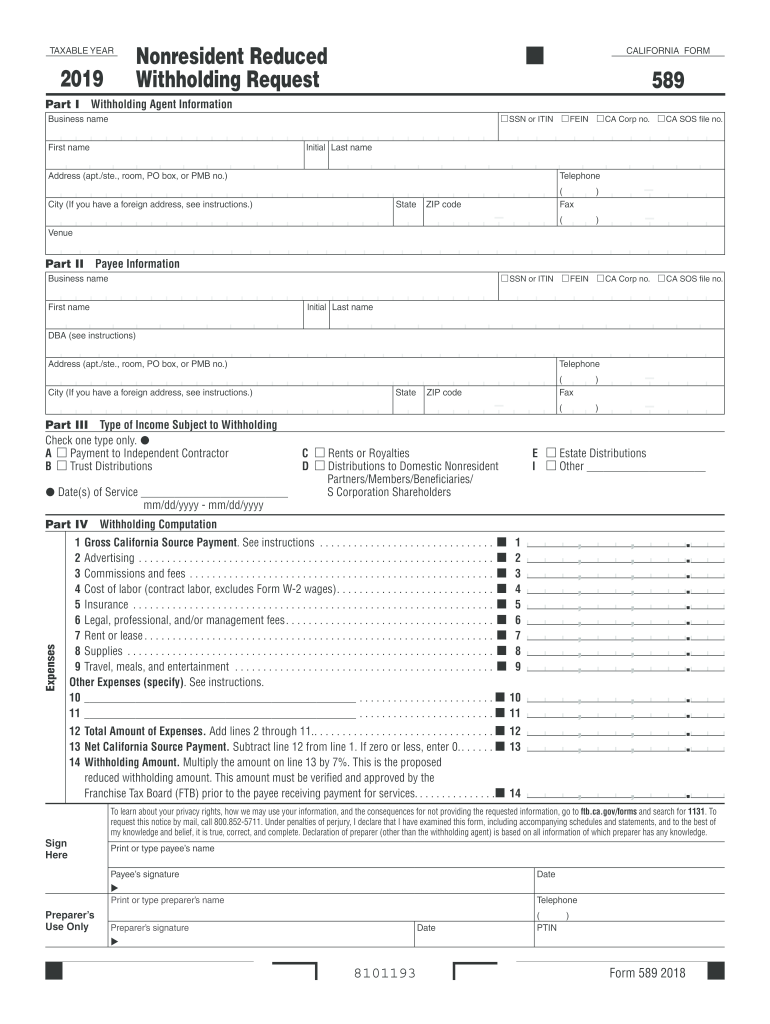
California state withholding form 2019-2026

Get Form
ca state tax withholding form Preview on Page 1

Here's how it works

01. Edit your ca state tax withholding form online
Type text, add images, blackout confidential details, add comments, highlights and more.
02. Sign it in a few clicks
Draw your signature, type it, upload its image, or use your mobile device as a signature pad.
03. Share your form with others
Send it via email, link, or fax. You can also download it, export it or print it out.

How to use or fill out California State Withholding Form 2019 with DocHub

Form edit decoration
9.5
Ease of Setup
DocHub User Ratings on G2
9.0
Ease of Use
DocHub User Ratings on G2
  1. Click ‘Get Form’ to open the California State Withholding Form 2019 in our editor.
  2. Begin with Part I, where you will enter the Withholding Agent Information. Fill in your SSN or ITIN, FEIN, and business name along with your address and contact details.
  3. Move to Part II for Payee Information. Input the payee's SSN or ITIN, business name, and address. Ensure all fields are accurately completed.
  4. In Part III, select the type of income subject to withholding by checking one box that applies to your situation.
  5. Proceed to Part IV for Withholding Computation. Enter the gross California source payment and detail any expenses as instructed. Calculate the net payment and withholding amount based on provided formulas.
  6. Finally, sign and date the form at the bottom before submitting it electronically or printing it out for mailing.

Start using our platform today to fill out your California State Withholding Form 2019 easily and for free!

See more california state withholding form 2019 versions

We've got more versions of the california state withholding form 2019 form. Select the right california state withholding form 2019 version from the list and start editing it straight away!
Versions Form popularity Fillable & printable
2023 4.2 Satisfied (58 Votes)
2022 4.9 Satisfied (33 Votes)
2021 4.4 Satisfied (159 Votes)
2020 4.4 Satisfied (155 Votes)
2019 4.3 Satisfied (230 Votes)
2017 4.4 Satisfied (339 Votes)
2016 4.3 Satisfied (122 Votes)
2015 4 Satisfied (51 Votes)
2014 4.2 Satisfied (74 Votes)
2013 4.4 Satisfied (46 Votes)
2012 4.8 Satisfied (22 Votes)
be ready to get more

Complete this form in 5 minutes or less

Get form

Got questions?

We have answers to the most popular questions from our customers. If you can't find an answer to your question, please contact us.
Contact us
You must file the state form DE 4 to determine the appropriate California PIT withholding.
However, you generally only have three years to claim it. The three-year countdown begins either on the original due date of the return or on the extended due date, if an extension was filed. For example, if your 2019 tax return was due by July 15, 2020, then you likely had until July 17, 2023, to claim a 2019 refund.
Are tax forms available at my local Post Office? No, Post Offices do not have tax forms available for customers.
Picking up copies at an IRS Taxpayer Assistance Center. Going to the IRS Small Business and Self-Employed Tax Center page. Requesting copies by phone 800-TAX-FORM (800-829-3676). Hours of operation are 7 a.m. to 10 p.m., Monday-Friday, your local time except Alaska and Hawaii which are Pacific time.
If you are trying to locate, download, or print California tax forms, you can do so on the state of California Franchise Tax Board website, found at .

Security and compliance

At DocHub, your data security is our priority. We follow HIPAA, SOC2, GDPR, and other standards, so you can work on your documents with confidence.

Learn more
ccpa2
pci-dss
gdpr-compliance
hipaa
soc-compliance
be ready to get more

Complete this form in 5 minutes or less

Get form

People also ask

Get federal tax forms for current and prior years Download them from IRS.gov. Order online and have them delivered by U.S. mail. Order by phone at 1-800-TAX-FORM (1-800-829-3676)
The IRS can provide copies of past tax returns if you file Form 4506. To request a copy of your tax return, you must fill out Form 4506 with accurate personal information and the type of form used to file each tax return requested.
FTB Form 590, Withholding Exemption Certificate, listing CHCF as the withholding agent and docHubing exemption from the withholding requirement. CA Form 587, Nonresident Income Allocation Worksheet, which allocates the expected income under CHCFs contract for work completed within and outside of California.

Related links