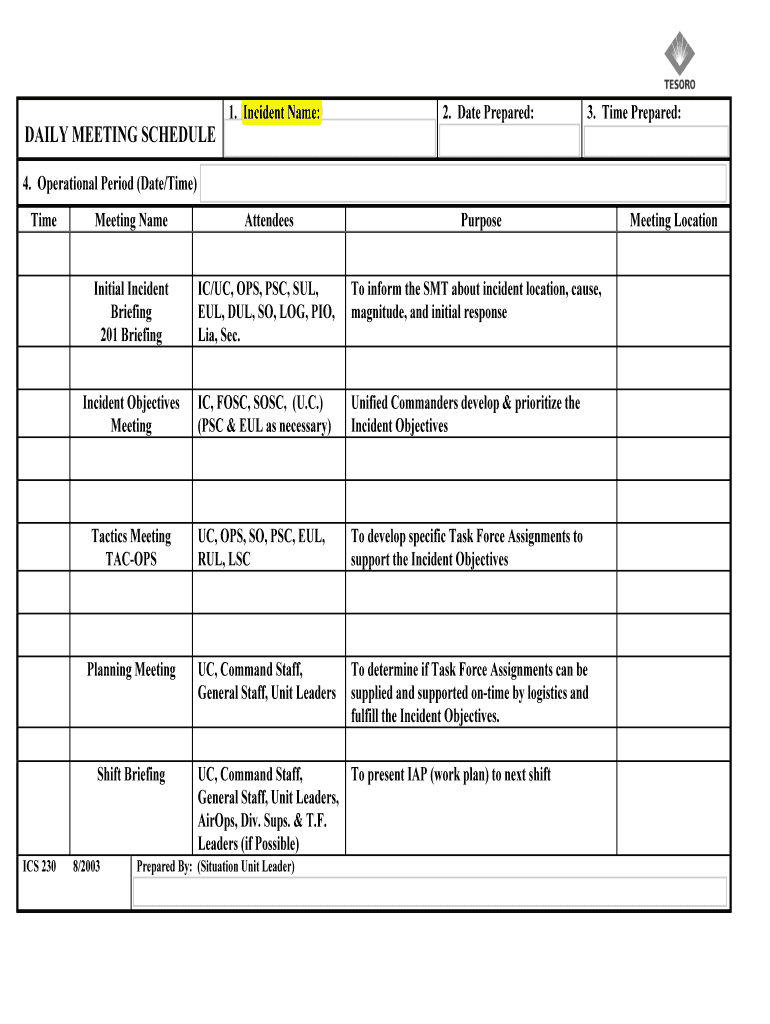
DAILY MEETING SCHEDULE (ICS FORM 230-OS) 2025

Get Form
DAILY MEETING SCHEDULE (ICS FORM 230-OS) Preview on Page 1

Here's how it works

01. Edit your form online
Type text, add images, blackout confidential details, add comments, highlights and more.
02. Sign it in a few clicks
Draw your signature, type it, upload its image, or use your mobile device as a signature pad.
03. Share your form with others
Send it via email, link, or fax. You can also download it, export it or print it out.

The easiest way to edit DAILY MEETING SCHEDULE (ICS FORM 230-OS) in PDF format online

Form edit decoration
9.5
Ease of Setup
DocHub User Ratings on G2
9.0
Ease of Use
DocHub User Ratings on G2

Working on documents with our extensive and intuitive PDF editor is simple. Adhere to the instructions below to fill out DAILY MEETING SCHEDULE (ICS FORM 230-OS) online quickly and easily:

  1. Log in to your account. Log in with your email and password or register a free account to try the product prior to choosing the subscription.
  2. Import a document. Drag and drop the file from your device or import it from other services, like Google Drive, OneDrive, Dropbox, or an external link.
  3. Edit DAILY MEETING SCHEDULE (ICS FORM 230-OS). Quickly add and underline text, insert pictures, checkmarks, and signs, drop new fillable areas, and rearrange or delete pages from your document.
  4. Get the DAILY MEETING SCHEDULE (ICS FORM 230-OS) accomplished. Download your modified document, export it to the cloud, print it from the editor, or share it with others using a Shareable link or as an email attachment.

Make the most of DocHub, the most straightforward editor to promptly manage your paperwork online!

be ready to get more

Complete this form in 5 minutes or less

Get form

Got questions?

We have answers to the most popular questions from our customers. If you can't find an answer to your question, please contact us.
Contact us
Scheduling appointments Instead of using Scheduled, job seekers can use synonyms like Arranged, Booked, or Coordinated to highlight their ability to efficiently manage appointments and meetings.
The ICS 201 can serve as part of the initial Incident Action Plan (IAP). If additional pages are needed for any form page, use a blank ICS 201 and repaginate as needed.
Example: Hi [Name], I hope this email finds you well. Id like to schedule a meeting to discuss [topic]. Im available on [date] at [time], [date] at [time], or [date] at [time]. Please let me know if any of these times work for you or if you have another time in mind.
How to write a meeting agenda Clarify meeting objectives. The first step in writing a meeting agenda is to clearly define any goals. Invite participant input. Outline key questions for discussion. Define each tasks purpose. Allocate time for agenda items. Assign topic facilitators. Write the meeting agenda.
You can use these steps to effectively schedule a meeting by email: Write a clear and concise subject line. Use a salutation. Introduce yourself to colleagues you havent met. Explain the purpose of the meeting. Offer multiple times and dates for the meeting. Request a reply or confirmation. Send a reminder.
be ready to get more

Complete this form in 5 minutes or less

Get form

People also ask

So, what are the 5Ps? The 5Ps are Purpose, Participants, Process, Payoff, and Preparation (some suggest it should be 6Ps including Pizza). Purpose: Every meeting should have a clear purpose, which must be more specific than just a subject line calling for a daily meeting (why should the team meet daily?).

Related links