CHANGE IN MANAGING OFFICER APPLICATION 2026

Get Form
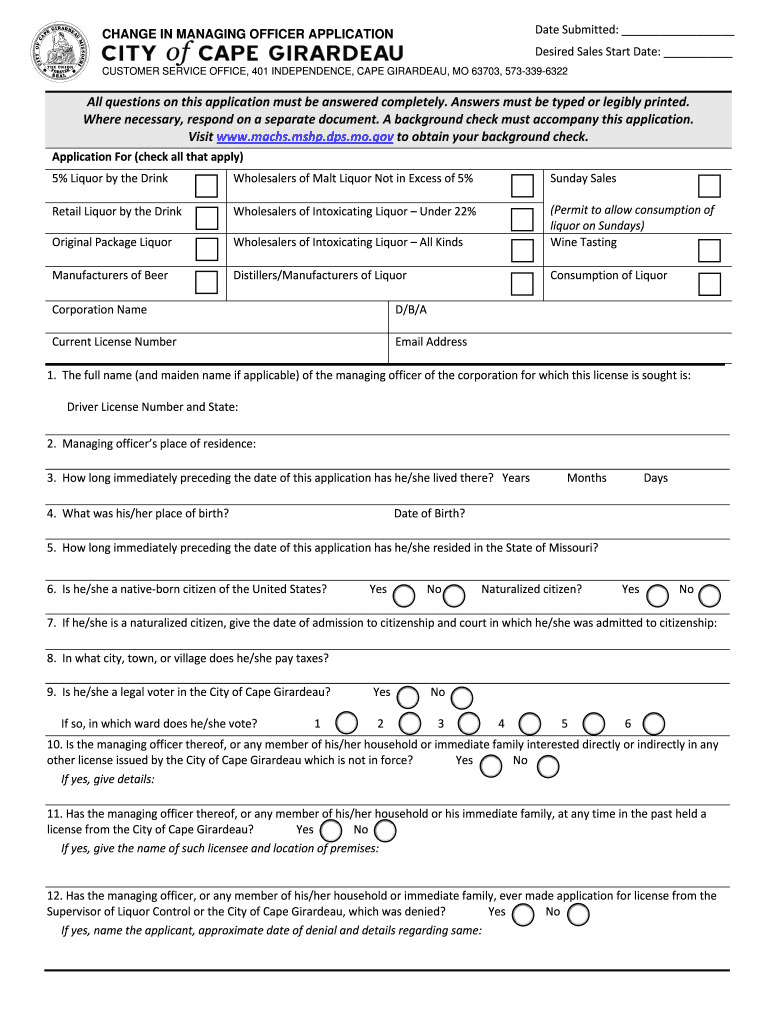
CHANGE IN MANAGING OFFICER APPLICATION Preview on Page 1

Here's how it works

01. Edit your form online
Type text, add images, blackout confidential details, add comments, highlights and more.
02. Sign it in a few clicks
Draw your signature, type it, upload its image, or use your mobile device as a signature pad.
03. Share your form with others
Send it via email, link, or fax. You can also download it, export it or print it out.

How to use or fill out CHANGE IN MANAGING OFFICER APPLICATION with our platform

Form edit decoration
9.5
Ease of Setup
DocHub User Ratings on G2
9.0
Ease of Use
DocHub User Ratings on G2
  1. Click ‘Get Form’ to open the CHANGE IN MANAGING OFFICER APPLICATION in the editor.
  2. Begin by entering the 'Date Submitted' at the top of the form. Ensure this is accurate as it marks your application timeline.
  3. Fill in the 'Desired Sales Start Date' to indicate when you wish to commence operations.
  4. Complete the 'Application For' section by checking all applicable boxes for your desired licenses, such as '5% Liquor by the Drink' or 'Sunday Sales'.
  5. Provide your corporation name and any Doing Business As (D/B/A) names, along with your current license number and email address.
  6. Answer all personal questions regarding the managing officer, including full name, residence, and citizenship status. Be thorough and clear.
  7. For any yes/no questions regarding past licenses or legal issues, provide detailed explanations where necessary in the designated fields.
  8. Finally, ensure that you sign and date the application before submitting it. If required, include a notary signature for validation.

Start using our platform today to fill out your CHANGE IN MANAGING OFFICER APPLICATION easily and for free!

be ready to get more

Complete this form in 5 minutes or less

Get form
be ready to get more

Complete this form in 5 minutes or less

Get form