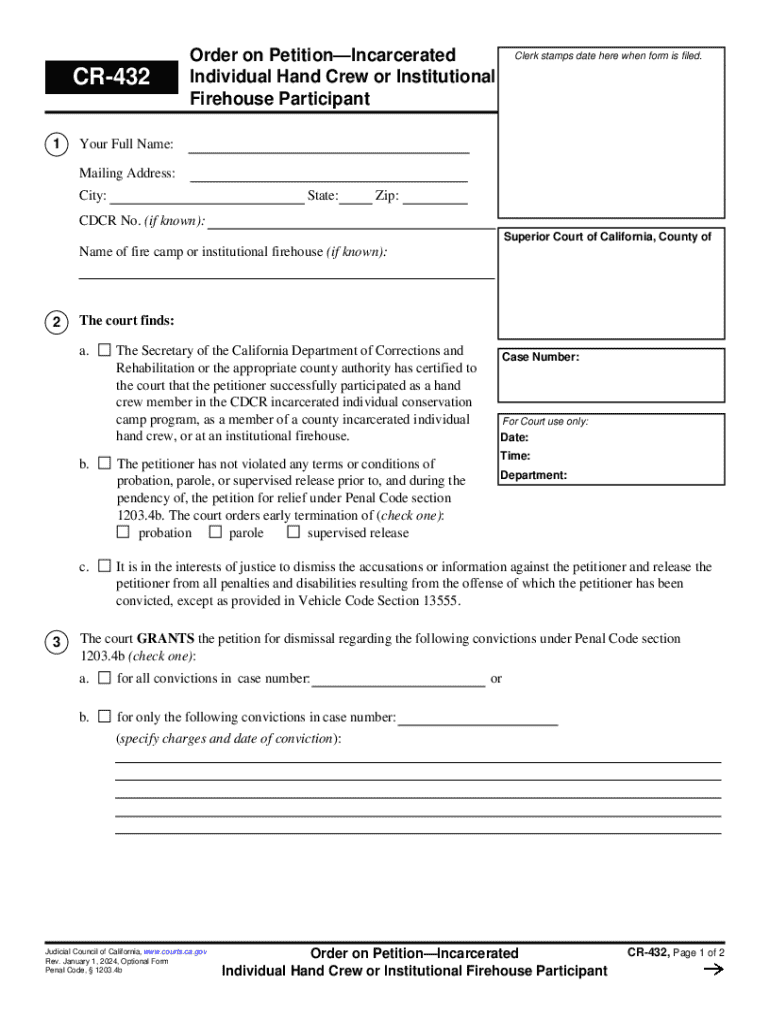







Definition and Meaning of Cr-432
The Cr-432 is a legal document issued by the Superior Court of California. It pertains to petitions for early termination of probation, parole, or supervised release for individuals who have participated in fire crew programs while incarcerated. The form outlines the court's findings and details the conditions required for granting or denying such petitions. In addition, it includes the implications of dismissing convictions under California Penal Code section 1203.4b. This section allows certain eligible individuals to have their convictions dismissed once they have met specific conditions, thus restoring certain rights and opportunities.
Key Features of Cr-432
- Intent: To facilitate the early release and rehabilitation of qualified individuals.
- Focus: Participants in fire crew programs during incarceration.
- Legal Basis: California Penal Code section 1203.4b.
- Outcome: Potential dismissal of convictions with specific conditions.
Eligibility Criteria for Cr-432
Eligibility for the Cr-432 form is specific to incarcerated individuals involved in fire crew programs. Consideration for early termination of probation or parole involves several conditions:
- Participation in Fire Crew Programs: Applicants must have actively participated in recognized fire crew programs while incarcerated.
- Behavioral Compliance: Demonstration of good behavior and compliance with prison regulations during the period of incarceration.
- Completion of Required Programs: Completion of any mandatory rehabilitation programs or vocational training as part of the inmate’s rehabilitation plan.


Additional Conditions
- No Major Disciplinary Issues: Candidates must have no significant disciplinary actions against them during their incarceration.
- Length of Remaining Sentence: Consideration might be given based on the time left on their sentence and the degree of rehabilitation demonstrated.
Steps to Complete the Cr-432
Filing the Cr-432 requires a systematic approach to ensure the application is complete and considered by the court. Here’s a step-by-step guide:
- Gather Supporting Documents: Collect evidence of participation in fire crew programs, including certificates or endorsements from program supervisors.
- Complete the Application: Fill out the Cr-432 accurately, ensuring all personal and legal information is up-to-date and correct.
- Attach Supplementary Materials: Provide character references, proof of completed rehabilitation programs, and any other documents that support the petition.
- File the Form: Submit the completed form along with all attachments to the Superior Court of California.
- Attend Court Hearing: Be prepared to attend a court hearing where the petition will be assessed, and additional information or testimonies might be required.
Considerations During Submission
- Legal Representation: Consulting with a legal expert may help ensure the application process meets all legal requirements.
- Time-Sensitive: Ensure the form is submitted within any specified deadlines to avoid delays.
Key Elements of the Cr-432
The Cr-432 document includes several critical components that must be addressed accurately to be considered valid by the court:
- Personal Information: Applicant’s name, inmate identification number, and contact information.
- Program Participation Details: Dates of participation in fire crew programs and any achievements or awards received.
- Behavioral Record: Summary of the applicant's disciplinary record during incarceration.
- Recommendations: Letter of recommendation from program mentors or prison officials supporting the application for early termination.
Legal Use of the Cr-432
The Cr-432 serves as a legal tool for modifying the terms of an individual’s probation or parole based on completion of fire crew service. Its legal standing is underpinned by California's statutory provisions relating to the dismissal of convictions, specifically aimed at promoting rehabilitation and reintegration into society.
Important Legal Considerations
- Accessing Legal Counsel: Applicants are encouraged to seek legal advice before submitting the form to confirm all legal aspects are met.
- Court’s Discretion: The granting of early termination is at the discretion of the court and will require a thorough review of all submitted evidence.
Who Typically Uses the Cr-432
The form is primarily used by incarcerated individuals in California who have been part of fire crew programs and seek an early release through legal channels. It may also involve:
- Legal Counsel: Attorneys specialized in criminal law and post-conviction relief.
- Correctional Institutions: Administrators providing necessary documentation and records of program participation.
- Judicial Officials: Judges who evaluate the merit of petitions based on statutory guidelines and evidence presented.

Examples of Using the Cr-432
Several cases may illustrate how Cr-432 works:
- Successful Petition: An inmate who completed a two-year fire crew program receives early dismissal of their conviction, leading to parole and rehabilitation in a community job.
- Denied Petition: An applicant with multiple disciplinary infractions during their sentence may have their petition denied despite fulfilling program criteria.
Case Study Scenarios
- Scenario A: An inmate demonstrates reform and contributes significantly to the community through fire crew activities.
- Scenario B: An individual fails to meet the activity threshold in the fire crew program due to behavioral issues.
State-Specific Rules for the Cr-432
While the Cr-432 is specifically issued by the Superior Court of California, applicants must be aware of unique state-specific statutes and regulations that may influence eligibility and application processing:
- State Legislation: Understanding state legislation that impacts probation, parole, and post-conviction processes.
- Court Precedents: Familiarity with past court decisions that may inform the decision-making process for current applications.
Impact of Local Policies
- County Variations: Certain counties within California may have additional procedures or requirements for submission and review.
- Periodic Updates: Awareness of changes in state laws or court mandates affecting the use and processing of the Cr-432 form.